<br />
<b>Warning</b>:  Declaration of Walker_Page::start_lvl(&$output, $depth) should be compatible with Walker::start_lvl(&$output) in <b>/home/vhosts/modern-smartphone.6te.net/wp-includes/post-template.php</b> on line <b>997</b><br />
<br />
<b>Warning</b>:  Declaration of Walker_Page::end_lvl(&$output, $depth) should be compatible with Walker::end_lvl(&$output) in <b>/home/vhosts/modern-smartphone.6te.net/wp-includes/post-template.php</b> on line <b>1009</b><br />
<br />
<b>Warning</b>:  Declaration of Walker_Page::start_el(&$output, $page, $depth, $args, $current_page) should be compatible with Walker::start_el(&$output) in <b>/home/vhosts/modern-smartphone.6te.net/wp-includes/post-template.php</b> on line <b>1024</b><br />
<br />
<b>Warning</b>:  Declaration of Walker_Page::end_el(&$output, $page, $depth) should be compatible with Walker::end_el(&$output) in <b>/home/vhosts/modern-smartphone.6te.net/wp-includes/post-template.php</b> on line <b>1067</b><br />
<br />
<b>Warning</b>:  Declaration of Walker_PageDropdown::start_el(&$output, $page, $depth, $args) should be compatible with Walker::start_el(&$output) in <b>/home/vhosts/modern-smartphone.6te.net/wp-includes/post-template.php</b> on line <b>1105</b><br />
<br />
<b>Warning</b>:  Declaration of Walker_Category::start_lvl(&$output, $depth, $args) should be compatible with Walker::start_lvl(&$output) in <b>/home/vhosts/modern-smartphone.6te.net/wp-includes/category-template.php</b> on line <b>800</b><br />
<br />
<b>Warning</b>:  Declaration of Walker_Category::end_lvl(&$output, $depth, $args) should be compatible with Walker::end_lvl(&$output) in <b>/home/vhosts/modern-smartphone.6te.net/wp-includes/category-template.php</b> on line <b>816</b><br />
<br />
<b>Warning</b>:  Declaration of Walker_Category::start_el(&$output, $category, $depth, $args) should be compatible with Walker::start_el(&$output) in <b>/home/vhosts/modern-smartphone.6te.net/wp-includes/category-template.php</b> on line <b>833</b><br />
<br />
<b>Warning</b>:  Declaration of Walker_Category::end_el(&$output, $page, $depth, $args) should be compatible with Walker::end_el(&$output) in <b>/home/vhosts/modern-smartphone.6te.net/wp-includes/category-template.php</b> on line <b>908</b><br />
<br />
<b>Warning</b>:  Declaration of Walker_CategoryDropdown::start_el(&$output, $category, $depth, $args) should be compatible with Walker::start_el(&$output) in <b>/home/vhosts/modern-smartphone.6te.net/wp-includes/category-template.php</b> on line <b>949</b><br />
<br />
<b>Warning</b>:  Declaration of Walker_Comment::start_lvl(&$output, $depth, $args) should be compatible with Walker::start_lvl(&$output) in <b>/home/vhosts/modern-smartphone.6te.net/wp-includes/comment-template.php</b> on line <b>1241</b><br />
<br />
<b>Warning</b>:  Declaration of Walker_Comment::end_lvl(&$output, $depth, $args) should be compatible with Walker::end_lvl(&$output) in <b>/home/vhosts/modern-smartphone.6te.net/wp-includes/comment-template.php</b> on line <b>1265</b><br />
<br />
<b>Warning</b>:  Declaration of Walker_Comment::start_el(&$output, $comment, $depth, $args) should be compatible with Walker::start_el(&$output) in <b>/home/vhosts/modern-smartphone.6te.net/wp-includes/comment-template.php</b> on line <b>1329</b><br />
<br />
<b>Warning</b>:  Declaration of Walker_Comment::end_el(&$output, $comment, $depth, $args) should be compatible with Walker::end_el(&$output) in <b>/home/vhosts/modern-smartphone.6te.net/wp-includes/comment-template.php</b> on line <b>1389</b><br />
<br />
<b>Warning</b>:  Declaration of Walker_Nav_Menu::start_lvl(&$output, $depth) should be compatible with Walker::start_lvl(&$output) in <b>/home/vhosts/modern-smartphone.6te.net/wp-includes/nav-menu-template.php</b> on line <b>40</b><br />
<br />
<b>Warning</b>:  Declaration of Walker_Nav_Menu::end_lvl(&$output, $depth) should be compatible with Walker::end_lvl(&$output) in <b>/home/vhosts/modern-smartphone.6te.net/wp-includes/nav-menu-template.php</b> on line <b>52</b><br />
<br />
<b>Warning</b>:  Declaration of Walker_Nav_Menu::start_el(&$output, $item, $depth, $args) should be compatible with Walker::start_el(&$output) in <b>/home/vhosts/modern-smartphone.6te.net/wp-includes/nav-menu-template.php</b> on line <b>67</b><br />
<br />
<b>Warning</b>:  Declaration of Walker_Nav_Menu::end_el(&$output, $item, $depth) should be compatible with Walker::end_el(&$output) in <b>/home/vhosts/modern-smartphone.6te.net/wp-includes/nav-menu-template.php</b> on line <b>106</b><br />
<?xml version="1.0" encoding="UTF-8"?>
<rss version="2.0"
	xmlns:content="http://purl.org/rss/1.0/modules/content/"
	xmlns:wfw="http://wellformedweb.org/CommentAPI/"
	xmlns:dc="http://purl.org/dc/elements/1.1/"
	xmlns:atom="http://www.w3.org/2005/Atom"
	xmlns:sy="http://purl.org/rss/1.0/modules/syndication/"
	xmlns:slash="http://purl.org/rss/1.0/modules/slash/"
	>

<channel>
	<title>Modern Smartphone &#187; iPhone tutorials</title>
	<atom:link href="http://modern-smartphone.6te.net/?cat=9&#038;feed=rss2" rel="self" type="application/rss+xml" />
	<link>http://modern-smartphone.6te.net</link>
	<description>Just another WordPress site</description>
	<lastBuildDate>Mon, 28 May 2012 10:07:11 +0000</lastBuildDate>
	<language>en</language>
	<sy:updatePeriod>hourly</sy:updatePeriod>
	<sy:updateFrequency>1</sy:updateFrequency>
	<generator>http://wordpress.org/?v=3.3.2</generator>
		<item>
		<title>&gt;Jailbreak untethered iPhone [iOS 5.1.1] using Absinthe 2.0.2</title>
		<link>http://modern-smartphone.6te.net/?p=217</link>
		<comments>http://modern-smartphone.6te.net/?p=217#comments</comments>
		<pubDate>Fri, 25 May 2012 13:26:00 +0000</pubDate>
		<dc:creator>admin</dc:creator>
				<category><![CDATA[iOS]]></category>
		<category><![CDATA[iPhone]]></category>
		<category><![CDATA[iPhone Jailbreak]]></category>
		<category><![CDATA[iPhone tutorials]]></category>
		<category><![CDATA[Jailbreak]]></category>

		<guid isPermaLink="false">http://modern-smartphone.6te.net/?p=217</guid>
		<description><![CDATA[These are instructions on how to perform an untethered jailbreak of your iPhone on iOS 5.1.1 using Absinthe for Windows. Warning***: Before you continue make sure to do a backup of your device in iTunes as you may lose your Camera Roll during this process. Supported Devices:  iPad 1, iPad 2, iPad 3 (Note: support [...]]]></description>
			<content:encoded><![CDATA[<p><img class="alignleft" title="Absinte 2" src="http://4.bp.blogspot.com/-jK4PKTEfhOk/T7-GvCg3x1I/AAAAAAAABn4/IgneYmE32sY/s1600/Absinte+2.png" alt="Absinte 2" width="500" height="500" /></p>
<div class="separator" style="clear: both; text-align: center;"><a style="clear: right; float: right; margin-bottom: 1em; margin-left: 1em;" href="http://4.bp.blogspot.com/-jK4PKTEfhOk/T7-GvCg3x1I/AAAAAAAABn4/IgneYmE32sY/s1600/Absinte+2.png"><em><img title="Absinte 2" src="http://4.bp.blogspot.com/-jK4PKTEfhOk/T7-GvCg3x1I/AAAAAAAABn4/IgneYmE32sY/s200/Absinte+2.png" alt="Absinte 2" width="200" height="200" border="0" /></em></a></div>
<p><em>These are instructions on how to perform an untethered jailbreak of your iPhone on iOS 5.1.1 using Absinthe for Windows.</em><br />
<em><br />
</em><br />
<em><span style="color: red;">Warning***: Before you continue make sure to do a backup of your device in iTunes as you may lose your Camera Roll during this process.</span></em></p>
<h3><em>Supported Devices:</em></h3>
<ul>
<li> <em>iPad 1, iPad 2, iPad 3 (Note: support for the new iPad 2,4 is coming)</em></li>
<li><em> iPhone 3GS, iPhone 4, iPhone 4S</em></li>
<li><em> iPod Touch 3G, iPod Touch 4G</em></li>
</ul>
<h3><em>Steps to be followed:</em></h3>
<ul>
<li><em>Download the latest version of Absinthe (see the bottom of the page for links).</em></li>
<li><em>Extract the downloaded archive.</em></li>
<li><em>Double click the <strong>absinthe-win-2.0.exe</strong> file from the folder that was just extracted. </em></li>
<li><em>This will create a new folder called <strong>absinthe-win-2.0. </strong></em></li>
<li><em>Open the newly created folder and launch absinthe.exe.</em></li>
</ul>
<div class="separator" style="clear: both; text-align: center;"><a style="margin-left: 1em; margin-right: 1em;" href="http://4.bp.blogspot.com/-SIltQt4WR5g/T7-EyDER1II/AAAAAAAABnI/2v3pY-6Bqw0/s1600/Jailbreak+iphone+5.1.1.png"><em><img title="How to Jailbreak untethered iPhone [5.1.1] using Absinthe 2.0" src="http://4.bp.blogspot.com/-SIltQt4WR5g/T7-EyDER1II/AAAAAAAABnI/2v3pY-6Bqw0/s400/Jailbreak+iphone+5.1.1.png" alt="How to Jailbreak untethered iPhone [5.1.1] using Absinthe 2.0" width="400" height="273" border="0" /></em></a></div>
<ul>
<li><em>As prompted, connect your iPhone to the computer via USB. Make sure to remove any passcodes or VPN settings you&#8217;ve previously set.</em></li>
</ul>
<div class="separator" style="clear: both; text-align: center;"><a style="margin-left: 1em; margin-right: 1em;" href="http://4.bp.blogspot.com/-ZPkHC6YZrpI/T7-FB_aO1QI/AAAAAAAABnQ/EjzNb5MdR_E/s1600/Jailbreak+iphone+5.1.1-1.png"><em><img title="How to Jailbreak untethered iPhone [5.1.1] using Absinthe 2.0" src="http://4.bp.blogspot.com/-ZPkHC6YZrpI/T7-FB_aO1QI/AAAAAAAABnQ/EjzNb5MdR_E/s400/Jailbreak+iphone+5.1.1-1.png" alt="How to Jailbreak untethered iPhone [5.1.1] using Absinthe 2.0" width="400" height="298" border="0" /></em></a></div>
<ul>
<li><em>Click the Jailbreak button to begin</em></li>
</ul>
<div class="separator" style="clear: both; text-align: center;"><a style="margin-left: 1em; margin-right: 1em;" href="http://4.bp.blogspot.com/-AXyRgbIXUqE/T7-FN9jNsFI/AAAAAAAABnY/wDi2qFLyNHc/s1600/Jailbreak+iphone+5.1.1-2.png"><em><img title="How to Jailbreak untethered iPhone [5.1.1] using Absinthe 2.0" src="http://4.bp.blogspot.com/-AXyRgbIXUqE/T7-FN9jNsFI/AAAAAAAABnY/wDi2qFLyNHc/s400/Jailbreak+iphone+5.1.1-2.png" alt="How to Jailbreak untethered iPhone [5.1.1] using Absinthe 2.0" width="400" height="298" border="0" /></em></a></div>
<ul>
<li><em>The application will take you through several steps to jailbreak including: beginning jailbreak, sending initial jailbreak data, sending final jailbreak data, waiting for reboot, and waiting for process to complete.</em></li>
</ul>
<div class="separator" style="clear: both; text-align: center;"><a style="margin-left: 1em; margin-right: 1em;" href="http://4.bp.blogspot.com/-XeBIWOpmBc0/T7-Fdxj0rTI/AAAAAAAABng/UV8vXFmFcpA/s1600/Jailbreak+iphone+5.1.1-3.png"><em><img title="How to Jailbreak untethered iPhone [5.1.1] using Absinthe 2.0" src="http://4.bp.blogspot.com/-XeBIWOpmBc0/T7-Fdxj0rTI/AAAAAAAABng/UV8vXFmFcpA/s400/Jailbreak+iphone+5.1.1-3.png" alt="How to Jailbreak untethered iPhone [5.1.1] using Absinthe 2.0" width="400" height="298" border="0" /></em></a></div>
<ul>
<li><em>You will be informed that the jailbreak is &#8216;Done&#8217;. </em></li>
</ul>
<div class="separator" style="clear: both; text-align: center;"><a style="margin-left: 1em; margin-right: 1em;" href="http://3.bp.blogspot.com/-4059s3ZIYDM/T7-FqzuapVI/AAAAAAAABno/iBhY8XQgA0s/s1600/Jailbreak+iphone+5.1.1-4.png"><em><img title="How to Jailbreak untethered iPhone [5.1.1] using Absinthe 2.0" src="http://3.bp.blogspot.com/-4059s3ZIYDM/T7-FqzuapVI/AAAAAAAABno/iBhY8XQgA0s/s400/Jailbreak+iphone+5.1.1-4.png" alt="How to Jailbreak untethered iPhone [5.1.1] using Absinthe 2.0" width="400" height="298" border="0" /></em></a></div>
<ul>
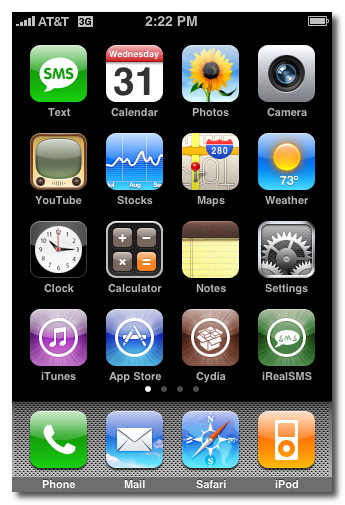
<li><em>In a few moments you will notice Cydia appear on your Springboard!</em></li>
</ul>
<div class="separator" style="clear: both; text-align: center;"><a style="margin-left: 1em; margin-right: 1em;" href="http://1.bp.blogspot.com/-CG_oAqGIm4k/T7-GMEgTDVI/AAAAAAAABnw/iX9hcNP4e58/s1600/Jailbreak+iphone+5.1.1-5.png"><em><img title="How to Jailbreak untethered iPhone [5.1.1] using Absinthe 2.0" src="http://1.bp.blogspot.com/-CG_oAqGIm4k/T7-GMEgTDVI/AAAAAAAABnw/iX9hcNP4e58/s400/Jailbreak+iphone+5.1.1-5.png" alt="How to Jailbreak untethered iPhone [5.1.1] using Absinthe 2.0" width="266" height="400" border="0" /></em></a></div>
<p><em>Download Absinte 2.0 for Windows from <a href="http://www.mediafire.com/?7d7axmha0gufdbz" target="_blank">Here </a>!</em><br />
<em>Download Absinte 2.0 for Mac from <a href="http://www.mediafire.com/?k47yo8uag2jhk52" target="_blank">Here </a>! </em><br />
<em>Download Absinte 2.0 for Linux from <a href="http://www.mediafire.com/?s6arys5qeda0dcn" target="_blank">Here </a>!</em></p>
<h3><em>Update: Absinte 2.0.1 released to fix minor issues</em></h3>
<div><em>Download Absinte 2.0.1 for Windows from <a href="http://www.mediafire.com/?32amxx9lakb04uk" target="_blank">Here </a>!</em><br />
<em>Download Absinte 2.0.1 for Mac from <a href="http://www.mediafire.com/?vyf9er2wt1pws70" target="_blank">Here </a>!</em><br />
<em>Download Absinte 2.0.1 for Linux from <a href="http://www.mediafire.com/?vyf9er2wt1pws70" target="_blank">Here </a>!</em></div>
<h3><em>Update: Absinte 2.0.2 released to jailbreak the new iPhone 4 firmware.</em></h3>
<div><em></em></p>
<blockquote class="tr_bq"><p><em>Support for the new iPhone4 firmware (9B208) is on the way, should be live within a couple of hours <img src='http://modern-smartphone.6te.net/wp-includes/images/smilies/icon_biggrin.gif' alt=':D' class='wp-smiley' />  #Absinthe</em><br />
<em>#Absinthe 2.0.2 is now live! Includes support for new iPhone4 firmware 9B208</em></p></blockquote>
</div>
<div><em>Download Absinte 2.0.2 for Windows from <a href="http://www.mediafire.com/?5yqlgboqjr6av8y" target="_blank">Here </a>!</em><br />
<em>Download Absinte 2.0.2 for Mac from <a href="http://www.mediafire.com/?j56zp342si8suzr" target="_blank">Here</a> !</em><br />
<em>Download Absinte 2.0.2 for Linux from <a href="http://www.mediafire.com/?7j1s2z61m3uh2f7" target="_blank">Here </a>!</em></div>
]]></content:encoded>
			<wfw:commentRss>http://modern-smartphone.6te.net/?feed=rss2&#038;p=217</wfw:commentRss>
		<slash:comments>0</slash:comments>
		</item>
		<item>
		<title>&gt;Unlock iPhone 4S, iPhone 4, and iPhone 3GS With SAM</title>
		<link>http://modern-smartphone.6te.net/?p=180</link>
		<comments>http://modern-smartphone.6te.net/?p=180#comments</comments>
		<pubDate>Thu, 26 Apr 2012 06:31:00 +0000</pubDate>
		<dc:creator>admin</dc:creator>
				<category><![CDATA[iOS]]></category>
		<category><![CDATA[iPhone]]></category>
		<category><![CDATA[iPhone tutorials]]></category>
		<category><![CDATA[iPhone unlock]]></category>

		<guid isPermaLink="false">http://modern-smartphone.6te.net/?p=180</guid>
		<description><![CDATA[> &#160;These are instructions on how to unlock your iPhone using SAM. This method will work with the iPhone 4S, iPhone 4, iPhone 3GS, and iPhone 3G on any jailbreakable firmware including 5.x. Jailbreak your iPhone. You can find instructions on how to do that HERE ! Tap to launch Cydia from your SpringBoard. Press [...]]]></description>
			<content:encoded><![CDATA[<p>>
<div class="separator" style="clear: both; text-align: center;"><a href="http://3.bp.blogspot.com/-UY3pq2bm0kE/T5lH1_CYC5I/AAAAAAAABUo/vKjNyfb5soM/s1600/SamPrefs.png" imageanchor="1" style="clear: left; float: left; margin-bottom: 1em; margin-right: 1em;"><img border="0" src="http://3.bp.blogspot.com/-UY3pq2bm0kE/T5lH1_CYC5I/AAAAAAAABUo/vKjNyfb5soM/s1600/SamPrefs.png" /></a></div>
<p><i><br /></i><br /><i><br /></i><br /><i>&nbsp;These are instructions on how to unlock your iPhone using SAM. This method will work with the iPhone 4S, iPhone 4, iPhone 3GS, and iPhone 3G on any jailbreakable firmware including 5.x.</i>
<div class="separator" style="clear: both; text-align: center;"><a href="http://2.bp.blogspot.com/-sOTzcHcYygs/T5lFA431-kI/AAAAAAAABUM/9MiOxX1nn1o/s1600/IMG_0002.jpg" imageanchor="1" style="clear: right; float: right; margin-bottom: 1em; margin-left: 1em;"><img border="0" height="200" src="http://2.bp.blogspot.com/-sOTzcHcYygs/T5lFA431-kI/AAAAAAAABUM/9MiOxX1nn1o/s200/IMG_0002.jpg" width="133" /></a></div>
<p>
<ul><a href="http://3.bp.blogspot.com/-pMbKZmeDaho/T5lFBi3PyZI/AAAAAAAABUU/qOMJJvyi24k/s1600/IMG_0005.jpg" imageanchor="1" style="clear: right; display: inline !important; float: right; margin-bottom: 1em; margin-left: 1em; text-align: center;"><img border="0" height="200" src="http://3.bp.blogspot.com/-pMbKZmeDaho/T5lFBi3PyZI/AAAAAAAABUU/qOMJJvyi24k/s200/IMG_0005.jpg" width="133" /></a><a href="http://3.bp.blogspot.com/-w5mWV3DQnKg/T5lFCvFuqvI/AAAAAAAABUY/sglP0jG_Uy4/s1600/IMG_0008.jpg" imageanchor="1" style="clear: right; float: right; margin-bottom: 1em; margin-left: 1em;"><img border="0" height="200" src="http://3.bp.blogspot.com/-w5mWV3DQnKg/T5lFCvFuqvI/AAAAAAAABUY/sglP0jG_Uy4/s200/IMG_0008.jpg" width="133" /></a>
<li><i>Jailbreak your iPhone. You can find instructions on how to do that <a href="http://www.modern-smartphone.com/p/ios-jailbreaking.html" target="_blank">HERE </a>!</i></li>
<li><i>Tap to launch <b>Cydia</b> from your <b>SpringBoard</b>.</i></li>
<li><i>Press to select <b>Manage</b> from the tabs at the bottom of the screen.</i></li>
<li><i>Press the <b>Sources</b> button.</i></li>
<li><i>Press the <b>Edit</b> button at the top right of the screen.</i></li>
<li><i>Press the <b>Add</b> button that appears at the top left of the screen.</i></li>
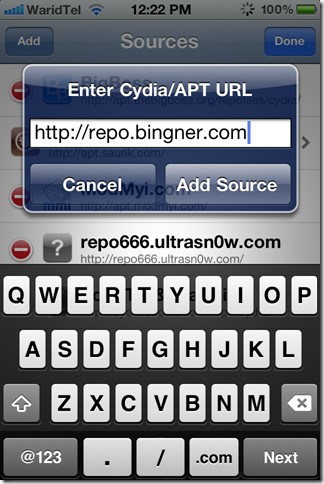
<li><i>Enter <b>http://repo.bingner.com</b> and press the<b> Add Source</b> button.</i></li>
<li><i>Press the <b>Return to Cydia</b> button.</i></li>
<li><i>Press to select <b>Bingner</b> from the list of Sources.</i></li>
<li><i>Choose<b> SAM</b> from the list of packages.</i></li>
<li><i>Press the <b>Install</b> button at the top right of the screen.</i></li>
<li><i>Press the <b>Confirm</b> button to begin installation.</i></li>
<li><i>Once installation has completed press the large <b>Restart SpringBoard</b> button.</i></li>
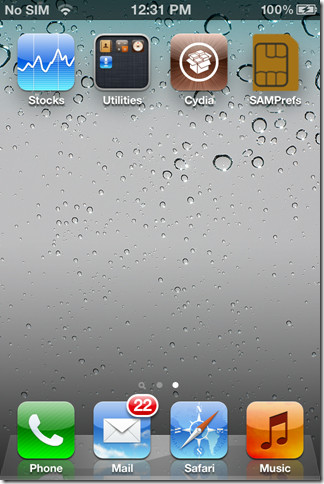
<li><i>Insert your new SIM card and tap to select <b>SAMPrefs</b> from your <b>SpringBoard</b>.</i></li>
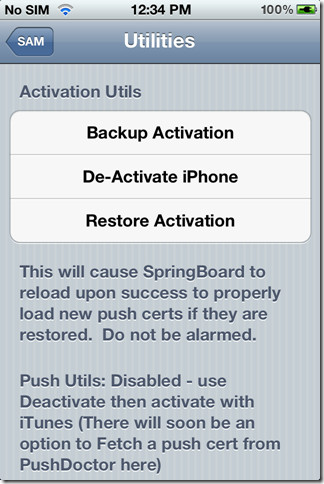
<li><i>Tap <b>Utilities</b></i></li>
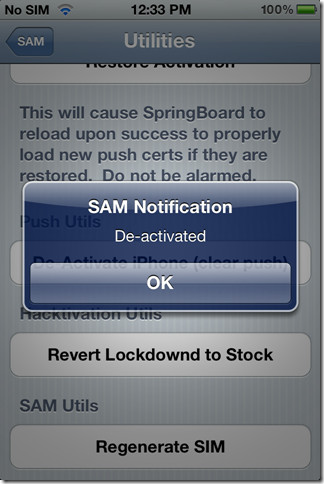
<li><i>Press to select <b>De-Activate iPhone</b>. Your ActivationState under &#8220;<b>More Information</b>&#8221; should now be &#8220;<b>Unactivated</b>&#8220;. If you don&#8217;t have De-Activate iPhone you can use De-Activate iPhone (clear push).</i></li>
<li><i><b>With SAM enabled, tap Method and choose By Country and Carrier.</b></i></li>
<li><i><b>Tap Country and choose the country of your ORIGINAL SIM.</b></i></li>
<li><i><b>Tap Carrier and choose your ORIGINAL carrier that your iPhone is locked to.</b></i></li>
<li><i><b>For some carriers operating more than one Carrier ID you may need to select SIM ID. If you are unable to activate in then you have selected the wrong one.</b></i></li>
<li><i><b>Tap More Information and copy the IMSI under SAM Details to the clipboard.</b></i></li>
<li><i><b>Tap Spoof Real SIM to SAM</b></i></li>
<li><i><b>Go back to the main SAM screen and paste the IMSI number in your clipboard.</b></i></li>
<li><i><b>Connect your iPhone to the computer and let iTunes reactivate your phone.</b></i></li>
</ul>
<blockquote class="tr_bq"><p><i>&#8220;Double click &#8220;Phone Number&#8221; parameter at the main device screen and make sure that the ICCID matches that of your SIM card.&#8221; If not you need to start over .&#8221;</i></p></blockquote>
<ul>
<li><i>Unplug your iPhone from the computer and close iTunes.</i></li>
<li><i>Reopen SAMPrefs from your SpringBoard and disable it using the Enabled switch.</i></li>
<li><i>Connect your iPhone to the computer and launch iTunes again.&nbsp;</i></li>
</ul>
<blockquote class="tr_bq"><p><i>You should get an error saying that your phone cannot be activated. This is normal. Just close iTunes and open it again.</i></p></blockquote>
<ul>
<li><i>In a short time you should see signal bars. Congratulations!</i></li>
<li><i>You should now backup your iPhone unlock ticket in case this method is ever blocked.&nbsp;</i></li>
</ul>
<div class="separator" style="clear: both; text-align: center;"><object class="BLOGGER-youtube-video" classid="clsid:D27CDB6E-AE6D-11cf-96B8-444553540000" codebase="http://download.macromedia.com/pub/shockwave/cabs/flash/swflash.cab#version=6,0,40,0" data-thumbnail-src="http://1.gvt0.com/vi/9ZyOm3o_8hE/0.jpg" height="366" width="420"><param name="movie" value="http://www.youtube.com/v/9ZyOm3o_8hE&#038;fs=1&#038;source=uds" /><param name="bgcolor" value="#FFFFFF" /><embed width="320" height="266"  src="http://www.youtube.com/v/9ZyOm3o_8hE&#038;fs=1&#038;source=uds" type="application/x-shockwave-flash"></embed></object></div>
<div class="separator" style="clear: both; text-align: center;"><a href="http://3.bp.blogspot.com/-4oB4pqBiC1c/T5lEweBvtfI/AAAAAAAABUE/iOAM26rt_Sc/s1600/IMG_0009.jpg" imageanchor="1" style="clear: right; float: right; margin-bottom: 1em; margin-left: 1em;"><img border="0" height="200" src="http://3.bp.blogspot.com/-4oB4pqBiC1c/T5lEweBvtfI/AAAAAAAABUE/iOAM26rt_Sc/s200/IMG_0009.jpg" width="133" /></a></div>
<p><b><i><u><br /></u></i></b><br /><b><i><u>IMPORTANT:</u></i></b><br /><i>&nbsp; &nbsp; &nbsp;If push notifications stop after this process, you can restore then with the Clear Push utility in SAM, followed by connecting to iTunes.</i><br /><i>&nbsp; &nbsp; &nbsp;Your phone will work normally with your SIM card and that SIM card ONLY since we have tricked iTunes to think that ICCID is one of the intended carrier&#8217;s. The phone can be rebooted and connected to iTunes freely without losing the &#8220;unlock&#8221;, at least for now.</i><br /><i><br /></i><br /><i><span style="font-size: x-small;">A big thanks to Loktar_Sun and Laforet !</span></i></p>
]]></content:encoded>
			<wfw:commentRss>http://modern-smartphone.6te.net/?feed=rss2&#038;p=180</wfw:commentRss>
		<slash:comments>0</slash:comments>
		</item>
		<item>
		<title>&gt;How to SSH Into Your iPhone Using WinSCP</title>
		<link>http://modern-smartphone.6te.net/?p=157</link>
		<comments>http://modern-smartphone.6te.net/?p=157#comments</comments>
		<pubDate>Wed, 04 Apr 2012 22:21:00 +0000</pubDate>
		<dc:creator>admin</dc:creator>
				<category><![CDATA[iOS]]></category>
		<category><![CDATA[iPhone]]></category>
		<category><![CDATA[iPhone tutorials]]></category>

		<guid isPermaLink="false">http://modern-smartphone.6te.net/?p=157</guid>
		<description><![CDATA[>&#160; These are instructions on how to transfer files to your iPhone using WinSCP. To follow this tutorial you need to have a jailbroken iPhone with SSH installed. You can find instructions on how to jailbreak your iPhone here. Press the Cydia icon on your Springboard Press to select the Sections tab at the bottom [...]]]></description>
			<content:encoded><![CDATA[<p>><i><b>&nbsp; These are instructions on how to transfer files to your iPhone using WinSCP. To follow this tutorial you need to have a jailbroken iPhone with SSH installed. You can find instructions on how to jailbreak your iPhone <a href="http://www.modern-smartphone.com/p/ios-jailbreaking.html" target="_blank">here</a>.</b></i><br /><i></i>
<ul>
<li><i>Press the Cydia icon on your Springboard</i></li>
</ul>
<div class="separator" style="clear: both; text-align: center;"><i><a href="http://3.bp.blogspot.com/-9KWCcR1EgH8/T3zG6cCKxAI/AAAAAAAABD0/jtwPxHX3XJk/s1600/1.png" imageanchor="1" style="margin-left: 1em; margin-right: 1em;"><img border="0" height="320" src="http://3.bp.blogspot.com/-9KWCcR1EgH8/T3zG6cCKxAI/AAAAAAAABD0/jtwPxHX3XJk/s320/1.png" width="218" /></a></i></div>
<p><i><i></i></i>
<div style="display: inline !important;"></div>
<ul>
<li><i><i>Press to select the Sections tab at the bottom of the screen.</i></i></li>
</ul>
<div class="separator" style="clear: both; text-align: center;"><i><a href="http://3.bp.blogspot.com/-I2UqOsTN2pk/T3zHDByi_lI/AAAAAAAABD8/ie2HdROpIvQ/s1600/2.png" imageanchor="1" style="margin-left: 1em; margin-right: 1em;"><img border="0" height="320" src="http://3.bp.blogspot.com/-I2UqOsTN2pk/T3zHDByi_lI/AAAAAAAABD8/ie2HdROpIvQ/s320/2.png" width="218" /></a></i></div>
<p><i><i></i></i>
<div style="display: inline !important;"></div>
<ul>
<li><i><i><i>Press to select Networking from the list of Sections.</i></i></i></li>
</ul>
<div class="separator" style="clear: both; text-align: center;"><i><a href="http://4.bp.blogspot.com/-_Mk6Ci9iw7k/T3zHIhjze6I/AAAAAAAABEE/VRB6jrecD8c/s1600/3.png" imageanchor="1" style="margin-left: 1em; margin-right: 1em;"><img border="0" height="320" src="http://4.bp.blogspot.com/-_Mk6Ci9iw7k/T3zHIhjze6I/AAAAAAAABEE/VRB6jrecD8c/s320/3.png" width="218" /></a></i></div>
<p>
<ul>
<li><i>Press to select OpenSSH from the list of Packages.</i></li>
</ul>
<div class="separator" style="clear: both; text-align: center;"><i><a href="http://3.bp.blogspot.com/-5Ct5G2doJsw/T3zHQIHbehI/AAAAAAAABEM/MF6WZszZjWI/s1600/4.png" imageanchor="1" style="margin-left: 1em; margin-right: 1em;"><img border="0" height="320" src="http://3.bp.blogspot.com/-5Ct5G2doJsw/T3zHQIHbehI/AAAAAAAABEM/MF6WZszZjWI/s320/4.png" width="218" /></a></i></div>
<ul>
<li><i>Press the Install button at the top right of the screen.</i></li>
</ul>
<div class="separator" style="clear: both; text-align: center;"><i><a href="http://3.bp.blogspot.com/-aBtpV5n1y9Q/T3zHaSuG3JI/AAAAAAAABEU/Daq2poKfBNQ/s1600/5.png" imageanchor="1" style="margin-left: 1em; margin-right: 1em;"><img border="0" height="320" src="http://3.bp.blogspot.com/-aBtpV5n1y9Q/T3zHaSuG3JI/AAAAAAAABEU/Daq2poKfBNQ/s320/5.png" width="218" /></a></i></div>
<ul>
<li><i>Press the Confirm button at the top right of the screen.</i></li>
</ul>
<div class="separator" style="clear: both; text-align: center;"><i><a href="http://4.bp.blogspot.com/-hOMRomf43TA/T3zHfo69gfI/AAAAAAAABEc/SIkCzuN_ths/s1600/6.png" imageanchor="1" style="margin-left: 1em; margin-right: 1em;"><img border="0" height="320" src="http://4.bp.blogspot.com/-hOMRomf43TA/T3zHfo69gfI/AAAAAAAABEc/SIkCzuN_ths/s320/6.png" width="218" /></a></i></div>
<ul>
<li><i>Once installation has completed successfully press the large Return to Cydia button.</i></li>
</ul>
<div class="separator" style="clear: both; text-align: center;"><i><a href="http://2.bp.blogspot.com/-OH2uWGQRiag/T3zHlkt30LI/AAAAAAAABEk/UcKrwhP9OlM/s1600/7.png" imageanchor="1" style="margin-left: 1em; margin-right: 1em;"><img border="0" height="320" src="http://2.bp.blogspot.com/-OH2uWGQRiag/T3zHlkt30LI/AAAAAAAABEk/UcKrwhP9OlM/s320/7.png" width="218" /></a></i></div>
<ul>
<li><i><i>
<div style="display: inline !important;">Hit the home button on your iPhone to return to the Springboard.</div>
<p></i></i></li>
<li><i><i>
<div style="display: inline !important;">We must now obtain the IP Address of the iPhone. To do this press the Settings button on your Springboard</div>
<p></i></i></li>
<li><i><i>
<div style="display: inline !important;">Press to select Wi-Fi from the Settings Menu</div>
<p></i></i></li>
<li><i><i>
<div style="display: inline !important;"><i></i></div>
<div style="display: inline !important;"><i>Make sure you are connected to a wireless network then press the circular blue arrow button.</i></div>
<p></i></i></li>
</ul>
<div class="separator" style="clear: both; text-align: center;"><i><a href="http://2.bp.blogspot.com/-NFJv6pwVJmc/T3zH5nNVTWI/AAAAAAAABEs/PiHxrh0mjBw/s1600/11.png" imageanchor="1" style="margin-left: 1em; margin-right: 1em;"><img border="0" height="320" src="http://2.bp.blogspot.com/-NFJv6pwVJmc/T3zH5nNVTWI/AAAAAAAABEs/PiHxrh0mjBw/s320/11.png" width="218" /></a></i></div>
<ul>
<li><i>Take note of your IP address from the Wi-Fi details screen</i></li>
</ul>
<div class="separator" style="clear: both; text-align: center;"><i><a href="http://4.bp.blogspot.com/-PepMGYO9yZU/T3zIBWxDOzI/AAAAAAAABE0/wuV1lqAPvhc/s1600/12.png" imageanchor="1" style="margin-left: 1em; margin-right: 1em;"><img border="0" height="320" src="http://4.bp.blogspot.com/-PepMGYO9yZU/T3zIBWxDOzI/AAAAAAAABE0/wuV1lqAPvhc/s320/12.png" width="218" /></a></i></div>
<ul>
<li><i><i>
<div style="display: inline !important;">Make sure you are on the same wireless network as your iPhone and launch WinSCP by clicking it on your desktop, or in the start menu. You can download WinSCP from <a href="http://winscp.net/download/winscp418.exe" target="_blank">here</a>.</div>
<p></i></i></li>
<li><i>Once WinSCP opens, enter your iPhone&#8217;s IP Address into the Host Name Field. Then enter root as your iPhone username and and alpine as the password. Then click Login.</i></li>
</ul>
<div class="separator" style="clear: both; text-align: center;"><a href="http://4.bp.blogspot.com/-dbnNcBzLy5s/T3zIX-eMMbI/AAAAAAAABE8/6E18dgVVgU4/s1600/14.png" imageanchor="1" style="margin-left: 1em; margin-right: 1em;"><img border="0" height="231" src="http://4.bp.blogspot.com/-dbnNcBzLy5s/T3zIX-eMMbI/AAAAAAAABE8/6E18dgVVgU4/s320/14.png" width="320" /></a></div>
<p><i>You will now see WinSCP connecting to your iPhone. The first time you login using SSH, it may take 30-45 seconds.&nbsp;</i>
<div class="separator" style="clear: both; text-align: center;"><a href="http://1.bp.blogspot.com/--RyNX4vgM1M/T3zIex_9ABI/AAAAAAAABFE/FqAxeoezaco/s1600/15.png" imageanchor="1" style="margin-left: 1em; margin-right: 1em;"><img border="0" height="258" src="http://1.bp.blogspot.com/--RyNX4vgM1M/T3zIex_9ABI/AAAAAAAABFE/FqAxeoezaco/s320/15.png" width="320" /></a></div>
<ul>
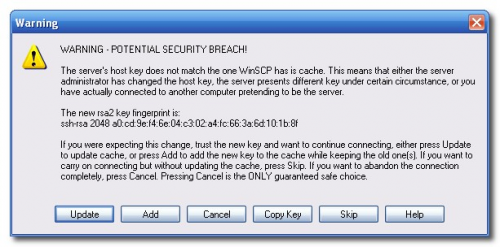
<li><i>If a Warning dialogue pops up, click Update or Add</i></li>
</ul>
<div class="separator" style="clear: both; text-align: center;"><a href="http://1.bp.blogspot.com/-ULaT1RBSzZo/T3zIkNv5TII/AAAAAAAABFM/3ilhrqVkcTA/s1600/16.png" imageanchor="1" style="margin-left: 1em; margin-right: 1em;"><img border="0" height="158" src="http://1.bp.blogspot.com/-ULaT1RBSzZo/T3zIkNv5TII/AAAAAAAABFM/3ilhrqVkcTA/s320/16.png" width="320" /></a></div>
<ul>
<li><i>After about 30-45 seconds, WinSCP should successfully log you into your iPhone. You will be placed in the /private/var/root directory.</i></li>
</ul>
<div class="separator" style="clear: both; text-align: center;"><a href="http://3.bp.blogspot.com/-ddNvnrZR0GA/T3zIovvd3MI/AAAAAAAABFU/cyWV1xBUmF8/s1600/17.png" imageanchor="1" style="margin-left: 1em; margin-right: 1em;"><img border="0" height="222" src="http://3.bp.blogspot.com/-ddNvnrZR0GA/T3zIovvd3MI/AAAAAAAABFU/cyWV1xBUmF8/s320/17.png" width="320" /></a></div>
<ul>
<li><i>To get to the root folder of the iPhone you can select / from the dropdown on the right side of the window. From here you can access all the folders on your iPhone for example the Applications folder</i></li>
<li><i>To transfer a file to the iPhone simply locate your local (on your computer) file using the left pane. Then navigate to the desired location in the right pane. Drag the file from the left pane to the right pane to copy the file to your iPhone.</i></li>
</ul>
<div class="separator" style="clear: both; text-align: center;"><a href="http://4.bp.blogspot.com/-3lxHPA1cUy0/T3zIwHQu84I/AAAAAAAABFc/yDenXNN1M_Q/s1600/19.png" imageanchor="1" style="margin-left: 1em; margin-right: 1em;"><img border="0" height="222" src="http://4.bp.blogspot.com/-3lxHPA1cUy0/T3zIwHQu84I/AAAAAAAABFc/yDenXNN1M_Q/s320/19.png" width="320" /></a></div>
]]></content:encoded>
			<wfw:commentRss>http://modern-smartphone.6te.net/?feed=rss2&#038;p=157</wfw:commentRss>
		<slash:comments>0</slash:comments>
		</item>
		<item>
		<title>&gt;How to Install Apps/Games in Jailbroken iDevices</title>
		<link>http://modern-smartphone.6te.net/?p=156</link>
		<comments>http://modern-smartphone.6te.net/?p=156#comments</comments>
		<pubDate>Wed, 04 Apr 2012 21:55:00 +0000</pubDate>
		<dc:creator>admin</dc:creator>
				<category><![CDATA[iOS]]></category>
		<category><![CDATA[iPhone]]></category>
		<category><![CDATA[iPhone tutorials]]></category>

		<guid isPermaLink="false">http://modern-smartphone.6te.net/?p=156</guid>
		<description><![CDATA[> This is a basic tutorial regarding on&#160;how to install apps and games found here (*.ipa) Basic Requirements: 1. A jailbroken iPhone/iPod/iPad 2. Cydia&#160; 3. Add source cydia.hackulo.us and install appsync (Depends on your iOS version, you need to install the correct appsync version) 4. Internet connection (Faster is better!) Method 1 (Using Installous, stand [...]]]></description>
			<content:encoded><![CDATA[<p>>
<div class="separator" style="clear: both; text-align: center;"><a href="http://1.bp.blogspot.com/-rOuXZxQdYRo/T3zDH8LCInI/AAAAAAAABDs/3MWfJdKqZqE/s1600/usb-iphone.jpg" imageanchor="1" style="clear: right; float: right; margin-bottom: 1em; margin-left: 1em;"><img border="0" height="240" src="http://1.bp.blogspot.com/-rOuXZxQdYRo/T3zDH8LCInI/AAAAAAAABDs/3MWfJdKqZqE/s320/usb-iphone.jpg" width="320" /></a></div>
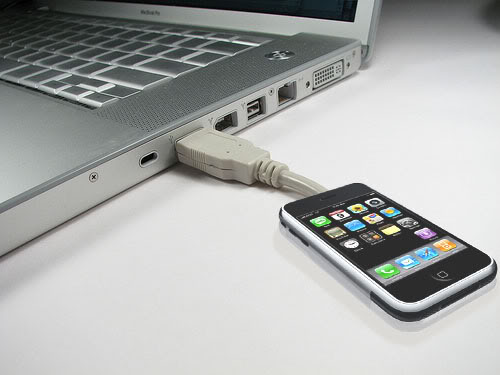
<p><b><i><u>This is a basic tutorial regarding on&nbsp;how to install apps and games found here (*.ipa)</u></i></b><br />
<h2><b><i>Basic Requirements:</i></b></h2>
<ul>
<li><i>1. A jailbroken iPhone/iPod/iPad</i></li>
<li><i>2. Cydia&nbsp;</i></li>
<li><i>3. Add source <b>cydia.hackulo.us</b> and install <b>appsync</b> (Depends on your iOS version, you need to install the correct appsync version)</i></li>
<li><i>4. Internet connection (Faster is better!)</i></li>
</ul>
<h2> <b><i>Method 1 (Using Installous, stand alone):</i></b></h2>
<ul>
<li>&nbsp;<i>Open Cydia, add this source: <b>cydia.hackulo.us/</b></i></li>
<li><i>&nbsp;Still in Cydia, install <b>Installous</b></i></li>
<li><i>&nbsp;Quit Cydia</i></li>
<li><i>&nbsp;Reboot iPhone</i></li>
<li><i>&nbsp;Open Installous ( Go to Settings tab and turn &#8216;<b>automatic install</b>&#8216; and &#8216;<b>sync to itunes&#8217; to ON</b>.)&nbsp;</i></li>
<li><i>Select any apps/games you want.</i></li>
<li><i>&nbsp;Download it.&nbsp;</i></li>
</ul>
<h2> Method 2 (Using Installous together with PC/Mac, using CyberDuck/WinSCP):</h2>
<ul>
<li><i>Open Cydia</i></li>
<li><i>Add this source: <b>cydia.hackulo.us</b></i></li>
<li><i>Still in Cydia, install “<b>Installous</b>”</i></li>
<li><i>Still in Cydia, install “<b>OpenSSH</b>”</i></li>
<li><i>Quit Cydia</i></li>
<li><i>Reboot iPhone</i></li>
<li><i>Download <a href="http://winscp.net/eng/download.php" target="_blank">WinSCP</a> for windows or <a href="http://cyberduck.en.softonic.com/mac" target="_blank">CyberDuck</a> for Macs.</i></li>
<li><i>Connect iPhone to PC/Mac (Using WiFi)</i></li>
<li><i>Connect to the iPhone using SSH connection (WinSCP ,CyberDuck , etc) “<b>Username: root Password: alpine</b>”</i></li>
<li><i>Navigate to “/Private/var/mobile/Documents/Installous/Downloads “</i></li>
<li><i>Copy “<b>.ipa</b>” files to this folder</i></li>
<li><i>Now, disconnect from PC/Mac.</i></li>
<li><i>Open Installous and go to Download tab. At this time you see a list of applications that previously copied to the “<b>Downloads</b>” folder</i></li>
<li><i>Click on the application name then click install.</i></li>
</ul>
<h2> Method 3 (Using Installous together with PC, using iFunbox):</h2>
<ul>
<li><i>Open Cydia</i></li>
<li><i>Add this source: <b>cydia.hackulo.us</b></i></li>
<li><i>Still in Cydia, install “<b>Installous</b>”</i></li>
<li><i>Still in Cydia, install “<b>afc2dd</b>”&nbsp;</i></li>
<li><i>&nbsp;Download iFunbox from <a href="http://www.i-funbox.com/" target="_blank">HERE</a></i></li>
<li><i>Open iFunbox and navigate to “<b>/Private/var/mobile/Documents/Installous/Downloads </b>“</i></li>
<li><i>Copy “<b>.ipa</b>” files to this folder</i></li>
<li><i>Now, disconnect from PC.</i></li>
<li><i>Open Installous and go to Download tab. At this time you see a list of applications that previously copied to the “<b>Downloads</b>” folder</i></li>
<li><i>Click on the application name then click install.</i></li>
</ul>
<h2> Method 4 (Using iTunes)</h2>
<ul>
<li><i>Download any ipa you want from our forum.</i></li>
<li><i>Just be sure that the extension is ipa, not zip or rar, if not, rename it.</i></li>
<li><i>Connect your iDevice, open iTunes and Double-click the ipa that you just downloaded.</i></li>
</ul>
<p><b><i>Here&#8217;s how to transfer your cracked apps to itunes, and be able to sync through itunes:</i></b><br />
<blockquote class="tr_bq">
<ul>
<li><i>iTunes&gt;Edit&gt;Preferences&gt; Devices Tab&gt; Uncheck &#8216;Prevent iPods, iPhones and iPads from syncing Automatically&#8217;.</i></li>
<li><i>Connect your iPhone&gt; On the main iTunes Screen &gt; Right click iPhone on the Devices Pane&gt; Reset Warnings.</i></li>
<li><i>Right click on your iPhone&gt; Transfer Purchases.</i></li>
</ul>
</blockquote>
<p><span style="background-color: #f1c232;"></span>
<div style="font-weight: bold;"><i>If &nbsp;you get this error : &#8220;Cannot transfer this &#8230;.. because this computer is not authorized&#8221; follow the steps below :</i></div>
<blockquote class="tr_bq"><ul>
<li><i>On itunes, sign in to your itunes account (Store-&gt;Sign in)</i></li>
<li><i>Authorize your laptop. (You have until 5 units to authorize) (Store-&gt;Authorize this computer)</i></li>
<li><i>After Authorizing you can start the purchase transfer and then you can tick on the &#8216;sync apps&#8217; options on itunes</i>.</li>
</ul>
</blockquote>
<p><b style="background-color: #f1c232;">Note </b>:<i>If you don&#8217;t want to see updates of your cracked apps on the appstore, install<b> MetadataRemovr </b>from&nbsp;cydia.hackulo.us</i></p>
]]></content:encoded>
			<wfw:commentRss>http://modern-smartphone.6te.net/?feed=rss2&#038;p=156</wfw:commentRss>
		<slash:comments>0</slash:comments>
		</item>
		<item>
		<title>&gt;Tethered Jailbreak all non-A5 Devices on iOS 5.1</title>
		<link>http://modern-smartphone.6te.net/?p=154</link>
		<comments>http://modern-smartphone.6te.net/?p=154#comments</comments>
		<pubDate>Wed, 04 Apr 2012 10:50:00 +0000</pubDate>
		<dc:creator>admin</dc:creator>
				<category><![CDATA[iOS]]></category>
		<category><![CDATA[iPhone]]></category>
		<category><![CDATA[iPhone Apps]]></category>
		<category><![CDATA[iPhone tutorials]]></category>

		<guid isPermaLink="false">http://modern-smartphone.6te.net/?p=154</guid>
		<description><![CDATA[> &#160;&#160;&#160; &#160;We realize that some of you non-A5 jailbreakers are itching to get to 5.1, even though there seems to be no compelling new feature there. Because of geohot’s limera1n exploit, those with devices earlier than the iPad2 can test the 5.1 jailbreak waters if they really want to, using redsn0w 0.9.10b6. Here’s what [...]]]></description>
			<content:encoded><![CDATA[<p>>
<div class="separator" style="clear: both; text-align: center;"><a href="http://2.bp.blogspot.com/-ft-HCxRsB9o/T3wmo5i8FuI/AAAAAAAABC0/oR-jPFoC8cw/s1600/redsnow.png" imageanchor="1" style="clear: right; float: right; margin-bottom: 1em; margin-left: 1em;"><img border="0" height="200" src="http://2.bp.blogspot.com/-ft-HCxRsB9o/T3wmo5i8FuI/AAAAAAAABC0/oR-jPFoC8cw/s200/redsnow.png" width="199" /></a></div>
<p><i>&nbsp;&nbsp;</i><i>&nbsp; &nbsp;We realize that some of you non-A5 jailbreakers are itching to get to 5.1, even though there seems to be no compelling new feature there. Because of geohot’s limera1n exploit, those with devices earlier than the iPad2 can test the 5.1 jailbreak waters if they really want to, using redsn0w 0.9.10b6. Here’s what you need to know:</i>
<ul>
<li><i>his is a *<b>tethered</b>* 5.1 jailbreak<b> for non-A5 </b>devices. You’ll need to use redsn0w to “Just Boot” your device every time it power cycles, otherwise jailbreak apps won’t work (neither will Safari).</i></li>
<li><i>If you use ultrasn0w for your carrier unlock, be sure to use a custom IPSW to get to 5.1 first! Don’t ever restore to a stock Apple IPSW! Use redsn0w’s “Custom IPSW” button to create a NO_BB_* version of the 5.1 IPSW and restore to that instead of the stock one. (That option is available only to 3GS and iPhone4-GSM owners.) ultrasn0w itself will be updated for 5.1 in the next few days (same baseband support, not 5.1’s baseband).</i></li>
<li><i>If you’re lucky enough to have an old-bootrom 3GS, this jailbreak is actually untethered (redsn0w will figure that part out automatically).</i></li>
<li><i>While we were at it, we added @pod2g’s steaks4uce exploit to support MC models of the iPod touch 2G (whose last firmware was 4.2.1). So now redsn0w will auto-detect and jailbreak all versions of that older device.</i></li>
<li><i>iBooks won’t work until a future update of redsn0w</i></li>
</ul>
<p><b><i>Download :</i></b>
<ul>
<li><a href="https://sites.google.com/a/iphone-dev.com/files/home/redsn0w_mac_0.9.10b6.zip?attredirects=0&amp;d=1"><i>redsn0w 0.9.10b6 for OS X</i></a></li>
<li><i><a href="https://sites.google.com/a/iphone-dev.com/files/home/redsn0w_mac_0.9.10b6.zip?attredirects=0&amp;d=1">redsn0w 0.9.10b6 for Windows</a> (be sure to run in Administrator mode)</i></li>
</ul>
]]></content:encoded>
			<wfw:commentRss>http://modern-smartphone.6te.net/?feed=rss2&#038;p=154</wfw:commentRss>
		<slash:comments>0</slash:comments>
		</item>
		<item>
		<title>&gt;Downgrade Your iPhone Firmware Using TinyUmbrella</title>
		<link>http://modern-smartphone.6te.net/?p=122</link>
		<comments>http://modern-smartphone.6te.net/?p=122#comments</comments>
		<pubDate>Fri, 16 Mar 2012 23:06:00 +0000</pubDate>
		<dc:creator>admin</dc:creator>
				<category><![CDATA[iOS]]></category>
		<category><![CDATA[iPhone]]></category>
		<category><![CDATA[iPhone tutorials]]></category>

		<guid isPermaLink="false">http://modern-smartphone.6te.net/?p=122</guid>
		<description><![CDATA[> These are instructions on how to downgrade your iPhone firmware using TinyUmbrella. In order to follow this tutorial you must already have saved your SHSH Blobs for the firmware you want to restore to. Download TinyUmbrella from here and save it in a Pwnage folder on your desktop if don&#8217;t have it already. Download [...]]]></description>
			<content:encoded><![CDATA[<p>>
<div class="separator" style="clear: both; text-align: center;"><a href="http://3.bp.blogspot.com/-CqugzOm5ds0/T2PGzG5IunI/AAAAAAAAA3I/Sq-pYHu5_30/s1600/tinyUmbrella.png" imageanchor="1" style="clear: right; float: right; margin-bottom: 1em; margin-left: 1em;"><img border="0" height="200" src="http://3.bp.blogspot.com/-CqugzOm5ds0/T2PGzG5IunI/AAAAAAAAA3I/Sq-pYHu5_30/s200/tinyUmbrella.png" width="200" /></a></div>
<p>These are instructions on how to <b>downgrade your iPhone firmware using TinyUmbrella</b>. In order to follow this tutorial you must already have saved your SHSH Blobs for the firmware you want to restore to.</p>
<ul>
<li>Download TinyUmbrella from <a href="http://thefirmwareumbrella.blogspot.com/" target="_blank">here</a> and save it in a Pwnage folder on your desktop if don&#8217;t have it already.</li>
<li>Download the firmware you want to restore to from <a href="http://modern-smartphone.blogspot.com/2012/01/iphone-firmware-files.html" target="_blank">here</a> and save it in a Pwnage folder on your desktop. Remember you must have saved your SHSH Blobs for this firmware already.</li>
<li>Launch TinyUmbrella by double clicking its icon.</li>
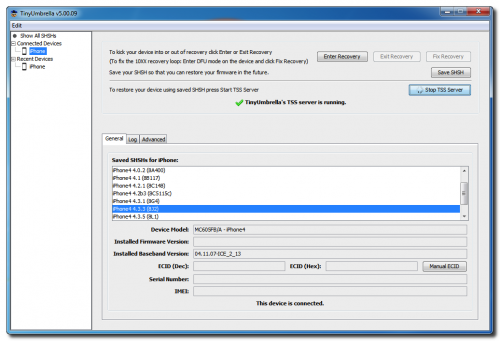
<li>Connect your device and make sure it lists saved SHSH Blobs for the firmware you are restoring to. You may need to click Save SHSH to restore your blobs from Cydia if you don&#8217;t see any listed.</li>
</ul>
<div class="separator" style="clear: both; text-align: center;"><a href="http://4.bp.blogspot.com/-_xuI8Jgj0WA/T2PF6laol1I/AAAAAAAAA24/7AOyKMuPqOw/s1600/tiny+umbrella.png" imageanchor="1" style="margin-left: 1em; margin-right: 1em;"><img border="0" height="218" src="http://4.bp.blogspot.com/-_xuI8Jgj0WA/T2PF6laol1I/AAAAAAAAA24/7AOyKMuPqOw/s320/tiny+umbrella.png" width="320" /></a></div>
<ul>
<li>Click the Start TSS Server button.</li>
</ul>
<div style="text-align: center;"><span style="color: red;"><b>*Do not continue if TinyUmbrella&#8217;s TSS server is not started successfully.</b></span></div>
<div class="separator" style="clear: both; text-align: center;"><a href="http://2.bp.blogspot.com/-hoF3IuidR88/T2PGHywnI-I/AAAAAAAAA3A/TfnQXoyUmII/s1600/tiny+umbrella+1.png" imageanchor="1" style="margin-left: 1em; margin-right: 1em;"><img border="0" height="218" src="http://2.bp.blogspot.com/-hoF3IuidR88/T2PGHywnI-I/AAAAAAAAA3A/TfnQXoyUmII/s320/tiny+umbrella+1.png" width="320" /></a></div>
<ul>
<li>Launch iTunes by clicking its icon in your Start Menu.</li>
<li>Place your<b> iPhone into DFU mode</b> by <i>holding down the Power and Home buttons for 10 seconds then release the Power button and continue holding the Home button for another 10 seconds.</i></li>
<li>Select your iPhone from the list of devices on the left, hold down the Shift key and click Restore.</li>
<li>Navigate to the Pwnage folder on your desktop, select the ipsw file you downloaded and click the Open button</li>
<li>iTunes will now restore to the lower firmware version.</li>
</ul>
<p><b><i><u>If you &nbsp;get an Error 1 or you get stuck in recovery mode follow the steps below</u></i></b>
<ul>
<li>Download FixRecovery from <a href="http://thefirmwareumbrella.blogspot.com/" target="_blank">here</a> and save it to the Pwnage folder on your desktop. Then extract the archive.</li>
<li>Download zlib1.dll from <a href="http://www.dll-files.com/dllindex/dll-files.shtml?zlib1" target="_blank">here </a>and save it to the Pwnage folder on your desktop. Then extract the archive.</li>
<li>Place your iPhone into DFU mode by holding down the Power and Home buttons for 10 seconds then release the Power button and continue holding the Home button for another 10 seconds.</li>
<li>Double click to launch the fixrecovery43 executable we just extracted.</li>
<li>FixRecovery will perform its magic after which your device will be successfully rebooted.</li>
</ul>
<p><i style="background-color: #f1c232;"><b><u>IMPORTANT:</u></b></i><br /><span style="background-color: #f1c232;"><i><b>&nbsp;If fixrecovery does not work the first time you may need to rerestore to your desired firmware version and try again. Remember to keep the TSS Server running during your second restore as well.</b></i></span></p>
]]></content:encoded>
			<wfw:commentRss>http://modern-smartphone.6te.net/?feed=rss2&#038;p=122</wfw:commentRss>
		<slash:comments>0</slash:comments>
		</item>
		<item>
		<title>&gt;Untether a previously tethered jailbreak using Corona</title>
		<link>http://modern-smartphone.6te.net/?p=51</link>
		<comments>http://modern-smartphone.6te.net/?p=51#comments</comments>
		<pubDate>Thu, 19 Jan 2012 20:31:00 +0000</pubDate>
		<dc:creator>admin</dc:creator>
				<category><![CDATA[iOS]]></category>
		<category><![CDATA[iPhone]]></category>
		<category><![CDATA[iPhone Jailbreak]]></category>
		<category><![CDATA[iPhone tutorials]]></category>

		<guid isPermaLink="false">http://modern-smartphone.6te.net/?p=51</guid>
		<description><![CDATA[>These are instructions on how to untether your previously tethered iOS 5.0.1 jailbreak using Corona. Corona package will allow your 5.0.1 device to install pod2g&#8217;s untethered exploits and reboot without requiring an external tool like redsn0w or sn0wbreeze, and without having to restore your device (so you get to keep all your apps, contacts, etc). [...]]]></description>
			<content:encoded><![CDATA[<p>>These are instructions on how to untether your previously tethered<b> iOS 5.0.1 jailbreak</b> using <b>Corona.</b><br />
<blockquote class="tr_bq"><i>Corona package will allow your 5.0.1 device to install pod2g&#8217;s untethered exploits and reboot without requiring an external tool like redsn0w or sn0wbreeze, and without having to restore your device (so you get to keep all your apps, contacts, etc).</i></p></blockquote>
<ul>
<li>&nbsp;Launch <b>Cydia</b> from your <b>Springboard</b>.</li>
<li>Select the <b>Search</b> tab at the bottom of the screen.</li>
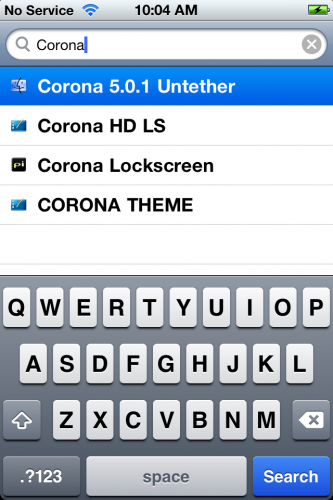
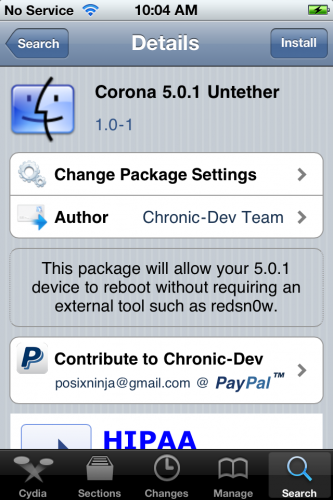
<li>Type <b>Corona</b> into the search field and press to select the <b>Corona 5.0.1 Untether</b> package once it&#8217;s found.</li>
<li>Press the <b>Install</b> button at the top right of the screen.</li>
<li>Press the <b>Confirm</b> button to begin installation.</li>
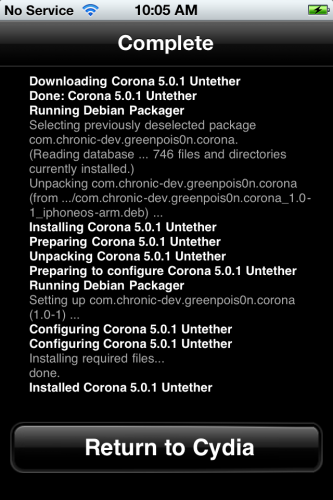
<li>Once installation has completed successfully you can press the large <b>Return to Cydia</b> button.</li>
</ul>
<div class="separator" style="clear: both; text-align: center;"><a href="http://3.bp.blogspot.com/-xDncoyA6Uog/Txh8xeOcFkI/AAAAAAAAAZM/EPOvYnh5Lnw/s1600/67115-500.png" imageanchor="1" style="margin-left: 1em; margin-right: 1em;"><img border="0" height="200" src="http://3.bp.blogspot.com/-xDncoyA6Uog/Txh8xeOcFkI/AAAAAAAAAZM/EPOvYnh5Lnw/s200/67115-500.png" width="133" /></a><a href="http://3.bp.blogspot.com/-eU9MFElQk1A/Txh8yWzki_I/AAAAAAAAAZU/zVoiMLfS_jI/s1600/67117-500.png" imageanchor="1" style="margin-left: 1em; margin-right: 1em;"><img border="0" height="200" src="http://3.bp.blogspot.com/-eU9MFElQk1A/Txh8yWzki_I/AAAAAAAAAZU/zVoiMLfS_jI/s200/67117-500.png" width="133" /></a><a href="http://1.bp.blogspot.com/-dz6wc_pr9Rg/Txh8zB-kl7I/AAAAAAAAAZc/h4YKYMFbpPc/s1600/67120-500.png" imageanchor="1" style="margin-left: 1em; margin-right: 1em;"><img border="0" height="200" src="http://1.bp.blogspot.com/-dz6wc_pr9Rg/Txh8zB-kl7I/AAAAAAAAAZc/h4YKYMFbpPc/s200/67120-500.png" width="133" /></a></div>
<p>&nbsp;You can now reboot your device with an <b>untethered jailbreak</b>!</p>
]]></content:encoded>
			<wfw:commentRss>http://modern-smartphone.6te.net/?feed=rss2&#038;p=51</wfw:commentRss>
		<slash:comments>0</slash:comments>
		</item>
		<item>
		<title>&gt;How to Jailbreak Your iPhone Without Updating the Baseband (Windows) [5.0.1]</title>
		<link>http://modern-smartphone.6te.net/?p=36</link>
		<comments>http://modern-smartphone.6te.net/?p=36#comments</comments>
		<pubDate>Mon, 09 Jan 2012 23:43:00 +0000</pubDate>
		<dc:creator>admin</dc:creator>
				<category><![CDATA[iOS]]></category>
		<category><![CDATA[iPhone Jailbreak]]></category>
		<category><![CDATA[iPhone tutorials]]></category>
		<category><![CDATA[iPhone unlock]]></category>

		<guid isPermaLink="false">http://modern-smartphone.6te.net/?p=36</guid>
		<description><![CDATA[>These are instructions on how to jailbreak your iPhone 3GS or iPhone 4 on iOS 5.0.1 without updating the baseband using RedSn0w for Windows. You may want to do this to preserve an unlock from a lower baseband version. Please note this jailbreak is tethered for every device but the old bootrom iPhone 3GS which [...]]]></description>
			<content:encoded><![CDATA[<p>><br />These are instructions on how to jailbreak your iPhone 3GS or iPhone 4 on iOS 5.0.1 without updating the baseband using <b>RedSn0w</b> for Windows. You may want to do this to preserve an unlock from a lower baseband version.</p>
<p><i>Please note this jailbreak is tethered for every device but the old bootrom iPhone 3GS which means you will need to connect your device to the computer each time you reboot.&nbsp;</i></p>
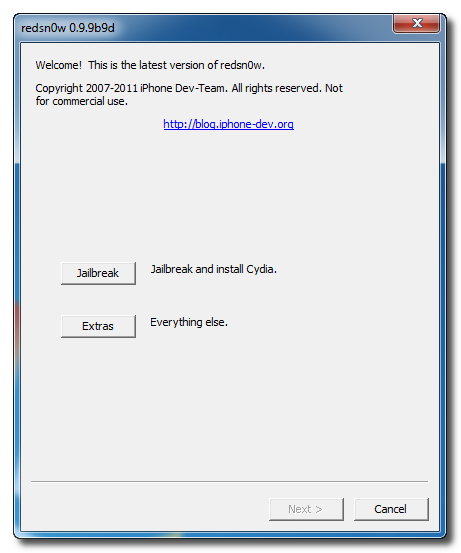
<p>1.Create a folder on your desktop called <b>Pwnage</b><br />Download <a href="http://www.mediafire.com/?w8msbtyujbp5c48" target="_blank">RedSn0w</a> &nbsp;and place it in the <b>Pwnage</b> folder. Likewise, download the 5.0.1 firmware from <a href="http://appldnld.apple.com/iPhone4/041-3309.20111109.64rtg/iPhone3,1_5.0.1_9A405_Restore.ipsw" target="_blank">here</a> and place it in the Pwnage folder.</p>
<p>Extract &nbsp;<b>RedSn0w</b> by double clicking it.
<div class="separator" style="clear: both; text-align: center;"><a href="http://1.bp.blogspot.com/-alncR5S3jjo/Twt4eG2we7I/AAAAAAAAATE/bmW-bXKostI/s1600/jailbreack+with+custom+IPSW.png" imageanchor="1" style="margin-left: 1em; margin-right: 1em;"><img border="0" height="224" src="http://1.bp.blogspot.com/-alncR5S3jjo/Twt4eG2we7I/AAAAAAAAATE/bmW-bXKostI/s320/jailbreack+with+custom+IPSW.png" width="320" /></a></div>
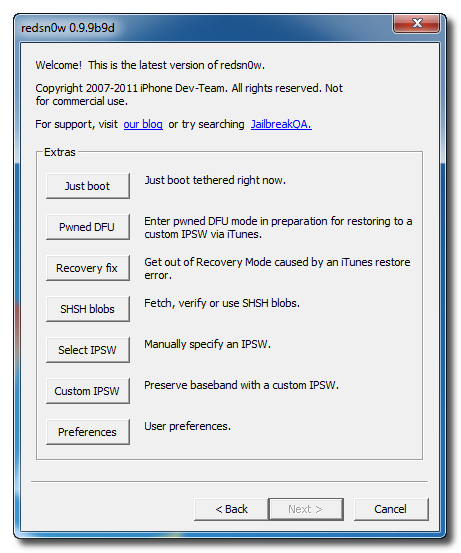
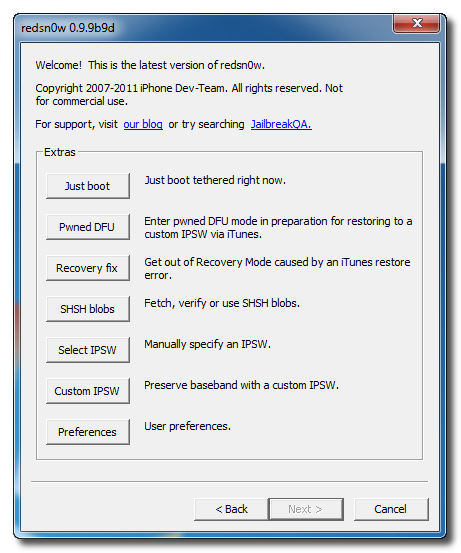
<p>2.Launch the <b>redsn0w</b> application from the redsn0w folder we just extracted.<br />3.Click to select <b><i>Extras</i></b> from the main menu.
<div class="separator" style="clear: both; text-align: center;"><a href="http://3.bp.blogspot.com/-ABcAo_FOn7I/Twt4oigAmCI/AAAAAAAAATM/HMLJG6hTiJg/s1600/jailbreack+with+custom+IPSW+1.png" imageanchor="1" style="margin-left: 1em; margin-right: 1em;"><img border="0" height="200" src="http://3.bp.blogspot.com/-ABcAo_FOn7I/Twt4oigAmCI/AAAAAAAAATM/HMLJG6hTiJg/s200/jailbreack+with+custom+IPSW+1.png" width="166" /></a></div>
<p>4.Click to select <b><i>Custom IPSW</i></b> from the Extras menu.
<div class="separator" style="clear: both; text-align: center;"><a href="http://1.bp.blogspot.com/-Z7zawsF-hqo/Twt4w7eB7dI/AAAAAAAAATU/NiySZ0BLbY0/s1600/jailbreack+with+custom+IPSW+2.png" imageanchor="1" style="margin-left: 1em; margin-right: 1em;"><img border="0" height="200" src="http://1.bp.blogspot.com/-Z7zawsF-hqo/Twt4w7eB7dI/AAAAAAAAATU/NiySZ0BLbY0/s200/jailbreack+with+custom+IPSW+2.png" width="166" /></a></div>
<p>5.Navigate to the<b> Pwnage</b> folder on your desktop and select the<b> IPSW</b> we downloaded then click Open.
<div class="separator" style="clear: both; text-align: center;"><a href="http://4.bp.blogspot.com/-qUeA7zfwLyM/Twt44gj9p1I/AAAAAAAAATc/5MPIKXcO3R0/s1600/jailbreack+with+custom+IPSW+3.png" imageanchor="1" style="margin-left: 1em; margin-right: 1em;"><img border="0" height="240" src="http://4.bp.blogspot.com/-qUeA7zfwLyM/Twt44gj9p1I/AAAAAAAAATc/5MPIKXcO3R0/s320/jailbreack+with+custom+IPSW+3.png" width="320" /></a></div>
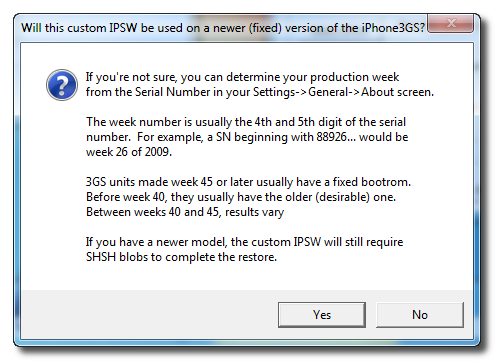
<p>If you are using the iPhone 3GS you may be asked to identify whether you are on a newer or older model.
<div class="separator" style="clear: both; text-align: center;"><a href="http://2.bp.blogspot.com/-YAXP5v20pnM/Twt48SBTkNI/AAAAAAAAATk/_nbSKZnFU3w/s1600/jailbreack+with+custom+IPSW+4.png" imageanchor="1" style="margin-left: 1em; margin-right: 1em;"><img border="0" height="233" src="http://2.bp.blogspot.com/-YAXP5v20pnM/Twt48SBTkNI/AAAAAAAAATk/_nbSKZnFU3w/s320/jailbreack+with+custom+IPSW+4.png" width="320" /></a></div>
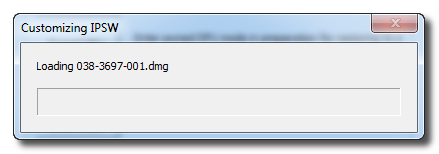
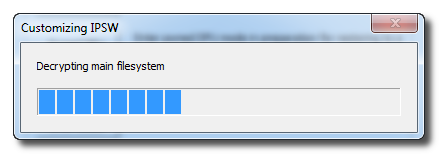
<p>6.<b>RedSn0w</b> will now begin building a custom IPSW for you.
<div class="separator" style="clear: both; text-align: center;"><a href="http://3.bp.blogspot.com/-Zs130jN_GTY/Twt5CTXWxuI/AAAAAAAAATs/0k45ys1RHx8/s1600/jailbreack+with+custom+IPSW+5.png" imageanchor="1" style="margin-left: 1em; margin-right: 1em;"><img border="0" height="70" src="http://3.bp.blogspot.com/-Zs130jN_GTY/Twt5CTXWxuI/AAAAAAAAATs/0k45ys1RHx8/s200/jailbreack+with+custom+IPSW+5.png" width="200" /></a><a href="http://1.bp.blogspot.com/-lkaQHb-e0Ck/Twt5CyFJ8FI/AAAAAAAAAT0/k2V5E19bYMg/s1600/jailbreack+with+custom+IPSW+6.png" imageanchor="1" style="margin-left: 1em; margin-right: 1em;"><img border="0" height="70" src="http://1.bp.blogspot.com/-lkaQHb-e0Ck/Twt5CyFJ8FI/AAAAAAAAAT0/k2V5E19bYMg/s200/jailbreack+with+custom+IPSW+6.png" width="200" /></a></div>
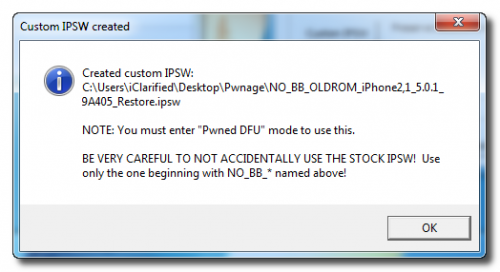
<p>7.You&#8217;ll be notified once <b>RedSn0w</b> has completed building your IPSW. Click the OK button.
<div class="separator" style="clear: both; text-align: center;"><a href="http://2.bp.blogspot.com/-LhF8kUAjIbw/Twt5M6srYBI/AAAAAAAAAT8/JqCyUIQQDmo/s1600/jailbreack+with+custom+IPSW+7.png" imageanchor="1" style="margin-left: 1em; margin-right: 1em;"><img border="0" height="174" src="http://2.bp.blogspot.com/-LhF8kUAjIbw/Twt5M6srYBI/AAAAAAAAAT8/JqCyUIQQDmo/s320/jailbreack+with+custom+IPSW+7.png" width="320" /></a></div>
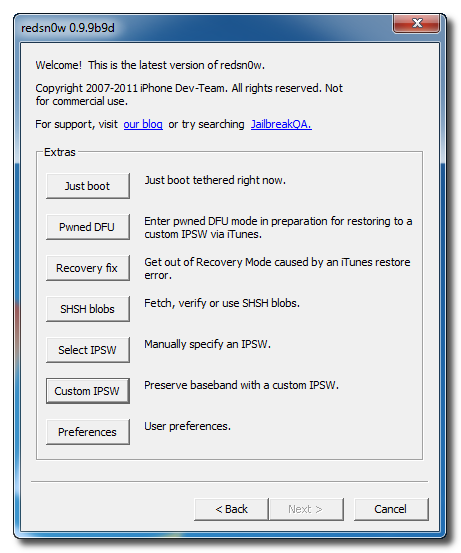
<p>8.Click the <b>Pwned DFU</b> button from the Extras menu.
<div class="separator" style="clear: both; text-align: center;"><a href="http://1.bp.blogspot.com/-QIwd-oZ_S8o/Twt5RN3kbKI/AAAAAAAAAUE/miTZas2rZWM/s1600/jailbreack+with+custom+IPSW+8.png" imageanchor="1" style="margin-left: 1em; margin-right: 1em;"><img border="0" height="320" src="http://1.bp.blogspot.com/-QIwd-oZ_S8o/Twt5RN3kbKI/AAAAAAAAAUE/miTZas2rZWM/s320/jailbreack+with+custom+IPSW+8.png" width="266" /></a></div>
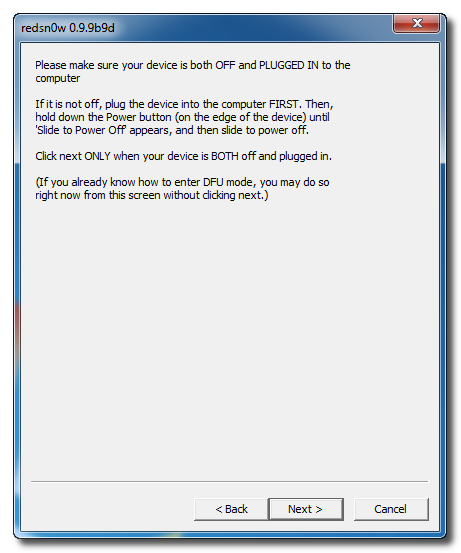
<p>9.Plug your iPhone into the computer and <b>make sure its OFF</b> then click the <b><i>Next</i></b> button
<div class="separator" style="clear: both; text-align: center;"><a href="http://3.bp.blogspot.com/-tsuKypqnYQg/Twt5Xzk-_CI/AAAAAAAAAUM/uhNHdsKsPfc/s1600/jailbreack+with+custom+IPSW+9.png" imageanchor="1" style="margin-left: 1em; margin-right: 1em;"><img border="0" height="320" src="http://3.bp.blogspot.com/-tsuKypqnYQg/Twt5Xzk-_CI/AAAAAAAAAUM/uhNHdsKsPfc/s320/jailbreack+with+custom+IPSW+9.png" width="266" /></a></div>
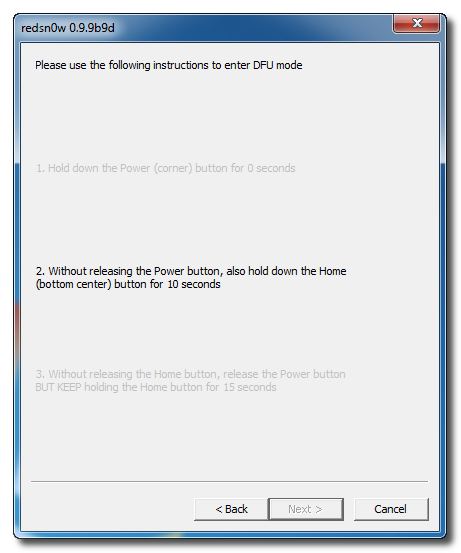
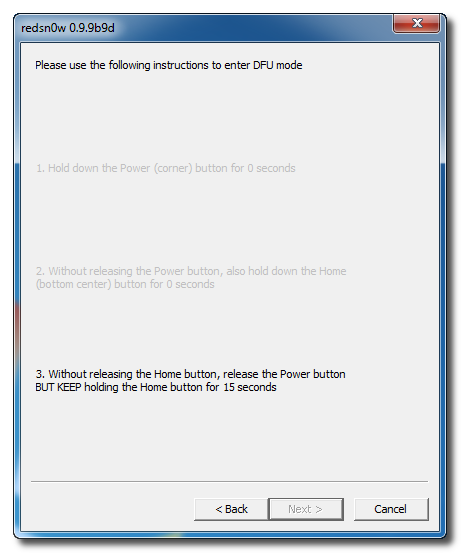
<p>10.<b>RedSn0w</b> will now guide you through the steps to get into <b>DFU mode</b>.
<div class="separator" style="clear: both; text-align: center;"><a href="http://4.bp.blogspot.com/-lauS45y0dxw/Twt5e5pQpDI/AAAAAAAAAUU/sGh9JFytvzs/s1600/jailbreack+with+custom+IPSW+10.png" imageanchor="1" style="margin-left: 1em; margin-right: 1em;"><img border="0" height="320" src="http://4.bp.blogspot.com/-lauS45y0dxw/Twt5e5pQpDI/AAAAAAAAAUU/sGh9JFytvzs/s320/jailbreack+with+custom+IPSW+10.png" width="266" /></a></div>
<p>Hold down both the <b>Home</b> button and the <b>Power</b> button for 10 seconds.
<div class="separator" style="clear: both; text-align: center;"><a href="http://3.bp.blogspot.com/-VK_QAFskm5I/Twt5kVKuAhI/AAAAAAAAAUc/uPbVPaVSg2A/s1600/jailbreack+with+custom+IPSW+11.png" imageanchor="1" style="margin-left: 1em; margin-right: 1em;"><img border="0" height="320" src="http://3.bp.blogspot.com/-VK_QAFskm5I/Twt5kVKuAhI/AAAAAAAAAUc/uPbVPaVSg2A/s320/jailbreack+with+custom+IPSW+11.png" width="266" /></a></div>
<p><b>Release the Power</b> button and <b>continue holding the Home</b> button until RedSn0w detects the device.
<div class="separator" style="clear: both; text-align: center;"><a href="http://3.bp.blogspot.com/-MZ9bKszG690/Twt5paHmupI/AAAAAAAAAUk/9l5S4-_3rN0/s1600/jailbreack+with+custom+IPSW+12.png" imageanchor="1" style="margin-left: 1em; margin-right: 1em;"><img border="0" height="320" src="http://3.bp.blogspot.com/-MZ9bKszG690/Twt5paHmupI/AAAAAAAAAUk/9l5S4-_3rN0/s320/jailbreack+with+custom+IPSW+12.png" width="266" /></a></div>
<p>11.RedSn0w will run the<b> LimeRa1n</b> exploit.
<div class="separator" style="clear: both; text-align: center;"><a href="http://4.bp.blogspot.com/-fZreSUv6Wcs/Twt5xXP-5dI/AAAAAAAAAUs/FqX9E57V8_k/s1600/jailbreack+with+custom+IPSW+13.png" imageanchor="1" style="margin-left: 1em; margin-right: 1em;"><img border="0" height="320" src="http://4.bp.blogspot.com/-fZreSUv6Wcs/Twt5xXP-5dI/AAAAAAAAAUs/FqX9E57V8_k/s320/jailbreack+with+custom+IPSW+13.png" width="266" /></a></div>
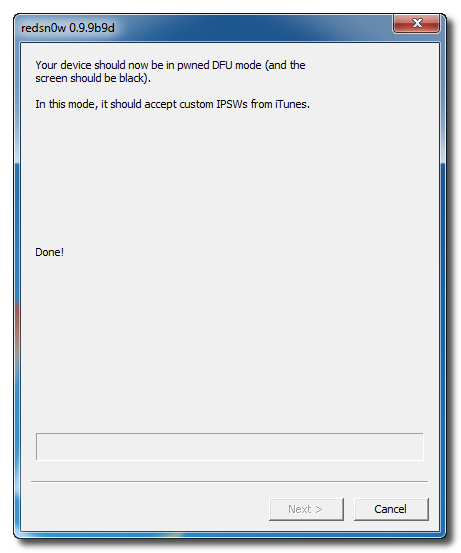
<p>12.You&#8217;ll then be notified that your iPhone is in <b>Pwned DFU</b> mode.
<div class="separator" style="clear: both; text-align: center;"><a href="http://3.bp.blogspot.com/-z_zC_o2iRQ4/Twt51z6bqcI/AAAAAAAAAU0/IEhnHwg1z6E/s1600/jailbreack+with+custom+IPSW+14.png" imageanchor="1" style="margin-left: 1em; margin-right: 1em;"><img border="0" height="320" src="http://3.bp.blogspot.com/-z_zC_o2iRQ4/Twt51z6bqcI/AAAAAAAAAU0/IEhnHwg1z6E/s320/jailbreack+with+custom+IPSW+14.png" width="266" /></a></div>
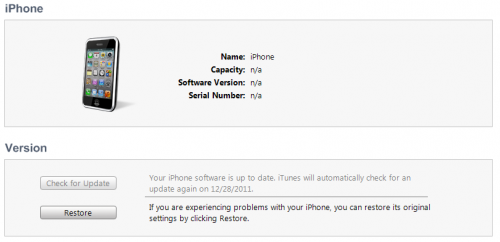
<p>13.<b>Launch iTunes</b> .<br />14.Select your device from the list on the left then under the Summary tab <b>hold down the Shift key and click the Restore button.</b>
<div class="separator" style="clear: both; text-align: center;"><a href="http://3.bp.blogspot.com/-diS161jStXw/Twt6BSdMBsI/AAAAAAAAAU8/JRYXVdNekoo/s1600/jailbreack+with+custom+IPSW+15.png" imageanchor="1" style="margin-left: 1em; margin-right: 1em;"><img border="0" height="96" src="http://3.bp.blogspot.com/-diS161jStXw/Twt6BSdMBsI/AAAAAAAAAU8/JRYXVdNekoo/s200/jailbreack+with+custom+IPSW+15.png" width="200" /></a><a href="http://4.bp.blogspot.com/-AKP30vw4TXY/Twt6CFYsilI/AAAAAAAAAVE/e4vaCm6Fdyc/s1600/jailbreack+with+custom+IPSW+16.png" imageanchor="1" style="margin-left: 1em; margin-right: 1em;"><img border="0" height="96" src="http://4.bp.blogspot.com/-AKP30vw4TXY/Twt6CFYsilI/AAAAAAAAAVE/e4vaCm6Fdyc/s200/jailbreack+with+custom+IPSW+16.png" width="200" /></a></div>
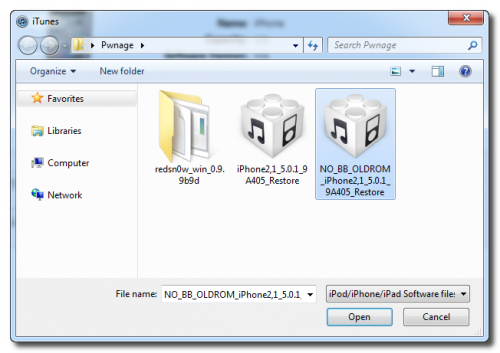
<p>15.You will then be asked to select your IPSW for restore. Navigate to the Pwnage folder on your desktop and <b>select the IPSW that begins with NO_BB</b> then click the Open button.
<div class="separator" style="clear: both; text-align: center;"><a href="http://2.bp.blogspot.com/-nge3w2Jc-Hk/Twt6OWipcEI/AAAAAAAAAVM/dszcmG3FWkQ/s1600/jailbreack+with+custom+IPSW+17.png" imageanchor="1" style="margin-left: 1em; margin-right: 1em;"><img border="0" height="225" src="http://2.bp.blogspot.com/-nge3w2Jc-Hk/Twt6OWipcEI/AAAAAAAAAVM/dszcmG3FWkQ/s320/jailbreack+with+custom+IPSW+17.png" width="320" /></a></div>
<p>16.iTunes will now restore and jailbreak your device using the Custom IPSW.</p>
<p><b>BOOT TETHERED</b><br />Once you have jailbroken you will need to rerun redsn0w to boot tethered.
<ul>
<li>From the main RedSn0w menu click the Extras button.</li>
<li>Select Just boot from the Extras menu to just boot tethered.</li>
</ul>
<div class="separator" style="clear: both; text-align: center;"><a href="http://4.bp.blogspot.com/-4Hnk2T37g-g/TwuD5WqDHTI/AAAAAAAAAVY/UOUUMSVGO_g/s1600/Boot+tehered.png" imageanchor="1" style="margin-left: 1em; margin-right: 1em;"><img border="0" height="200" src="http://4.bp.blogspot.com/-4Hnk2T37g-g/TwuD5WqDHTI/AAAAAAAAAVY/UOUUMSVGO_g/s200/Boot+tehered.png" width="166" /></a><a href="http://1.bp.blogspot.com/-UeIx8VciTM0/TwuD4mJb2BI/AAAAAAAAAVU/lLAHi7dzyOg/s1600/Boot+tehered+1.png" imageanchor="1" style="margin-left: 1em; margin-right: 1em;"><img border="0" height="200" src="http://1.bp.blogspot.com/-UeIx8VciTM0/TwuD4mJb2BI/AAAAAAAAAVU/lLAHi7dzyOg/s200/Boot+tehered+1.png" width="166" /></a></div>
<p><b><br /></b><br /><b>UNLOCK:</b><br />If you have a supported baseband you can now install UltraSn0w to unlock your device.<a href="http://modern-smartphone.blogspot.com/2012/01/how-to-unlock-iphone-4-3gs-3g-using.html" target="_blank"> Instructions are here.</a></p>
]]></content:encoded>
			<wfw:commentRss>http://modern-smartphone.6te.net/?feed=rss2&#038;p=36</wfw:commentRss>
		<slash:comments>0</slash:comments>
		</item>
		<item>
		<title>&gt;How to Find the Firmware and Baseband Version of Your iPhone</title>
		<link>http://modern-smartphone.6te.net/?p=35</link>
		<comments>http://modern-smartphone.6te.net/?p=35#comments</comments>
		<pubDate>Mon, 09 Jan 2012 22:27:00 +0000</pubDate>
		<dc:creator>admin</dc:creator>
				<category><![CDATA[iOS]]></category>
		<category><![CDATA[iPhone Jailbreak]]></category>
		<category><![CDATA[iPhone tutorials]]></category>
		<category><![CDATA[iPhone unlock]]></category>

		<guid isPermaLink="false">http://modern-smartphone.6te.net/?p=35</guid>
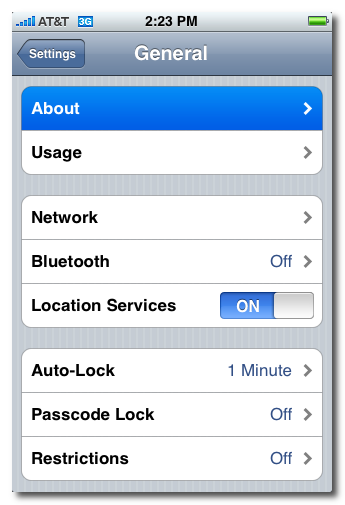
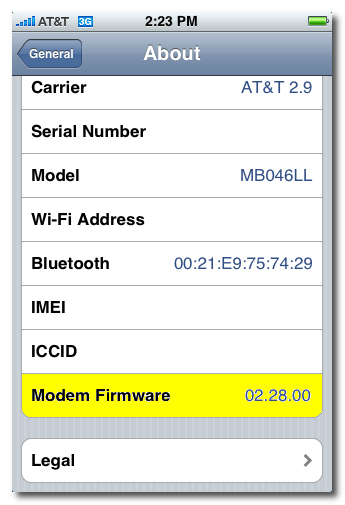
		<description><![CDATA[>These are instructions on how to find the firmware and baseband version (modem firmware) your iPhone is currently running. Step One:&#160;press to launch Settings from your Springboard. Step Two: press to select General from the Settings Menu. Step Three: press to select About from the General Settings Menu. Step Four: from the about screen you [...]]]></description>
			<content:encoded><![CDATA[<p>><br />These are instructions on how to find the firmware and baseband version (modem firmware) your iPhone is currently running.</p>
<p><b>Step One:&nbsp;</b>press to launch <b><i>Settings</i></b> from your <b>Springboard</b>.
<div class="separator" style="clear: both; text-align: center;"><a href="http://3.bp.blogspot.com/-kJueKVxpMgQ/Twto0mI0QUI/AAAAAAAAAQs/ysJoRF4aVfY/s1600/iPhone+firmware.png" imageanchor="1" style="margin-left: 1em; margin-right: 1em;"><img border="0" height="200" src="http://3.bp.blogspot.com/-kJueKVxpMgQ/Twto0mI0QUI/AAAAAAAAAQs/ysJoRF4aVfY/s200/iPhone+firmware.png" width="136" /></a></div>
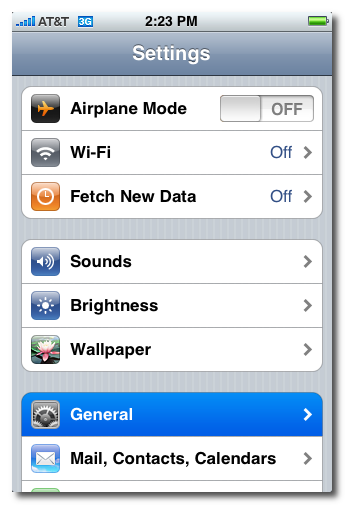
<p><b>Step Two:</b> press to select <b><i>General</i></b> from the <b><i>Settings Menu</i></b>.
<div class="separator" style="clear: both; text-align: center;"><a href="http://3.bp.blogspot.com/-wBz-Hn1PxLI/TwtpKAyR_EI/AAAAAAAAAQ0/QPsVkm3L7o0/s1600/iPhone+firmware1.png" imageanchor="1" style="margin-left: 1em; margin-right: 1em;"><img border="0" height="200" src="http://3.bp.blogspot.com/-wBz-Hn1PxLI/TwtpKAyR_EI/AAAAAAAAAQ0/QPsVkm3L7o0/s200/iPhone+firmware1.png" width="136" /></a></div>
<div class="separator" style="clear: both; text-align: center;"></div>
<div>
<div><b>Step Three:</b> press to select <b><i>About</i></b> from the <b>General Settings Menu</b>.</div>
</div>
<div class="separator" style="clear: both; text-align: center;"><a href="http://1.bp.blogspot.com/-Jp5pmfElg6M/TwtpXUo7sjI/AAAAAAAAAQ8/HcmMjr6eNw4/s1600/iPhone+firmware2.png" imageanchor="1" style="margin-left: 1em; margin-right: 1em;"><img border="0" height="200" src="http://1.bp.blogspot.com/-Jp5pmfElg6M/TwtpXUo7sjI/AAAAAAAAAQ8/HcmMjr6eNw4/s200/iPhone+firmware2.png" width="136" /></a></div>
<div>
<div><b>Step Four:</b> from the about screen you can find your firmware version under the <b><i>Version</i></b> label.&nbsp;</div>
</div>
<div class="separator" style="clear: both; text-align: center;"><a href="http://2.bp.blogspot.com/-xQpuCjbgThI/TwtpjiGZ1JI/AAAAAAAAARE/g23hO-dDXnA/s1600/iPhone+firmware3.png" imageanchor="1" style="margin-left: 1em; margin-right: 1em;"><img border="0" height="200" src="http://2.bp.blogspot.com/-xQpuCjbgThI/TwtpjiGZ1JI/AAAAAAAAARE/g23hO-dDXnA/s200/iPhone+firmware3.png" width="136" /></a></div>
<div><b>Scroll down and you can find your baseband version under the <i>Modem Firmware</i> label.</b></div>
<div class="separator" style="clear: both; text-align: center;"><a href="http://3.bp.blogspot.com/-i71-MgEbb_s/TwtpxOTNPdI/AAAAAAAAARM/EDOUt6iULUc/s1600/iPhone+firmware4.png" imageanchor="1" style="margin-left: 1em; margin-right: 1em;"><img border="0" height="200" src="http://3.bp.blogspot.com/-i71-MgEbb_s/TwtpxOTNPdI/AAAAAAAAARM/EDOUt6iULUc/s200/iPhone+firmware4.png" width="136" /></a></div>
<div><b><br /></b></div>
]]></content:encoded>
			<wfw:commentRss>http://modern-smartphone.6te.net/?feed=rss2&#038;p=35</wfw:commentRss>
		<slash:comments>0</slash:comments>
		</item>
		<item>
		<title>&gt;How to Unlock the iPhone 4, 3GS, 3G Using UltraSn0w</title>
		<link>http://modern-smartphone.6te.net/?p=34</link>
		<comments>http://modern-smartphone.6te.net/?p=34#comments</comments>
		<pubDate>Mon, 09 Jan 2012 22:21:00 +0000</pubDate>
		<dc:creator>admin</dc:creator>
				<category><![CDATA[iOS]]></category>
		<category><![CDATA[iPhone Jailbreak]]></category>
		<category><![CDATA[iPhone tutorials]]></category>
		<category><![CDATA[iPhone unlock]]></category>

		<guid isPermaLink="false">http://modern-smartphone.6te.net/?p=34</guid>
		<description><![CDATA[> These are instructions on how to unlock the iPhone 4, iPhone 3GS, and iPhone 3G for use with any GSM cellphone carrier using UltraSn0w. This will work with the iOS 4.2.1 firmware if you are on the 06.15.00 baseband. Before you can follow these instructions you must have a jailbroken iPhone and you must [...]]]></description>
			<content:encoded><![CDATA[<p>>
<div>These are instructions on how to unlock the iPhone 4, iPhone 3GS, and iPhone 3G for use with any GSM cellphone carrier using <b>UltraSn0w</b>. This will work with the <b>iOS 4.2.1</b> firmware if you are on the <b>06.15.00</b> baseband.</div>
<div></div>
<div>Before you can follow these instructions you must have a <a href="http://modern-smartphone.blogspot.com/2012/01/how-to-jailbreak-your-iphone-without.html" target="_blank">jailbroken iPhone</a> and you must be on the <b>04.26.08</b>, <b>05.11.07</b>, <b>05.12.01</b>, <b>05.13.04</b>, <b>06.15.00</b>, or <b>01.59</b> baseband(modem firmware).</div>
<div></div>
<div>To find your firmware and modem firmware(baseband) versions you can follow <a href="http://modern-smartphone.blogspot.com/2012/01/how-to-find-firmware-and-baseband.html" target="_blank">this tutorial</a>.&nbsp;</div>
<div><i>If you are on T-Mobile remember to turn off 3G before starting&#8230;</i><br /><i><br /></i></div>
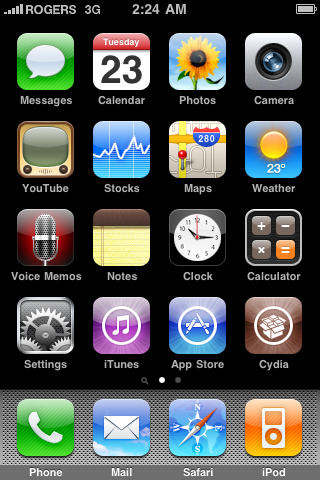
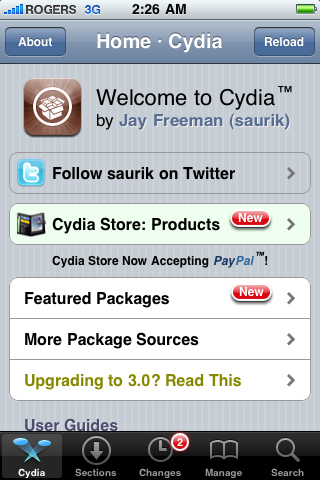
<div><span style="font-family: inherit;">1.</span><span style="font-family: inherit;">Press to launch </span><b style="font-family: inherit;"><i>Cydia Installer</i></b><span style="font-family: inherit;"> from your SpringBoard.</span></p>
<div class="separator" style="clear: both; text-align: center;"><a href="http://1.bp.blogspot.com/-1VC8nVQyWgM/TwttM1GwfUI/AAAAAAAAARU/Ir3ofA6vNn0/s1600/unlock+whit+ultrasn0w.png" imageanchor="1" style="margin-left: 1em; margin-right: 1em;"><img border="0" height="200" src="http://1.bp.blogspot.com/-1VC8nVQyWgM/TwttM1GwfUI/AAAAAAAAARU/Ir3ofA6vNn0/s200/unlock+whit+ultrasn0w.png" width="133" /></a></div>
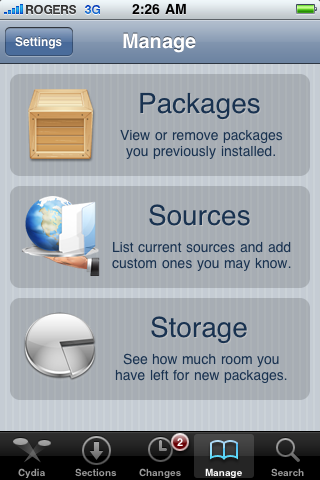
<p><span style="font-family: inherit;">2.</span><span style="font-family: inherit;">Press to select the </span><b style="font-family: inherit;"><i>Manage</i></b><span style="font-family: inherit;"> tab at the bottom of the screen.</span></p>
<div class="separator" style="clear: both; text-align: center;"><a href="http://2.bp.blogspot.com/--OsE0lRZ9Bw/TwttRA-akgI/AAAAAAAAARc/6BdERDMDAF4/s1600/unlock+whit+ultrasn0w+1.png" imageanchor="1" style="margin-left: 1em; margin-right: 1em;"><img border="0" height="200" src="http://2.bp.blogspot.com/--OsE0lRZ9Bw/TwttRA-akgI/AAAAAAAAARc/6BdERDMDAF4/s200/unlock+whit+ultrasn0w+1.png" width="133" /></a></div>
<p><span style="font-family: inherit;">3.</span><span style="font-family: inherit;">Press to select the large </span><b style="font-family: inherit;"><i>Sources</i></b><span style="font-family: inherit;"> button</span></p>
<div class="separator" style="clear: both; text-align: center;"><a href="http://1.bp.blogspot.com/-S7kSL4B6JVE/TwttVPuGX2I/AAAAAAAAARk/FFTPcMI0dT8/s1600/unlock+whit+ultrasn0w+2.png" imageanchor="1" style="margin-left: 1em; margin-right: 1em;"><img border="0" height="200" src="http://1.bp.blogspot.com/-S7kSL4B6JVE/TwttVPuGX2I/AAAAAAAAARk/FFTPcMI0dT8/s200/unlock+whit+ultrasn0w+2.png" width="133" /></a></div>
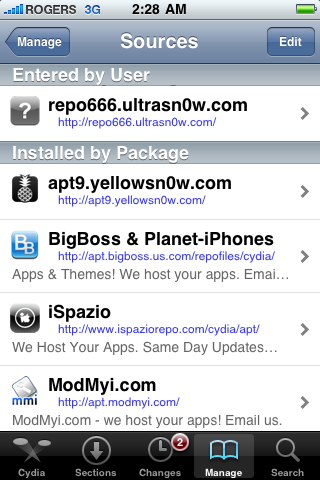
<p><span style="font-family: inherit;">4.</span><span style="font-family: inherit;">If the </span><b style="font-family: inherit;">ultrasn0w</b><span style="font-family: inherit;"> repo is not present press the </span><b style="font-family: inherit;"><i>Edit</i></b><span style="font-family: inherit;"> button at the top right of the screen. Otherwise, skip to Step 9.</span></p>
<div class="separator" style="clear: both; text-align: center;"><a href="http://4.bp.blogspot.com/-lMS2Pv_k5jM/TwttpTUrXAI/AAAAAAAAARs/WfnJXrkHBb8/s1600/unlock+whit+ultrasn0w+3.png" imageanchor="1" style="margin-left: 1em; margin-right: 1em;"><img border="0" height="200" src="http://4.bp.blogspot.com/-lMS2Pv_k5jM/TwttpTUrXAI/AAAAAAAAARs/WfnJXrkHBb8/s200/unlock+whit+ultrasn0w+3.png" width="133" /></a></div>
<p><span style="font-family: inherit;">5.</span><span style="font-family: inherit;">Press the </span><b style="font-family: inherit;"><i>Add</i></b><span style="font-family: inherit;"> button at the top left of the screen.</span></p>
<div class="separator" style="clear: both; text-align: center;"><a href="http://4.bp.blogspot.com/-poZ77hCTiDY/TwttuqSK33I/AAAAAAAAAR0/YfK72vHhimU/s1600/unlock+whit+ultrasn0w+4.png" imageanchor="1" style="margin-left: 1em; margin-right: 1em;"><img border="0" height="200" src="http://4.bp.blogspot.com/-poZ77hCTiDY/TwttuqSK33I/AAAAAAAAAR0/YfK72vHhimU/s200/unlock+whit+ultrasn0w+4.png" width="133" /></a></div>
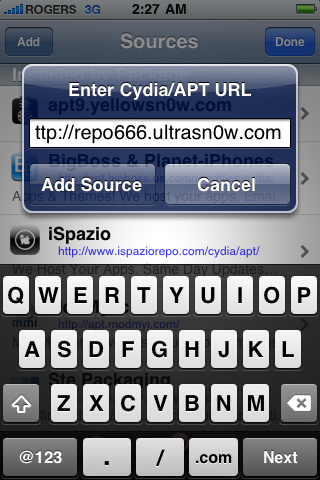
<p><span style="font-family: inherit;">6.</span><span style="font-family: inherit;">Enter </span><b style="font-family: inherit;"><i>http://repo666.ultrasn0w.com/</i></b><span style="font-family: inherit;"> as the source url and press the </span><b style="font-family: inherit;"><i>Add Source</i></b><span style="font-family: inherit;"> button.</span></p>
<div class="separator" style="clear: both; text-align: center;"><a href="http://2.bp.blogspot.com/-7ZH6DQrY-2Q/Twtt10zLHgI/AAAAAAAAAR8/QrREBRANksU/s1600/unlock+whit+ultrasn0w+5.png" imageanchor="1" style="margin-left: 1em; margin-right: 1em;"><img border="0" height="200" src="http://2.bp.blogspot.com/-7ZH6DQrY-2Q/Twtt10zLHgI/AAAAAAAAAR8/QrREBRANksU/s200/unlock+whit+ultrasn0w+5.png" width="133" /></a></div>
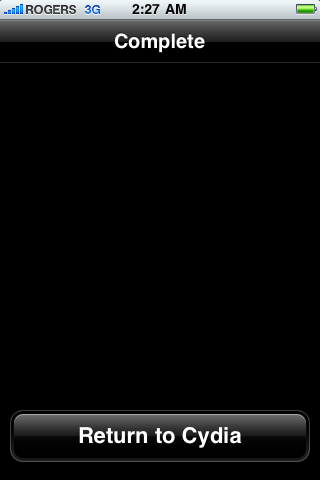
<p><span style="font-family: inherit;">7.</span><span style="font-family: inherit;">Once the source has been added press the large </span><b style="font-family: inherit;"><i>Return to Cydia</i></b><span style="font-family: inherit;"> button.</span></p>
<div class="separator" style="clear: both; text-align: center;"><a href="http://3.bp.blogspot.com/-n8hMAL4nH3c/Twtt7xwEkMI/AAAAAAAAASE/rm4CvWAju1M/s1600/unlock+whit+ultrasn0w+6.png" imageanchor="1" style="margin-left: 1em; margin-right: 1em;"><img border="0" height="200" src="http://3.bp.blogspot.com/-n8hMAL4nH3c/Twtt7xwEkMI/AAAAAAAAASE/rm4CvWAju1M/s200/unlock+whit+ultrasn0w+6.png" width="133" /></a></div>
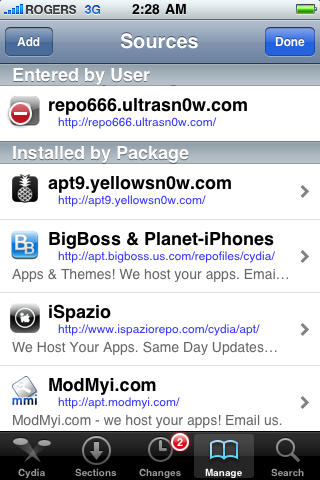
<p><span style="font-family: inherit;">8.</span><span style="font-family: inherit;">Press the </span><b style="font-family: inherit;"><i>Done</i></b><span style="font-family: inherit;"> button at the top right of the screen.</span></p>
<div class="separator" style="clear: both; text-align: center;"><a href="http://3.bp.blogspot.com/-jt9mGxTlpK4/TwtuB7pi1DI/AAAAAAAAASM/twsicM-OvIE/s1600/unlock+whit+ultrasn0w+7.png" imageanchor="1" style="margin-left: 1em; margin-right: 1em;"><img border="0" height="200" src="http://3.bp.blogspot.com/-jt9mGxTlpK4/TwtuB7pi1DI/AAAAAAAAASM/twsicM-OvIE/s200/unlock+whit+ultrasn0w+7.png" width="133" /></a></div>
<p><span style="font-family: inherit;">9.</span><span style="font-family: inherit;">Press to select </span><b style="font-family: inherit;"><i>repo666.ultrasn0w.com</i></b><span style="font-family: inherit;"> from the list of user entered sources.</span></p>
<div class="separator" style="clear: both; text-align: center;"><a href="http://1.bp.blogspot.com/-VhVwOsyo0Mk/TwtuHj-9mgI/AAAAAAAAASU/HTSeOSrk-9g/s1600/unlock+whit+ultrasn0w+8.png" imageanchor="1" style="margin-left: 1em; margin-right: 1em;"><img border="0" height="200" src="http://1.bp.blogspot.com/-VhVwOsyo0Mk/TwtuHj-9mgI/AAAAAAAAASU/HTSeOSrk-9g/s200/unlock+whit+ultrasn0w+8.png" width="133" /></a></div>
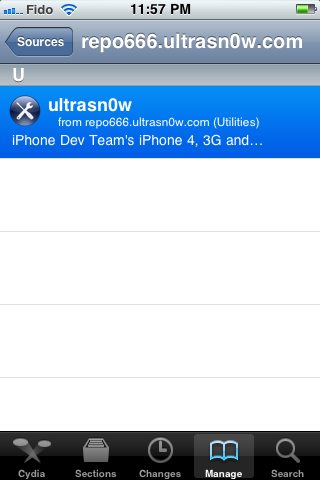
<p><span style="font-family: inherit;"><br /></span><br /><span style="font-family: inherit;">10.</span><span style="font-family: inherit;">Press to select</span><b style="font-family: inherit;"><i> ultrasn0w</i></b><span style="font-family: inherit;"> from the list of packages</span></p>
<div class="separator" style="clear: both; text-align: center;"><a href="http://3.bp.blogspot.com/-fWPpVc5XCKo/TwtuMyiwORI/AAAAAAAAASc/Gbf4dyCO3n4/s1600/unlock+whit+ultrasn0w+9.png" imageanchor="1" style="margin-left: 1em; margin-right: 1em;"><img border="0" height="200" src="http://3.bp.blogspot.com/-fWPpVc5XCKo/TwtuMyiwORI/AAAAAAAAASc/Gbf4dyCO3n4/s200/unlock+whit+ultrasn0w+9.png" width="133" /></a></div>
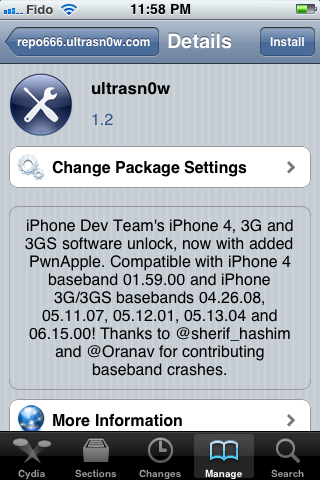
<p><span style="font-family: inherit;"><br /></span><br /><span style="font-family: inherit;">11.</span><span style="font-family: inherit;">Press the </span><b style="font-family: inherit;"><i>Install</i></b><span style="font-family: inherit;"> button at the top right of the screen.</span></p>
<div class="separator" style="clear: both; text-align: center;"><a href="http://1.bp.blogspot.com/-Cq5omNI4PJ8/TwtuaFy_hPI/AAAAAAAAASk/m1J6iGvWo8Y/s1600/unlock+whit+ultrasn0w+10.png" imageanchor="1" style="margin-left: 1em; margin-right: 1em;"><img border="0" height="200" src="http://1.bp.blogspot.com/-Cq5omNI4PJ8/TwtuaFy_hPI/AAAAAAAAASk/m1J6iGvWo8Y/s200/unlock+whit+ultrasn0w+10.png" width="133" /></a></div>
<p><span style="font-family: inherit;">12.</span><span style="font-family: inherit;">Press the <b><i>Confirm</i></b> button at the top right of the screen.</span>
<div class="separator" style="clear: both; text-align: center;"><a href="http://4.bp.blogspot.com/-7xVwTNaPuHM/Twtue1EgpRI/AAAAAAAAASs/9_F-FUKcVvo/s1600/unlock+whit+ultrasn0w+11.png" imageanchor="1" style="margin-left: 1em; margin-right: 1em;"><img border="0" height="200" src="http://4.bp.blogspot.com/-7xVwTNaPuHM/Twtue1EgpRI/AAAAAAAAASs/9_F-FUKcVvo/s200/unlock+whit+ultrasn0w+11.png" width="133" /></a></div>
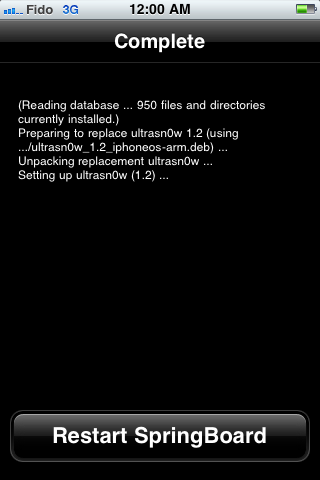
<p><span style="font-family: inherit;">13.</span><span style="font-family: inherit;">After installation completes successfully press the large </span><b style="font-family: inherit;"><i>Restart Springboard </i></b><span style="font-family: inherit;">button.</span></p>
<div class="separator" style="clear: both; text-align: center;"><a href="http://3.bp.blogspot.com/-H5g-BCQ5wOE/TwtujRNtNuI/AAAAAAAAAS0/P3bsrqPM5XM/s1600/unlock+whit+ultrasn0w+12.png" imageanchor="1" style="margin-left: 1em; margin-right: 1em;"><img border="0" height="200" src="http://3.bp.blogspot.com/-H5g-BCQ5wOE/TwtujRNtNuI/AAAAAAAAAS0/P3bsrqPM5XM/s200/unlock+whit+ultrasn0w+12.png" width="133" /></a></div>
<p><span style="font-family: inherit;">14.</span><span style="background-color: red; color: yellow; font-family: inherit;">You should now be able to insert the SIM of your choice!&nbsp;</span></p>
<div class="separator" style="clear: both; text-align: center;"><a href="http://4.bp.blogspot.com/-VHUQLbITiwA/Twtunvh6ULI/AAAAAAAAAS8/nQLQv_OLVDY/s1600/unlock+whit+ultrasn0w+13.png" imageanchor="1" style="margin-left: 1em; margin-right: 1em;"><img border="0" height="320" src="http://4.bp.blogspot.com/-VHUQLbITiwA/Twtunvh6ULI/AAAAAAAAAS8/nQLQv_OLVDY/s320/unlock+whit+ultrasn0w+13.png" width="213" /></a></div>
<div style="font-style: italic;"></div>
</div>
]]></content:encoded>
			<wfw:commentRss>http://modern-smartphone.6te.net/?feed=rss2&#038;p=34</wfw:commentRss>
		<slash:comments>0</slash:comments>
		</item>
	</channel>
</rss>