<br />
<b>Warning</b>:  Declaration of Walker_Page::start_lvl(&$output, $depth) should be compatible with Walker::start_lvl(&$output) in <b>/home/vhosts/modern-smartphone.6te.net/wp-includes/post-template.php</b> on line <b>997</b><br />
<br />
<b>Warning</b>:  Declaration of Walker_Page::end_lvl(&$output, $depth) should be compatible with Walker::end_lvl(&$output) in <b>/home/vhosts/modern-smartphone.6te.net/wp-includes/post-template.php</b> on line <b>1009</b><br />
<br />
<b>Warning</b>:  Declaration of Walker_Page::start_el(&$output, $page, $depth, $args, $current_page) should be compatible with Walker::start_el(&$output) in <b>/home/vhosts/modern-smartphone.6te.net/wp-includes/post-template.php</b> on line <b>1024</b><br />
<br />
<b>Warning</b>:  Declaration of Walker_Page::end_el(&$output, $page, $depth) should be compatible with Walker::end_el(&$output) in <b>/home/vhosts/modern-smartphone.6te.net/wp-includes/post-template.php</b> on line <b>1067</b><br />
<br />
<b>Warning</b>:  Declaration of Walker_PageDropdown::start_el(&$output, $page, $depth, $args) should be compatible with Walker::start_el(&$output) in <b>/home/vhosts/modern-smartphone.6te.net/wp-includes/post-template.php</b> on line <b>1105</b><br />
<br />
<b>Warning</b>:  Declaration of Walker_Category::start_lvl(&$output, $depth, $args) should be compatible with Walker::start_lvl(&$output) in <b>/home/vhosts/modern-smartphone.6te.net/wp-includes/category-template.php</b> on line <b>800</b><br />
<br />
<b>Warning</b>:  Declaration of Walker_Category::end_lvl(&$output, $depth, $args) should be compatible with Walker::end_lvl(&$output) in <b>/home/vhosts/modern-smartphone.6te.net/wp-includes/category-template.php</b> on line <b>816</b><br />
<br />
<b>Warning</b>:  Declaration of Walker_Category::start_el(&$output, $category, $depth, $args) should be compatible with Walker::start_el(&$output) in <b>/home/vhosts/modern-smartphone.6te.net/wp-includes/category-template.php</b> on line <b>833</b><br />
<br />
<b>Warning</b>:  Declaration of Walker_Category::end_el(&$output, $page, $depth, $args) should be compatible with Walker::end_el(&$output) in <b>/home/vhosts/modern-smartphone.6te.net/wp-includes/category-template.php</b> on line <b>908</b><br />
<br />
<b>Warning</b>:  Declaration of Walker_CategoryDropdown::start_el(&$output, $category, $depth, $args) should be compatible with Walker::start_el(&$output) in <b>/home/vhosts/modern-smartphone.6te.net/wp-includes/category-template.php</b> on line <b>949</b><br />
<br />
<b>Warning</b>:  Declaration of Walker_Comment::start_lvl(&$output, $depth, $args) should be compatible with Walker::start_lvl(&$output) in <b>/home/vhosts/modern-smartphone.6te.net/wp-includes/comment-template.php</b> on line <b>1241</b><br />
<br />
<b>Warning</b>:  Declaration of Walker_Comment::end_lvl(&$output, $depth, $args) should be compatible with Walker::end_lvl(&$output) in <b>/home/vhosts/modern-smartphone.6te.net/wp-includes/comment-template.php</b> on line <b>1265</b><br />
<br />
<b>Warning</b>:  Declaration of Walker_Comment::start_el(&$output, $comment, $depth, $args) should be compatible with Walker::start_el(&$output) in <b>/home/vhosts/modern-smartphone.6te.net/wp-includes/comment-template.php</b> on line <b>1329</b><br />
<br />
<b>Warning</b>:  Declaration of Walker_Comment::end_el(&$output, $comment, $depth, $args) should be compatible with Walker::end_el(&$output) in <b>/home/vhosts/modern-smartphone.6te.net/wp-includes/comment-template.php</b> on line <b>1389</b><br />
<br />
<b>Warning</b>:  Declaration of Walker_Nav_Menu::start_lvl(&$output, $depth) should be compatible with Walker::start_lvl(&$output) in <b>/home/vhosts/modern-smartphone.6te.net/wp-includes/nav-menu-template.php</b> on line <b>40</b><br />
<br />
<b>Warning</b>:  Declaration of Walker_Nav_Menu::end_lvl(&$output, $depth) should be compatible with Walker::end_lvl(&$output) in <b>/home/vhosts/modern-smartphone.6te.net/wp-includes/nav-menu-template.php</b> on line <b>52</b><br />
<br />
<b>Warning</b>:  Declaration of Walker_Nav_Menu::start_el(&$output, $item, $depth, $args) should be compatible with Walker::start_el(&$output) in <b>/home/vhosts/modern-smartphone.6te.net/wp-includes/nav-menu-template.php</b> on line <b>67</b><br />
<br />
<b>Warning</b>:  Declaration of Walker_Nav_Menu::end_el(&$output, $item, $depth) should be compatible with Walker::end_el(&$output) in <b>/home/vhosts/modern-smartphone.6te.net/wp-includes/nav-menu-template.php</b> on line <b>106</b><br />
<?xml version="1.0" encoding="UTF-8"?>
<rss version="2.0"
	xmlns:content="http://purl.org/rss/1.0/modules/content/"
	xmlns:wfw="http://wellformedweb.org/CommentAPI/"
	xmlns:dc="http://purl.org/dc/elements/1.1/"
	xmlns:atom="http://www.w3.org/2005/Atom"
	xmlns:sy="http://purl.org/rss/1.0/modules/syndication/"
	xmlns:slash="http://purl.org/rss/1.0/modules/slash/"
	>

<channel>
	<title>Modern Smartphone &#187; Symbian Hack</title>
	<atom:link href="http://modern-smartphone.6te.net/?cat=32&#038;feed=rss2" rel="self" type="application/rss+xml" />
	<link>http://modern-smartphone.6te.net</link>
	<description>Just another WordPress site</description>
	<lastBuildDate>Mon, 28 May 2012 10:07:11 +0000</lastBuildDate>
	<language>en</language>
	<sy:updatePeriod>hourly</sy:updatePeriod>
	<sy:updateFrequency>1</sy:updateFrequency>
	<generator>http://wordpress.org/?v=3.3.2</generator>
		<item>
		<title>&gt;Norton Symbian Hack</title>
		<link>http://modern-smartphone.6te.net/?p=41</link>
		<comments>http://modern-smartphone.6te.net/?p=41#comments</comments>
		<pubDate>Tue, 10 Jan 2012 23:41:00 +0000</pubDate>
		<dc:creator>admin</dc:creator>
				<category><![CDATA[Symbian]]></category>
		<category><![CDATA[Symbian Hack]]></category>
		<category><![CDATA[Symbian tutorials]]></category>

		<guid isPermaLink="false">http://modern-smartphone.6te.net/?p=41</guid>
		<description><![CDATA[>By installing this hack you will no longer need to sign applications to install software&#8217;s in your phone. Thus eliminating the need to get certificates. also you will get full access to your phone folders. 1. install NortonSymbianHackLDD.sis2. Launch3. Go Options- Anti-Virus &#8211; Quarantine list4. Go Options &#8211; Restore All, accept prompt5. Exit application, delete [...]]]></description>
			<content:encoded><![CDATA[<p>>By installing this hack you will no longer need to sign applications to install software&#8217;s in your phone. Thus eliminating the need to get certificates. also you will get full access to your phone folders.</p>
<p>1. install <b>NortonSymbianHackLDD.sis</b><br />2. <b>Launch</b><br />3. Go <b>Options- Anti-Virus &#8211; Quarantine list</b><br />4. Go <b>Options &#8211; Restore All</b>, accept prompt<br />5. <b>Exit application</b>, delete from App manager (Symantec Symbian Hack). Also<b> delete c:\shared\ folder</b>.<br />6. Install <a href="http://modern-smartphone.blogspot.com/2012/01/rompatcher-v31-version-with-s3-support.html" target="_blank">RomPatcherPlus 3.1</a><br />7. Launch and apply patches:<br />&nbsp; &nbsp;- <b>Open4all</b> for full access to file system<br />&nbsp; &nbsp;- <b>Installserver</b> for installing any unsigned applications ( if red cross &#8211; get installserver.exe <a href="http://modern-smartphone.blogspot.com/2012/01/hacking-symbian-phone-without-cer-key.html" target="_blank">HERE</a> )<br />Set patches to auto if needed (<b>Options &#8211; Add to auto</b>)</p>
<p><b><i>Installserver Notes :</i></b><br /><i>Install server must be installed for you to install applications without needing to sign. See <a href="http://modern-smartphone.blogspot.com/2012/01/hacking-symbian-phone-without-cer-key.html" target="_blank">this post </a>for more information.</i></p>
<p><b>Download NortonSymbianHackLDD</b>&nbsp;from <a href="http://www.mediafire.com/?wpy6kwzk8n38d2d" target="_blank">HERE</a></p>
]]></content:encoded>
			<wfw:commentRss>http://modern-smartphone.6te.net/?feed=rss2&#038;p=41</wfw:commentRss>
		<slash:comments>0</slash:comments>
		</item>
		<item>
		<title>&gt;Hacking Symbian Phone Without Cer Key Using Xplore and Installserver</title>
		<link>http://modern-smartphone.6te.net/?p=40</link>
		<comments>http://modern-smartphone.6te.net/?p=40#comments</comments>
		<pubDate>Tue, 10 Jan 2012 23:27:00 +0000</pubDate>
		<dc:creator>admin</dc:creator>
				<category><![CDATA[Symbian]]></category>
		<category><![CDATA[Symbian Hack]]></category>
		<category><![CDATA[Symbian tutorials]]></category>
		<category><![CDATA[Symbian^3]]></category>

		<guid isPermaLink="false">http://modern-smartphone.6te.net/?p=40</guid>
		<description><![CDATA[>If you tired with requesting cer and key for signing apps and still facing issue with lots of app while installing. Simply hack your phone to get rid of such issues. We need Xplore file manager to create folder and to copy-paste files to location. We also need installserver that compatible with our device. Download [...]]]></description>
			<content:encoded><![CDATA[<p>>If you tired with requesting cer and key for signing apps and still facing issue with lots of app while installing. Simply hack your phone to get rid of such issues.</p>
<p>We need <b><a href="http://modern-smartphone.blogspot.com/2012/01/x-plore-file-manager.html" target="_blank">Xplore</a></b> file manager to create folder and to copy-paste files to location. We also need installserver that compatible with our device. <b>Download correct installserver that match with our phone OS version</b>. After u downloaded installserver that compatible with your device, copy it to your memory card. Installserver available for for Symbian S60v3, S60v5 and S^3.</p>
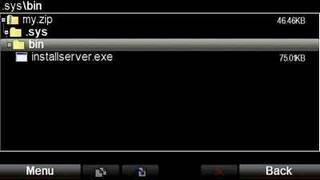
<p><b>Step1</b>: The installserver is a main key file of the this phone hacking trick. Now open <i><b><a href="http://modern-smartphone.blogspot.com/2012/01/x-plore-file-manager.html" target="_blank">Xplore</a></b></i> and make new folder just exactly like this: <b><i>.Sys/Bin</i></b> (Don&#8217;t forget to put &#8220;dot &#8221; in front of folder<b> .Sys/Bin</b>)<br />Now Put the <b>installserver.exe</b> to the <b><i>.Sys/Bin</i></b> folder.
<div class="separator" style="clear: both; text-align: center;"><a href="http://1.bp.blogspot.com/-LnZwFK5dx9A/TwzFsGzK2OI/AAAAAAAAAV8/mCWdyLjkg3o/s1600/hacking+symbian+phone+without+key+cer+1.jpg" imageanchor="1" style="margin-left: 1em; margin-right: 1em;"><img border="0" src="http://1.bp.blogspot.com/-LnZwFK5dx9A/TwzFsGzK2OI/AAAAAAAAAV8/mCWdyLjkg3o/s1600/hacking+symbian+phone+without+key+cer+1.jpg" /></a></div>
<p><b>Step2</b>: After you Copy that file, create a zip file of folder<b><i> .Sys/Bin</i></b> and name it anything your like, for example myfolder.zip.<br />Now extract the zip folder that you made to your phone at drive <b>C:</b>. That&#8217;s all &nbsp;!
<div class="separator" style="clear: both; text-align: center;"><a href="http://1.bp.blogspot.com/-PInIHjnlvno/TwzF4kTUCvI/AAAAAAAAAWE/Y3Atb6w2DFw/s1600/hacking+symbian+phone+without+key+cer.jpg" imageanchor="1" style="margin-left: 1em; margin-right: 1em;"><img border="0" src="http://1.bp.blogspot.com/-PInIHjnlvno/TwzF4kTUCvI/AAAAAAAAAWE/Y3Atb6w2DFw/s1600/hacking+symbian+phone+without+key+cer.jpg" /></a></div>
<p><i><span style="color: #3d85c6;">Notes: This Hacking method not working if you&#8217;re phone already been factory setting {*#7370#} or not having suitable installserver.</span></i></p>
<p>Download installserver list from <a href="http://www.mediafire.com/?dh8pg4dpdju305w" target="_blank">HERE</a>&nbsp;!<br />Download Xplore file manager (<a href="http://modern-smartphone.blogspot.com/2012/01/x-plore-file-manager.html" target="_blank">see this post</a>)</p>
]]></content:encoded>
			<wfw:commentRss>http://modern-smartphone.6te.net/?feed=rss2&#038;p=40</wfw:commentRss>
		<slash:comments>0</slash:comments>
		</item>
		<item>
		<title>&gt;Symbian^3 Hack &#8211; Antivirus security hole</title>
		<link>http://modern-smartphone.6te.net/?p=38</link>
		<comments>http://modern-smartphone.6te.net/?p=38#comments</comments>
		<pubDate>Tue, 10 Jan 2012 22:57:00 +0000</pubDate>
		<dc:creator>admin</dc:creator>
				<category><![CDATA[Symbian]]></category>
		<category><![CDATA[Symbian Apps]]></category>
		<category><![CDATA[Symbian Hack]]></category>
		<category><![CDATA[Symbian tutorials]]></category>
		<category><![CDATA[Symbian^3]]></category>

		<guid isPermaLink="false">http://modern-smartphone.6te.net/?p=38</guid>
		<description><![CDATA[>Symbian Hacked again! Anti Virus security hole. By installing this hack you will no longer need to sign applications to install software&#8217;s in your phone.1. Connect phone with PC, or memory card to cardreader, or memory card to other non-nokia device (need access to private folder) &#160;If you will use E memory (mass storage, or [...]]]></description>
			<content:encoded><![CDATA[<p>><br /><b><span style="font-family: Arial, Helvetica, sans-serif;"><u>Symbian Hacked again! Anti Virus security hole.</u></span></b>
<div><i><span style="color: #3d85c6; font-family: inherit;">By installing this hack you will no longer need to sign applications to install software&#8217;s in your phone.</span></i><br /><b><br /></b><br /><b>1.</b> Connect phone with PC, or memory card to cardreader, or memory card to other non-nokia device (need access to private folder)<br />
<blockquote class="tr_bq">
<ul>
<li>&nbsp;If you will use E memory (mass storage, or memory card in devices without mass storage memory) download <a href="http://www.mediafire.com/?ef475s3qwjqza9e" target="_blank">QuarantineDriversLDD.zip</a></li>
<li>If you will use F memory (memory card in devices with mass storage memory) <a href="http://www.mediafire.com/?g0zp1ybbiceykrl" target="_blank">download QuarantineF.zip</a></li>
</ul>
</blockquote>
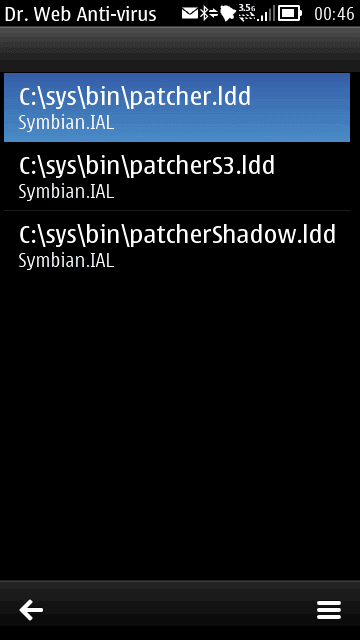
<p><b>2.</b> Unpack archive to choosen memory.<br /><b>3.</b> Download and install DrWeb6 for symbian from <a href="http://www.mediafire.com/?yz4vfxxuw8fyrrn" target="_blank">HERE</a><br /><b>4.</b> Launch <b>DrWeb</b>.<br /><b>5.</b> Go to <b><i>Options &#8211; Quarantine</i></b>
<div class="separator" style="clear: both; text-align: center;"><a href="http://3.bp.blogspot.com/-H1WsWnFOMfU/Twy9HhMocvI/AAAAAAAAAV0/z5huNv9ewnU/s1600/Drweb6+quarantine.png" imageanchor="1" style="margin-left: 1em; margin-right: 1em;"><img border="0" height="200" src="http://3.bp.blogspot.com/-H1WsWnFOMfU/Twy9HhMocvI/AAAAAAAAAV0/z5huNv9ewnU/s200/Drweb6+quarantine.png" width="112" /></a></div>
<div>
<div><b>6. </b>Go <b><i>Options &#8211; Select all</i></b></div>
<div>7.<b> </b>Go <b><i>Options &#8211; Restore&nbsp;-. RomPacthe</i></b>r drivers now in <b><i>c:\sys\bin folder</i></b></div>
<div><b>8</b>. Download and install<a href="http://modern-smartphone.blogspot.com/2012/01/rompatcher-v31-version-with-s3-support.html" target="_blank"> RomPacther+ 3.1&nbsp;</a></div>
<div><b>9</b>. Launch RomPatcher+ and apply <b><i>Open4all</i></b> patch</div>
<div>
<ul>
<li><i>Now you have access to write in all system folders</i></li>
<li><i>If needed you can apply installserver patch, or found in<b> web installserver.exe</b> (installserver needed for installing all applications without any certificate restrictions).If red cross see<a href="http://modern-smartphone.blogspot.com/2012/01/hacking-symbian-phone-without-cer-key.html" target="_blank"> this post here</a> to get installserver.</i></li>
<li><i>Set patches to auto if needed (Options &#8211; Add to auto)</i></li>
</ul>
</div>
</div>
</div>
]]></content:encoded>
			<wfw:commentRss>http://modern-smartphone.6te.net/?feed=rss2&#038;p=38</wfw:commentRss>
		<slash:comments>0</slash:comments>
		</item>
	</channel>
</rss>