<br />
<b>Warning</b>:  Declaration of Walker_Page::start_lvl(&$output, $depth) should be compatible with Walker::start_lvl(&$output) in <b>/home/vhosts/modern-smartphone.6te.net/wp-includes/post-template.php</b> on line <b>997</b><br />
<br />
<b>Warning</b>:  Declaration of Walker_Page::end_lvl(&$output, $depth) should be compatible with Walker::end_lvl(&$output) in <b>/home/vhosts/modern-smartphone.6te.net/wp-includes/post-template.php</b> on line <b>1009</b><br />
<br />
<b>Warning</b>:  Declaration of Walker_Page::start_el(&$output, $page, $depth, $args, $current_page) should be compatible with Walker::start_el(&$output) in <b>/home/vhosts/modern-smartphone.6te.net/wp-includes/post-template.php</b> on line <b>1024</b><br />
<br />
<b>Warning</b>:  Declaration of Walker_Page::end_el(&$output, $page, $depth) should be compatible with Walker::end_el(&$output) in <b>/home/vhosts/modern-smartphone.6te.net/wp-includes/post-template.php</b> on line <b>1067</b><br />
<br />
<b>Warning</b>:  Declaration of Walker_PageDropdown::start_el(&$output, $page, $depth, $args) should be compatible with Walker::start_el(&$output) in <b>/home/vhosts/modern-smartphone.6te.net/wp-includes/post-template.php</b> on line <b>1105</b><br />
<br />
<b>Warning</b>:  Declaration of Walker_Category::start_lvl(&$output, $depth, $args) should be compatible with Walker::start_lvl(&$output) in <b>/home/vhosts/modern-smartphone.6te.net/wp-includes/category-template.php</b> on line <b>800</b><br />
<br />
<b>Warning</b>:  Declaration of Walker_Category::end_lvl(&$output, $depth, $args) should be compatible with Walker::end_lvl(&$output) in <b>/home/vhosts/modern-smartphone.6te.net/wp-includes/category-template.php</b> on line <b>816</b><br />
<br />
<b>Warning</b>:  Declaration of Walker_Category::start_el(&$output, $category, $depth, $args) should be compatible with Walker::start_el(&$output) in <b>/home/vhosts/modern-smartphone.6te.net/wp-includes/category-template.php</b> on line <b>833</b><br />
<br />
<b>Warning</b>:  Declaration of Walker_Category::end_el(&$output, $page, $depth, $args) should be compatible with Walker::end_el(&$output) in <b>/home/vhosts/modern-smartphone.6te.net/wp-includes/category-template.php</b> on line <b>908</b><br />
<br />
<b>Warning</b>:  Declaration of Walker_CategoryDropdown::start_el(&$output, $category, $depth, $args) should be compatible with Walker::start_el(&$output) in <b>/home/vhosts/modern-smartphone.6te.net/wp-includes/category-template.php</b> on line <b>949</b><br />
<br />
<b>Warning</b>:  Declaration of Walker_Comment::start_lvl(&$output, $depth, $args) should be compatible with Walker::start_lvl(&$output) in <b>/home/vhosts/modern-smartphone.6te.net/wp-includes/comment-template.php</b> on line <b>1241</b><br />
<br />
<b>Warning</b>:  Declaration of Walker_Comment::end_lvl(&$output, $depth, $args) should be compatible with Walker::end_lvl(&$output) in <b>/home/vhosts/modern-smartphone.6te.net/wp-includes/comment-template.php</b> on line <b>1265</b><br />
<br />
<b>Warning</b>:  Declaration of Walker_Comment::start_el(&$output, $comment, $depth, $args) should be compatible with Walker::start_el(&$output) in <b>/home/vhosts/modern-smartphone.6te.net/wp-includes/comment-template.php</b> on line <b>1329</b><br />
<br />
<b>Warning</b>:  Declaration of Walker_Comment::end_el(&$output, $comment, $depth, $args) should be compatible with Walker::end_el(&$output) in <b>/home/vhosts/modern-smartphone.6te.net/wp-includes/comment-template.php</b> on line <b>1389</b><br />
<br />
<b>Warning</b>:  Declaration of Walker_Nav_Menu::start_lvl(&$output, $depth) should be compatible with Walker::start_lvl(&$output) in <b>/home/vhosts/modern-smartphone.6te.net/wp-includes/nav-menu-template.php</b> on line <b>40</b><br />
<br />
<b>Warning</b>:  Declaration of Walker_Nav_Menu::end_lvl(&$output, $depth) should be compatible with Walker::end_lvl(&$output) in <b>/home/vhosts/modern-smartphone.6te.net/wp-includes/nav-menu-template.php</b> on line <b>52</b><br />
<br />
<b>Warning</b>:  Declaration of Walker_Nav_Menu::start_el(&$output, $item, $depth, $args) should be compatible with Walker::start_el(&$output) in <b>/home/vhosts/modern-smartphone.6te.net/wp-includes/nav-menu-template.php</b> on line <b>67</b><br />
<br />
<b>Warning</b>:  Declaration of Walker_Nav_Menu::end_el(&$output, $item, $depth) should be compatible with Walker::end_el(&$output) in <b>/home/vhosts/modern-smartphone.6te.net/wp-includes/nav-menu-template.php</b> on line <b>106</b><br />
<?xml version="1.0" encoding="UTF-8"?>
<rss version="2.0"
	xmlns:content="http://purl.org/rss/1.0/modules/content/"
	xmlns:wfw="http://wellformedweb.org/CommentAPI/"
	xmlns:dc="http://purl.org/dc/elements/1.1/"
	xmlns:atom="http://www.w3.org/2005/Atom"
	xmlns:sy="http://purl.org/rss/1.0/modules/syndication/"
	xmlns:slash="http://purl.org/rss/1.0/modules/slash/"
	>

<channel>
	<title>Modern Smartphone &#187; iPhone unlock</title>
	<atom:link href="http://modern-smartphone.6te.net/?cat=30&#038;feed=rss2" rel="self" type="application/rss+xml" />
	<link>http://modern-smartphone.6te.net</link>
	<description>Just another WordPress site</description>
	<lastBuildDate>Mon, 28 May 2012 10:07:11 +0000</lastBuildDate>
	<language>en</language>
	<sy:updatePeriod>hourly</sy:updatePeriod>
	<sy:updateFrequency>1</sy:updateFrequency>
	<generator>http://wordpress.org/?v=3.3.2</generator>
		<item>
		<title>&gt;Unlock iPhone 4S, iPhone 4, and iPhone 3GS With SAM</title>
		<link>http://modern-smartphone.6te.net/?p=180</link>
		<comments>http://modern-smartphone.6te.net/?p=180#comments</comments>
		<pubDate>Thu, 26 Apr 2012 06:31:00 +0000</pubDate>
		<dc:creator>admin</dc:creator>
				<category><![CDATA[iOS]]></category>
		<category><![CDATA[iPhone]]></category>
		<category><![CDATA[iPhone tutorials]]></category>
		<category><![CDATA[iPhone unlock]]></category>

		<guid isPermaLink="false">http://modern-smartphone.6te.net/?p=180</guid>
		<description><![CDATA[> &#160;These are instructions on how to unlock your iPhone using SAM. This method will work with the iPhone 4S, iPhone 4, iPhone 3GS, and iPhone 3G on any jailbreakable firmware including 5.x. Jailbreak your iPhone. You can find instructions on how to do that HERE ! Tap to launch Cydia from your SpringBoard. Press [...]]]></description>
			<content:encoded><![CDATA[<p>>
<div class="separator" style="clear: both; text-align: center;"><a href="http://3.bp.blogspot.com/-UY3pq2bm0kE/T5lH1_CYC5I/AAAAAAAABUo/vKjNyfb5soM/s1600/SamPrefs.png" imageanchor="1" style="clear: left; float: left; margin-bottom: 1em; margin-right: 1em;"><img border="0" src="http://3.bp.blogspot.com/-UY3pq2bm0kE/T5lH1_CYC5I/AAAAAAAABUo/vKjNyfb5soM/s1600/SamPrefs.png" /></a></div>
<p><i><br /></i><br /><i><br /></i><br /><i>&nbsp;These are instructions on how to unlock your iPhone using SAM. This method will work with the iPhone 4S, iPhone 4, iPhone 3GS, and iPhone 3G on any jailbreakable firmware including 5.x.</i>
<div class="separator" style="clear: both; text-align: center;"><a href="http://2.bp.blogspot.com/-sOTzcHcYygs/T5lFA431-kI/AAAAAAAABUM/9MiOxX1nn1o/s1600/IMG_0002.jpg" imageanchor="1" style="clear: right; float: right; margin-bottom: 1em; margin-left: 1em;"><img border="0" height="200" src="http://2.bp.blogspot.com/-sOTzcHcYygs/T5lFA431-kI/AAAAAAAABUM/9MiOxX1nn1o/s200/IMG_0002.jpg" width="133" /></a></div>
<p>
<ul><a href="http://3.bp.blogspot.com/-pMbKZmeDaho/T5lFBi3PyZI/AAAAAAAABUU/qOMJJvyi24k/s1600/IMG_0005.jpg" imageanchor="1" style="clear: right; display: inline !important; float: right; margin-bottom: 1em; margin-left: 1em; text-align: center;"><img border="0" height="200" src="http://3.bp.blogspot.com/-pMbKZmeDaho/T5lFBi3PyZI/AAAAAAAABUU/qOMJJvyi24k/s200/IMG_0005.jpg" width="133" /></a><a href="http://3.bp.blogspot.com/-w5mWV3DQnKg/T5lFCvFuqvI/AAAAAAAABUY/sglP0jG_Uy4/s1600/IMG_0008.jpg" imageanchor="1" style="clear: right; float: right; margin-bottom: 1em; margin-left: 1em;"><img border="0" height="200" src="http://3.bp.blogspot.com/-w5mWV3DQnKg/T5lFCvFuqvI/AAAAAAAABUY/sglP0jG_Uy4/s200/IMG_0008.jpg" width="133" /></a>
<li><i>Jailbreak your iPhone. You can find instructions on how to do that <a href="http://www.modern-smartphone.com/p/ios-jailbreaking.html" target="_blank">HERE </a>!</i></li>
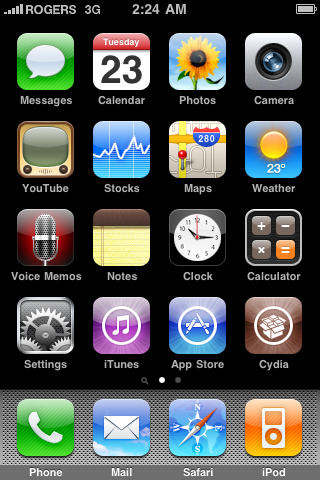
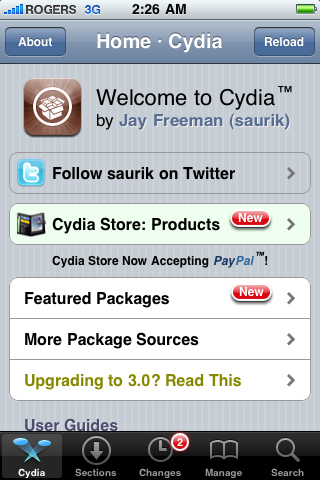
<li><i>Tap to launch <b>Cydia</b> from your <b>SpringBoard</b>.</i></li>
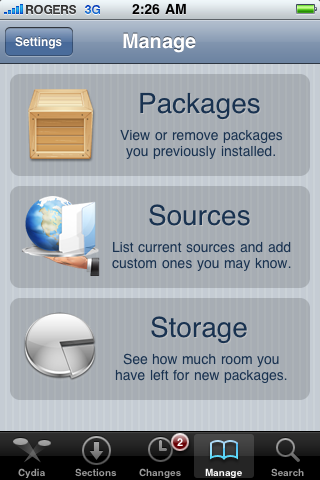
<li><i>Press to select <b>Manage</b> from the tabs at the bottom of the screen.</i></li>
<li><i>Press the <b>Sources</b> button.</i></li>
<li><i>Press the <b>Edit</b> button at the top right of the screen.</i></li>
<li><i>Press the <b>Add</b> button that appears at the top left of the screen.</i></li>
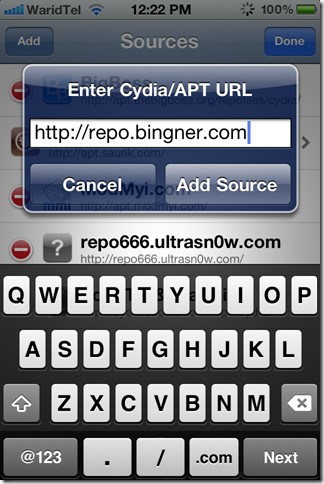
<li><i>Enter <b>http://repo.bingner.com</b> and press the<b> Add Source</b> button.</i></li>
<li><i>Press the <b>Return to Cydia</b> button.</i></li>
<li><i>Press to select <b>Bingner</b> from the list of Sources.</i></li>
<li><i>Choose<b> SAM</b> from the list of packages.</i></li>
<li><i>Press the <b>Install</b> button at the top right of the screen.</i></li>
<li><i>Press the <b>Confirm</b> button to begin installation.</i></li>
<li><i>Once installation has completed press the large <b>Restart SpringBoard</b> button.</i></li>
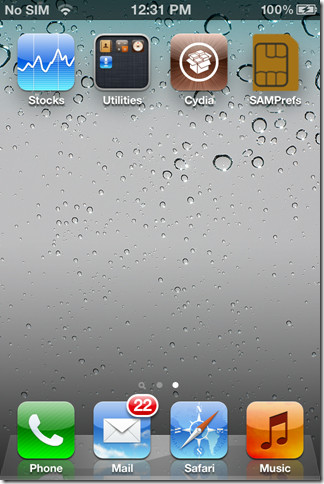
<li><i>Insert your new SIM card and tap to select <b>SAMPrefs</b> from your <b>SpringBoard</b>.</i></li>
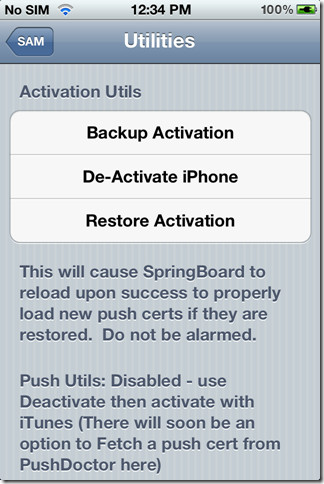
<li><i>Tap <b>Utilities</b></i></li>
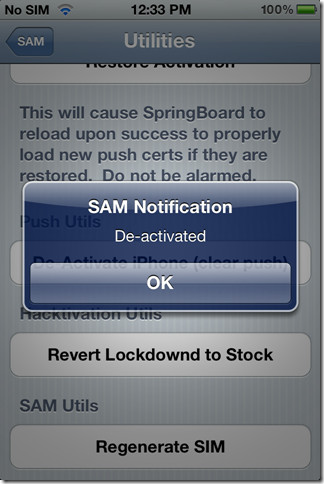
<li><i>Press to select <b>De-Activate iPhone</b>. Your ActivationState under &#8220;<b>More Information</b>&#8221; should now be &#8220;<b>Unactivated</b>&#8220;. If you don&#8217;t have De-Activate iPhone you can use De-Activate iPhone (clear push).</i></li>
<li><i><b>With SAM enabled, tap Method and choose By Country and Carrier.</b></i></li>
<li><i><b>Tap Country and choose the country of your ORIGINAL SIM.</b></i></li>
<li><i><b>Tap Carrier and choose your ORIGINAL carrier that your iPhone is locked to.</b></i></li>
<li><i><b>For some carriers operating more than one Carrier ID you may need to select SIM ID. If you are unable to activate in then you have selected the wrong one.</b></i></li>
<li><i><b>Tap More Information and copy the IMSI under SAM Details to the clipboard.</b></i></li>
<li><i><b>Tap Spoof Real SIM to SAM</b></i></li>
<li><i><b>Go back to the main SAM screen and paste the IMSI number in your clipboard.</b></i></li>
<li><i><b>Connect your iPhone to the computer and let iTunes reactivate your phone.</b></i></li>
</ul>
<blockquote class="tr_bq"><p><i>&#8220;Double click &#8220;Phone Number&#8221; parameter at the main device screen and make sure that the ICCID matches that of your SIM card.&#8221; If not you need to start over .&#8221;</i></p></blockquote>
<ul>
<li><i>Unplug your iPhone from the computer and close iTunes.</i></li>
<li><i>Reopen SAMPrefs from your SpringBoard and disable it using the Enabled switch.</i></li>
<li><i>Connect your iPhone to the computer and launch iTunes again.&nbsp;</i></li>
</ul>
<blockquote class="tr_bq"><p><i>You should get an error saying that your phone cannot be activated. This is normal. Just close iTunes and open it again.</i></p></blockquote>
<ul>
<li><i>In a short time you should see signal bars. Congratulations!</i></li>
<li><i>You should now backup your iPhone unlock ticket in case this method is ever blocked.&nbsp;</i></li>
</ul>
<div class="separator" style="clear: both; text-align: center;"><object class="BLOGGER-youtube-video" classid="clsid:D27CDB6E-AE6D-11cf-96B8-444553540000" codebase="http://download.macromedia.com/pub/shockwave/cabs/flash/swflash.cab#version=6,0,40,0" data-thumbnail-src="http://1.gvt0.com/vi/9ZyOm3o_8hE/0.jpg" height="366" width="420"><param name="movie" value="http://www.youtube.com/v/9ZyOm3o_8hE&#038;fs=1&#038;source=uds" /><param name="bgcolor" value="#FFFFFF" /><embed width="320" height="266"  src="http://www.youtube.com/v/9ZyOm3o_8hE&#038;fs=1&#038;source=uds" type="application/x-shockwave-flash"></embed></object></div>
<div class="separator" style="clear: both; text-align: center;"><a href="http://3.bp.blogspot.com/-4oB4pqBiC1c/T5lEweBvtfI/AAAAAAAABUE/iOAM26rt_Sc/s1600/IMG_0009.jpg" imageanchor="1" style="clear: right; float: right; margin-bottom: 1em; margin-left: 1em;"><img border="0" height="200" src="http://3.bp.blogspot.com/-4oB4pqBiC1c/T5lEweBvtfI/AAAAAAAABUE/iOAM26rt_Sc/s200/IMG_0009.jpg" width="133" /></a></div>
<p><b><i><u><br /></u></i></b><br /><b><i><u>IMPORTANT:</u></i></b><br /><i>&nbsp; &nbsp; &nbsp;If push notifications stop after this process, you can restore then with the Clear Push utility in SAM, followed by connecting to iTunes.</i><br /><i>&nbsp; &nbsp; &nbsp;Your phone will work normally with your SIM card and that SIM card ONLY since we have tricked iTunes to think that ICCID is one of the intended carrier&#8217;s. The phone can be rebooted and connected to iTunes freely without losing the &#8220;unlock&#8221;, at least for now.</i><br /><i><br /></i><br /><i><span style="font-size: x-small;">A big thanks to Loktar_Sun and Laforet !</span></i></p>
]]></content:encoded>
			<wfw:commentRss>http://modern-smartphone.6te.net/?feed=rss2&#038;p=180</wfw:commentRss>
		<slash:comments>0</slash:comments>
		</item>
		<item>
		<title>&gt;Jailbreak iPhone 4S / iPad 2 (untehered) with Absinthe ( Mac &amp; Windows)</title>
		<link>http://modern-smartphone.6te.net/?p=55</link>
		<comments>http://modern-smartphone.6te.net/?p=55#comments</comments>
		<pubDate>Fri, 27 Jan 2012 09:46:00 +0000</pubDate>
		<dc:creator>admin</dc:creator>
				<category><![CDATA[iOS]]></category>
		<category><![CDATA[iPhone]]></category>
		<category><![CDATA[iPhone Jailbreak]]></category>
		<category><![CDATA[iPhone unlock]]></category>

		<guid isPermaLink="false">http://modern-smartphone.6te.net/?p=55</guid>
		<description><![CDATA[>You can now jailbreak your iPhone 4S or iPad 2 using the DreamTeam&#8217;s Absinthe program. The Absinthe Untethered Jailbreak will support the following devices : iPhone 4S running iOS 5.0, 5.0.1 (9A405 and 9A406) iPad 2 Wifi/GSM/CDMA running iOS 5.0.1 Step 1: Download Absinthe from here (Mac) or here (Windows), extract it, than run it.Step [...]]]></description>
			<content:encoded><![CDATA[<p>>You can now <b>jailbreak your iPhone 4S or iPad 2</b> using the DreamTeam&#8217;s Absinthe program. 
<div class="separator" style="clear: both; text-align: center;"><a href="http://2.bp.blogspot.com/-M8QqqYhYfQ4/TyJxJxC8ZxI/AAAAAAAAAaU/ivBBLyT2esY/s1600/Absinthe-jailbreak.jpg" imageanchor="1" style="clear: right; float: right; margin-bottom: 1em; margin-left: 1em;"><img border="0" src="http://2.bp.blogspot.com/-M8QqqYhYfQ4/TyJxJxC8ZxI/AAAAAAAAAaU/ivBBLyT2esY/s1600/Absinthe-jailbreak.jpg" /></a></div>
<p>The <b>Absinthe Untethered Jailbreak</b> will support the following devices :
<ul>
<li><i>iPhone 4S running iOS 5.0, 5.0.1 (9A405 and 9A406)</i></li>
<li><i>iPad 2 Wifi/GSM/CDMA running iOS 5.0.1</i></li>
</ul>
<p><b>Step 1</b>: Download Absinthe from <a href="http://www.mediafire.com/?8is76tkemfjjjn5" target="_blank">here</a> (Mac) or <a href="http://www.mediafire.com/?s5hf3cnsh6chyvr" target="_blank">here</a> (Windows), extract it, than run it.<br /><b>Step 2</b>: Connect your iPhone 4S or iPad 2 to your computer via USB.<br /><b>Step 3</b>: Click &#8220;<b>Jailbreak</b>&#8221; to run the program. The process takes awhile in the beginning so don&#8217;t worry! It will eventually say &#8220;<b>Restoring in Progress</b>,&#8221; leave the device alone until it&#8217;s completely finished.
<div class="separator" style="clear: both; text-align: center;"><a href="http://3.bp.blogspot.com/-FXnyDJNIq8I/TyJxWaiIAwI/AAAAAAAAAac/QRXc5AVe4Gs/s1600/1.png" imageanchor="1" style="margin-left: 1em; margin-right: 1em;"><img border="0" height="247" src="http://3.bp.blogspot.com/-FXnyDJNIq8I/TyJxWaiIAwI/AAAAAAAAAac/QRXc5AVe4Gs/s320/1.png" width="320" /></a></div>
<p><b>Step 4</b>: Once it&#8217;s done, you should see the <b>Absinthe</b> icon on the Home screen. Tap the icon and it will then take you to the <b>Greenpois0n</b> site and reboot your idevice. After it loads back up, the Cydia icon will have replaced the Absinthe icon.</p>
<p><span style="background-color: #ffe599;">For those experiencing an &#8220;error establishing a database connection,&#8221; just&nbsp;go to</span><br />
<blockquote class="tr_bq"><b>Settings &gt; Network &gt; VPN &gt; On &nbsp; &nbsp;</b><br /><i>The VPN connection will &nbsp;give an error and reboot, and after the reboot you will be able to launch the <b>Absinthe</b> app!</i></p></blockquote>
<p><b><i><u>Update : v0.3</u></i></b>
<ul>
<li><i>&nbsp;<a href="http://cache.greenpois0n.com/dl/absinthe-win-0.3.zip">Absinthe Windows v0.3</a></i></li>
<li><i>&nbsp;<a href="http://cache.greenpois0n.com/dl/absinthe-mac-0.3.zip">Absinthe MacOSX (&gt;=10.6) v0.3</a></i></li>
<li><i><a href="http://cache.greenpois0n.com/dl/absinthe-linux-0.3.tar.gz">Absinthe Linux v0.3</a></i></li>
</ul>
]]></content:encoded>
			<wfw:commentRss>http://modern-smartphone.6te.net/?feed=rss2&#038;p=55</wfw:commentRss>
		<slash:comments>1</slash:comments>
		</item>
		<item>
		<title>&gt;How to Jailbreak Your iPhone Without Updating the Baseband (Windows) [5.0.1]</title>
		<link>http://modern-smartphone.6te.net/?p=36</link>
		<comments>http://modern-smartphone.6te.net/?p=36#comments</comments>
		<pubDate>Mon, 09 Jan 2012 23:43:00 +0000</pubDate>
		<dc:creator>admin</dc:creator>
				<category><![CDATA[iOS]]></category>
		<category><![CDATA[iPhone Jailbreak]]></category>
		<category><![CDATA[iPhone tutorials]]></category>
		<category><![CDATA[iPhone unlock]]></category>

		<guid isPermaLink="false">http://modern-smartphone.6te.net/?p=36</guid>
		<description><![CDATA[>These are instructions on how to jailbreak your iPhone 3GS or iPhone 4 on iOS 5.0.1 without updating the baseband using RedSn0w for Windows. You may want to do this to preserve an unlock from a lower baseband version. Please note this jailbreak is tethered for every device but the old bootrom iPhone 3GS which [...]]]></description>
			<content:encoded><![CDATA[<p>><br />These are instructions on how to jailbreak your iPhone 3GS or iPhone 4 on iOS 5.0.1 without updating the baseband using <b>RedSn0w</b> for Windows. You may want to do this to preserve an unlock from a lower baseband version.</p>
<p><i>Please note this jailbreak is tethered for every device but the old bootrom iPhone 3GS which means you will need to connect your device to the computer each time you reboot.&nbsp;</i></p>
<p>1.Create a folder on your desktop called <b>Pwnage</b><br />Download <a href="http://www.mediafire.com/?w8msbtyujbp5c48" target="_blank">RedSn0w</a> &nbsp;and place it in the <b>Pwnage</b> folder. Likewise, download the 5.0.1 firmware from <a href="http://appldnld.apple.com/iPhone4/041-3309.20111109.64rtg/iPhone3,1_5.0.1_9A405_Restore.ipsw" target="_blank">here</a> and place it in the Pwnage folder.</p>
<p>Extract &nbsp;<b>RedSn0w</b> by double clicking it.
<div class="separator" style="clear: both; text-align: center;"><a href="http://1.bp.blogspot.com/-alncR5S3jjo/Twt4eG2we7I/AAAAAAAAATE/bmW-bXKostI/s1600/jailbreack+with+custom+IPSW.png" imageanchor="1" style="margin-left: 1em; margin-right: 1em;"><img border="0" height="224" src="http://1.bp.blogspot.com/-alncR5S3jjo/Twt4eG2we7I/AAAAAAAAATE/bmW-bXKostI/s320/jailbreack+with+custom+IPSW.png" width="320" /></a></div>
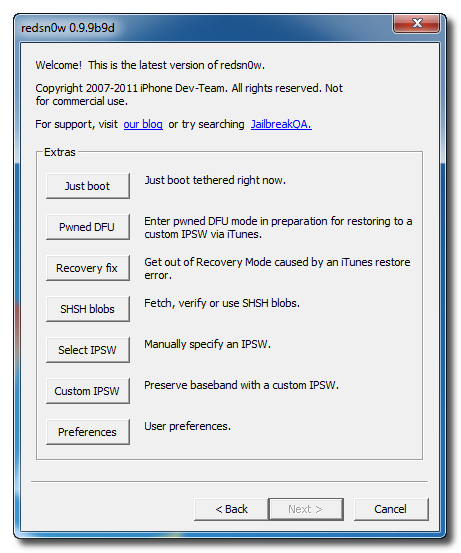
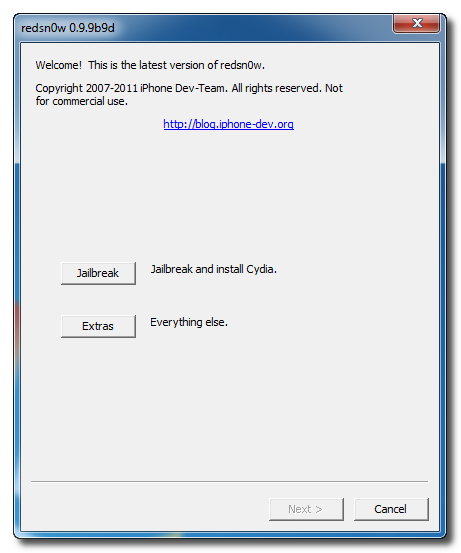
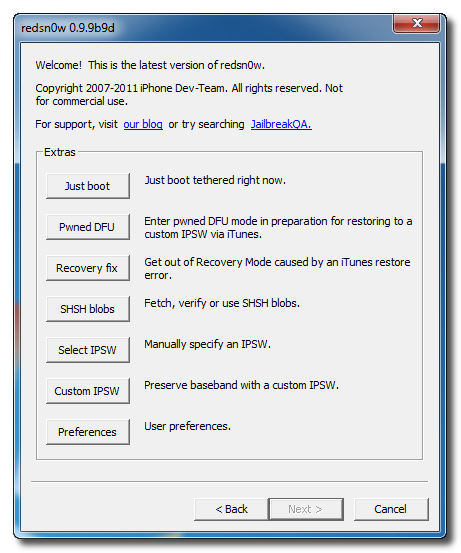
<p>2.Launch the <b>redsn0w</b> application from the redsn0w folder we just extracted.<br />3.Click to select <b><i>Extras</i></b> from the main menu.
<div class="separator" style="clear: both; text-align: center;"><a href="http://3.bp.blogspot.com/-ABcAo_FOn7I/Twt4oigAmCI/AAAAAAAAATM/HMLJG6hTiJg/s1600/jailbreack+with+custom+IPSW+1.png" imageanchor="1" style="margin-left: 1em; margin-right: 1em;"><img border="0" height="200" src="http://3.bp.blogspot.com/-ABcAo_FOn7I/Twt4oigAmCI/AAAAAAAAATM/HMLJG6hTiJg/s200/jailbreack+with+custom+IPSW+1.png" width="166" /></a></div>
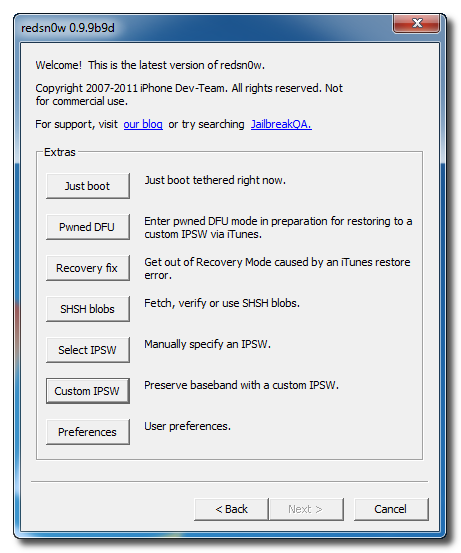
<p>4.Click to select <b><i>Custom IPSW</i></b> from the Extras menu.
<div class="separator" style="clear: both; text-align: center;"><a href="http://1.bp.blogspot.com/-Z7zawsF-hqo/Twt4w7eB7dI/AAAAAAAAATU/NiySZ0BLbY0/s1600/jailbreack+with+custom+IPSW+2.png" imageanchor="1" style="margin-left: 1em; margin-right: 1em;"><img border="0" height="200" src="http://1.bp.blogspot.com/-Z7zawsF-hqo/Twt4w7eB7dI/AAAAAAAAATU/NiySZ0BLbY0/s200/jailbreack+with+custom+IPSW+2.png" width="166" /></a></div>
<p>5.Navigate to the<b> Pwnage</b> folder on your desktop and select the<b> IPSW</b> we downloaded then click Open.
<div class="separator" style="clear: both; text-align: center;"><a href="http://4.bp.blogspot.com/-qUeA7zfwLyM/Twt44gj9p1I/AAAAAAAAATc/5MPIKXcO3R0/s1600/jailbreack+with+custom+IPSW+3.png" imageanchor="1" style="margin-left: 1em; margin-right: 1em;"><img border="0" height="240" src="http://4.bp.blogspot.com/-qUeA7zfwLyM/Twt44gj9p1I/AAAAAAAAATc/5MPIKXcO3R0/s320/jailbreack+with+custom+IPSW+3.png" width="320" /></a></div>
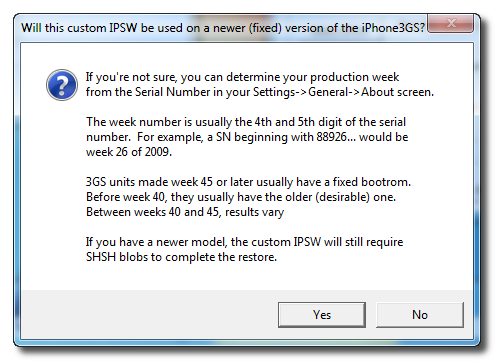
<p>If you are using the iPhone 3GS you may be asked to identify whether you are on a newer or older model.
<div class="separator" style="clear: both; text-align: center;"><a href="http://2.bp.blogspot.com/-YAXP5v20pnM/Twt48SBTkNI/AAAAAAAAATk/_nbSKZnFU3w/s1600/jailbreack+with+custom+IPSW+4.png" imageanchor="1" style="margin-left: 1em; margin-right: 1em;"><img border="0" height="233" src="http://2.bp.blogspot.com/-YAXP5v20pnM/Twt48SBTkNI/AAAAAAAAATk/_nbSKZnFU3w/s320/jailbreack+with+custom+IPSW+4.png" width="320" /></a></div>
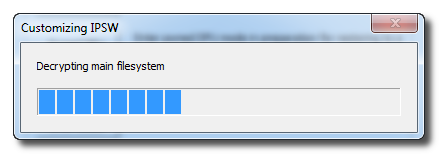
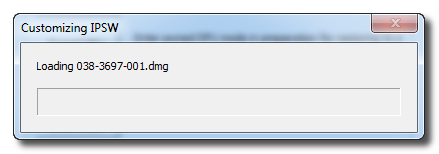
<p>6.<b>RedSn0w</b> will now begin building a custom IPSW for you.
<div class="separator" style="clear: both; text-align: center;"><a href="http://3.bp.blogspot.com/-Zs130jN_GTY/Twt5CTXWxuI/AAAAAAAAATs/0k45ys1RHx8/s1600/jailbreack+with+custom+IPSW+5.png" imageanchor="1" style="margin-left: 1em; margin-right: 1em;"><img border="0" height="70" src="http://3.bp.blogspot.com/-Zs130jN_GTY/Twt5CTXWxuI/AAAAAAAAATs/0k45ys1RHx8/s200/jailbreack+with+custom+IPSW+5.png" width="200" /></a><a href="http://1.bp.blogspot.com/-lkaQHb-e0Ck/Twt5CyFJ8FI/AAAAAAAAAT0/k2V5E19bYMg/s1600/jailbreack+with+custom+IPSW+6.png" imageanchor="1" style="margin-left: 1em; margin-right: 1em;"><img border="0" height="70" src="http://1.bp.blogspot.com/-lkaQHb-e0Ck/Twt5CyFJ8FI/AAAAAAAAAT0/k2V5E19bYMg/s200/jailbreack+with+custom+IPSW+6.png" width="200" /></a></div>
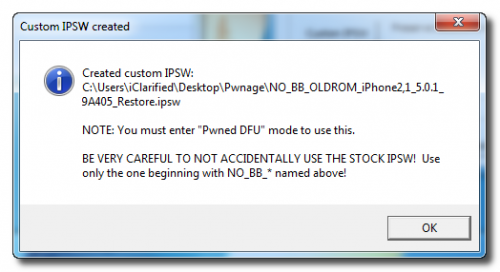
<p>7.You&#8217;ll be notified once <b>RedSn0w</b> has completed building your IPSW. Click the OK button.
<div class="separator" style="clear: both; text-align: center;"><a href="http://2.bp.blogspot.com/-LhF8kUAjIbw/Twt5M6srYBI/AAAAAAAAAT8/JqCyUIQQDmo/s1600/jailbreack+with+custom+IPSW+7.png" imageanchor="1" style="margin-left: 1em; margin-right: 1em;"><img border="0" height="174" src="http://2.bp.blogspot.com/-LhF8kUAjIbw/Twt5M6srYBI/AAAAAAAAAT8/JqCyUIQQDmo/s320/jailbreack+with+custom+IPSW+7.png" width="320" /></a></div>
<p>8.Click the <b>Pwned DFU</b> button from the Extras menu.
<div class="separator" style="clear: both; text-align: center;"><a href="http://1.bp.blogspot.com/-QIwd-oZ_S8o/Twt5RN3kbKI/AAAAAAAAAUE/miTZas2rZWM/s1600/jailbreack+with+custom+IPSW+8.png" imageanchor="1" style="margin-left: 1em; margin-right: 1em;"><img border="0" height="320" src="http://1.bp.blogspot.com/-QIwd-oZ_S8o/Twt5RN3kbKI/AAAAAAAAAUE/miTZas2rZWM/s320/jailbreack+with+custom+IPSW+8.png" width="266" /></a></div>
<p>9.Plug your iPhone into the computer and <b>make sure its OFF</b> then click the <b><i>Next</i></b> button
<div class="separator" style="clear: both; text-align: center;"><a href="http://3.bp.blogspot.com/-tsuKypqnYQg/Twt5Xzk-_CI/AAAAAAAAAUM/uhNHdsKsPfc/s1600/jailbreack+with+custom+IPSW+9.png" imageanchor="1" style="margin-left: 1em; margin-right: 1em;"><img border="0" height="320" src="http://3.bp.blogspot.com/-tsuKypqnYQg/Twt5Xzk-_CI/AAAAAAAAAUM/uhNHdsKsPfc/s320/jailbreack+with+custom+IPSW+9.png" width="266" /></a></div>
<p>10.<b>RedSn0w</b> will now guide you through the steps to get into <b>DFU mode</b>.
<div class="separator" style="clear: both; text-align: center;"><a href="http://4.bp.blogspot.com/-lauS45y0dxw/Twt5e5pQpDI/AAAAAAAAAUU/sGh9JFytvzs/s1600/jailbreack+with+custom+IPSW+10.png" imageanchor="1" style="margin-left: 1em; margin-right: 1em;"><img border="0" height="320" src="http://4.bp.blogspot.com/-lauS45y0dxw/Twt5e5pQpDI/AAAAAAAAAUU/sGh9JFytvzs/s320/jailbreack+with+custom+IPSW+10.png" width="266" /></a></div>
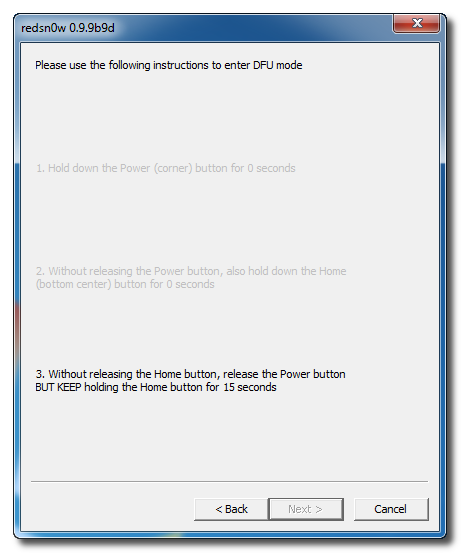
<p>Hold down both the <b>Home</b> button and the <b>Power</b> button for 10 seconds.
<div class="separator" style="clear: both; text-align: center;"><a href="http://3.bp.blogspot.com/-VK_QAFskm5I/Twt5kVKuAhI/AAAAAAAAAUc/uPbVPaVSg2A/s1600/jailbreack+with+custom+IPSW+11.png" imageanchor="1" style="margin-left: 1em; margin-right: 1em;"><img border="0" height="320" src="http://3.bp.blogspot.com/-VK_QAFskm5I/Twt5kVKuAhI/AAAAAAAAAUc/uPbVPaVSg2A/s320/jailbreack+with+custom+IPSW+11.png" width="266" /></a></div>
<p><b>Release the Power</b> button and <b>continue holding the Home</b> button until RedSn0w detects the device.
<div class="separator" style="clear: both; text-align: center;"><a href="http://3.bp.blogspot.com/-MZ9bKszG690/Twt5paHmupI/AAAAAAAAAUk/9l5S4-_3rN0/s1600/jailbreack+with+custom+IPSW+12.png" imageanchor="1" style="margin-left: 1em; margin-right: 1em;"><img border="0" height="320" src="http://3.bp.blogspot.com/-MZ9bKszG690/Twt5paHmupI/AAAAAAAAAUk/9l5S4-_3rN0/s320/jailbreack+with+custom+IPSW+12.png" width="266" /></a></div>
<p>11.RedSn0w will run the<b> LimeRa1n</b> exploit.
<div class="separator" style="clear: both; text-align: center;"><a href="http://4.bp.blogspot.com/-fZreSUv6Wcs/Twt5xXP-5dI/AAAAAAAAAUs/FqX9E57V8_k/s1600/jailbreack+with+custom+IPSW+13.png" imageanchor="1" style="margin-left: 1em; margin-right: 1em;"><img border="0" height="320" src="http://4.bp.blogspot.com/-fZreSUv6Wcs/Twt5xXP-5dI/AAAAAAAAAUs/FqX9E57V8_k/s320/jailbreack+with+custom+IPSW+13.png" width="266" /></a></div>
<p>12.You&#8217;ll then be notified that your iPhone is in <b>Pwned DFU</b> mode.
<div class="separator" style="clear: both; text-align: center;"><a href="http://3.bp.blogspot.com/-z_zC_o2iRQ4/Twt51z6bqcI/AAAAAAAAAU0/IEhnHwg1z6E/s1600/jailbreack+with+custom+IPSW+14.png" imageanchor="1" style="margin-left: 1em; margin-right: 1em;"><img border="0" height="320" src="http://3.bp.blogspot.com/-z_zC_o2iRQ4/Twt51z6bqcI/AAAAAAAAAU0/IEhnHwg1z6E/s320/jailbreack+with+custom+IPSW+14.png" width="266" /></a></div>
<p>13.<b>Launch iTunes</b> .<br />14.Select your device from the list on the left then under the Summary tab <b>hold down the Shift key and click the Restore button.</b>
<div class="separator" style="clear: both; text-align: center;"><a href="http://3.bp.blogspot.com/-diS161jStXw/Twt6BSdMBsI/AAAAAAAAAU8/JRYXVdNekoo/s1600/jailbreack+with+custom+IPSW+15.png" imageanchor="1" style="margin-left: 1em; margin-right: 1em;"><img border="0" height="96" src="http://3.bp.blogspot.com/-diS161jStXw/Twt6BSdMBsI/AAAAAAAAAU8/JRYXVdNekoo/s200/jailbreack+with+custom+IPSW+15.png" width="200" /></a><a href="http://4.bp.blogspot.com/-AKP30vw4TXY/Twt6CFYsilI/AAAAAAAAAVE/e4vaCm6Fdyc/s1600/jailbreack+with+custom+IPSW+16.png" imageanchor="1" style="margin-left: 1em; margin-right: 1em;"><img border="0" height="96" src="http://4.bp.blogspot.com/-AKP30vw4TXY/Twt6CFYsilI/AAAAAAAAAVE/e4vaCm6Fdyc/s200/jailbreack+with+custom+IPSW+16.png" width="200" /></a></div>
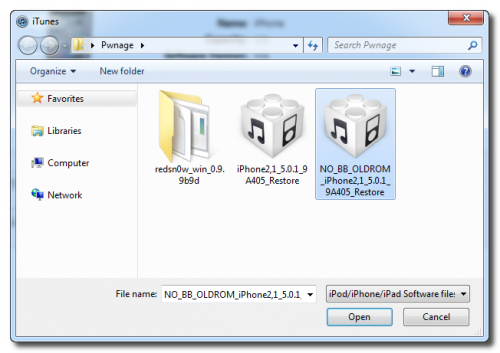
<p>15.You will then be asked to select your IPSW for restore. Navigate to the Pwnage folder on your desktop and <b>select the IPSW that begins with NO_BB</b> then click the Open button.
<div class="separator" style="clear: both; text-align: center;"><a href="http://2.bp.blogspot.com/-nge3w2Jc-Hk/Twt6OWipcEI/AAAAAAAAAVM/dszcmG3FWkQ/s1600/jailbreack+with+custom+IPSW+17.png" imageanchor="1" style="margin-left: 1em; margin-right: 1em;"><img border="0" height="225" src="http://2.bp.blogspot.com/-nge3w2Jc-Hk/Twt6OWipcEI/AAAAAAAAAVM/dszcmG3FWkQ/s320/jailbreack+with+custom+IPSW+17.png" width="320" /></a></div>
<p>16.iTunes will now restore and jailbreak your device using the Custom IPSW.</p>
<p><b>BOOT TETHERED</b><br />Once you have jailbroken you will need to rerun redsn0w to boot tethered.
<ul>
<li>From the main RedSn0w menu click the Extras button.</li>
<li>Select Just boot from the Extras menu to just boot tethered.</li>
</ul>
<div class="separator" style="clear: both; text-align: center;"><a href="http://4.bp.blogspot.com/-4Hnk2T37g-g/TwuD5WqDHTI/AAAAAAAAAVY/UOUUMSVGO_g/s1600/Boot+tehered.png" imageanchor="1" style="margin-left: 1em; margin-right: 1em;"><img border="0" height="200" src="http://4.bp.blogspot.com/-4Hnk2T37g-g/TwuD5WqDHTI/AAAAAAAAAVY/UOUUMSVGO_g/s200/Boot+tehered.png" width="166" /></a><a href="http://1.bp.blogspot.com/-UeIx8VciTM0/TwuD4mJb2BI/AAAAAAAAAVU/lLAHi7dzyOg/s1600/Boot+tehered+1.png" imageanchor="1" style="margin-left: 1em; margin-right: 1em;"><img border="0" height="200" src="http://1.bp.blogspot.com/-UeIx8VciTM0/TwuD4mJb2BI/AAAAAAAAAVU/lLAHi7dzyOg/s200/Boot+tehered+1.png" width="166" /></a></div>
<p><b><br /></b><br /><b>UNLOCK:</b><br />If you have a supported baseband you can now install UltraSn0w to unlock your device.<a href="http://modern-smartphone.blogspot.com/2012/01/how-to-unlock-iphone-4-3gs-3g-using.html" target="_blank"> Instructions are here.</a></p>
]]></content:encoded>
			<wfw:commentRss>http://modern-smartphone.6te.net/?feed=rss2&#038;p=36</wfw:commentRss>
		<slash:comments>0</slash:comments>
		</item>
		<item>
		<title>&gt;How to Find the Firmware and Baseband Version of Your iPhone</title>
		<link>http://modern-smartphone.6te.net/?p=35</link>
		<comments>http://modern-smartphone.6te.net/?p=35#comments</comments>
		<pubDate>Mon, 09 Jan 2012 22:27:00 +0000</pubDate>
		<dc:creator>admin</dc:creator>
				<category><![CDATA[iOS]]></category>
		<category><![CDATA[iPhone Jailbreak]]></category>
		<category><![CDATA[iPhone tutorials]]></category>
		<category><![CDATA[iPhone unlock]]></category>

		<guid isPermaLink="false">http://modern-smartphone.6te.net/?p=35</guid>
		<description><![CDATA[>These are instructions on how to find the firmware and baseband version (modem firmware) your iPhone is currently running. Step One:&#160;press to launch Settings from your Springboard. Step Two: press to select General from the Settings Menu. Step Three: press to select About from the General Settings Menu. Step Four: from the about screen you [...]]]></description>
			<content:encoded><![CDATA[<p>><br />These are instructions on how to find the firmware and baseband version (modem firmware) your iPhone is currently running.</p>
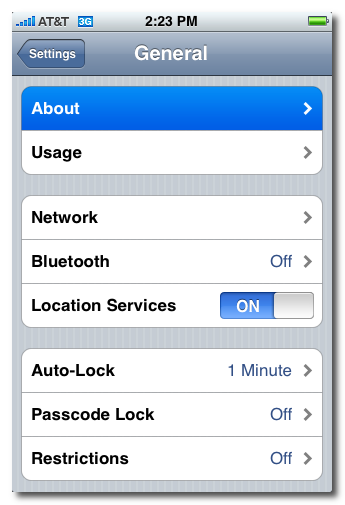
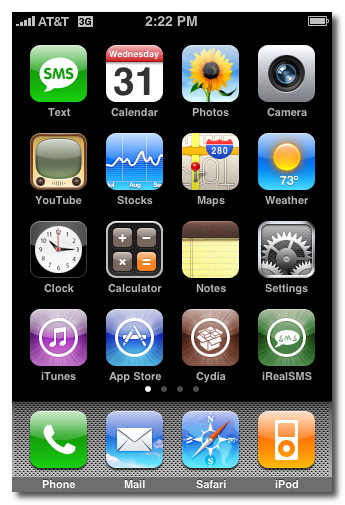
<p><b>Step One:&nbsp;</b>press to launch <b><i>Settings</i></b> from your <b>Springboard</b>.
<div class="separator" style="clear: both; text-align: center;"><a href="http://3.bp.blogspot.com/-kJueKVxpMgQ/Twto0mI0QUI/AAAAAAAAAQs/ysJoRF4aVfY/s1600/iPhone+firmware.png" imageanchor="1" style="margin-left: 1em; margin-right: 1em;"><img border="0" height="200" src="http://3.bp.blogspot.com/-kJueKVxpMgQ/Twto0mI0QUI/AAAAAAAAAQs/ysJoRF4aVfY/s200/iPhone+firmware.png" width="136" /></a></div>
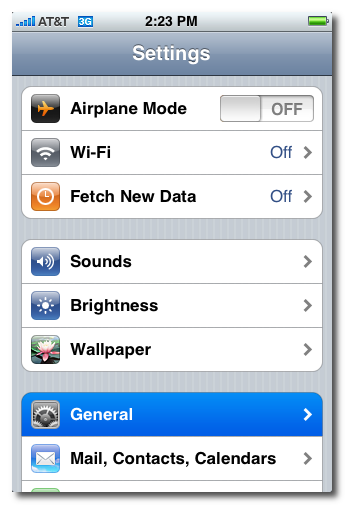
<p><b>Step Two:</b> press to select <b><i>General</i></b> from the <b><i>Settings Menu</i></b>.
<div class="separator" style="clear: both; text-align: center;"><a href="http://3.bp.blogspot.com/-wBz-Hn1PxLI/TwtpKAyR_EI/AAAAAAAAAQ0/QPsVkm3L7o0/s1600/iPhone+firmware1.png" imageanchor="1" style="margin-left: 1em; margin-right: 1em;"><img border="0" height="200" src="http://3.bp.blogspot.com/-wBz-Hn1PxLI/TwtpKAyR_EI/AAAAAAAAAQ0/QPsVkm3L7o0/s200/iPhone+firmware1.png" width="136" /></a></div>
<div class="separator" style="clear: both; text-align: center;"></div>
<div>
<div><b>Step Three:</b> press to select <b><i>About</i></b> from the <b>General Settings Menu</b>.</div>
</div>
<div class="separator" style="clear: both; text-align: center;"><a href="http://1.bp.blogspot.com/-Jp5pmfElg6M/TwtpXUo7sjI/AAAAAAAAAQ8/HcmMjr6eNw4/s1600/iPhone+firmware2.png" imageanchor="1" style="margin-left: 1em; margin-right: 1em;"><img border="0" height="200" src="http://1.bp.blogspot.com/-Jp5pmfElg6M/TwtpXUo7sjI/AAAAAAAAAQ8/HcmMjr6eNw4/s200/iPhone+firmware2.png" width="136" /></a></div>
<div>
<div><b>Step Four:</b> from the about screen you can find your firmware version under the <b><i>Version</i></b> label.&nbsp;</div>
</div>
<div class="separator" style="clear: both; text-align: center;"><a href="http://2.bp.blogspot.com/-xQpuCjbgThI/TwtpjiGZ1JI/AAAAAAAAARE/g23hO-dDXnA/s1600/iPhone+firmware3.png" imageanchor="1" style="margin-left: 1em; margin-right: 1em;"><img border="0" height="200" src="http://2.bp.blogspot.com/-xQpuCjbgThI/TwtpjiGZ1JI/AAAAAAAAARE/g23hO-dDXnA/s200/iPhone+firmware3.png" width="136" /></a></div>
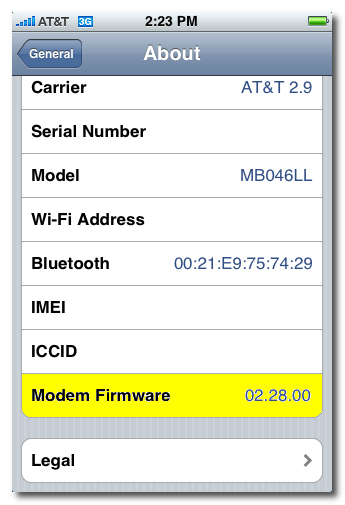
<div><b>Scroll down and you can find your baseband version under the <i>Modem Firmware</i> label.</b></div>
<div class="separator" style="clear: both; text-align: center;"><a href="http://3.bp.blogspot.com/-i71-MgEbb_s/TwtpxOTNPdI/AAAAAAAAARM/EDOUt6iULUc/s1600/iPhone+firmware4.png" imageanchor="1" style="margin-left: 1em; margin-right: 1em;"><img border="0" height="200" src="http://3.bp.blogspot.com/-i71-MgEbb_s/TwtpxOTNPdI/AAAAAAAAARM/EDOUt6iULUc/s200/iPhone+firmware4.png" width="136" /></a></div>
<div><b><br /></b></div>
]]></content:encoded>
			<wfw:commentRss>http://modern-smartphone.6te.net/?feed=rss2&#038;p=35</wfw:commentRss>
		<slash:comments>0</slash:comments>
		</item>
		<item>
		<title>&gt;How to Unlock the iPhone 4, 3GS, 3G Using UltraSn0w</title>
		<link>http://modern-smartphone.6te.net/?p=34</link>
		<comments>http://modern-smartphone.6te.net/?p=34#comments</comments>
		<pubDate>Mon, 09 Jan 2012 22:21:00 +0000</pubDate>
		<dc:creator>admin</dc:creator>
				<category><![CDATA[iOS]]></category>
		<category><![CDATA[iPhone Jailbreak]]></category>
		<category><![CDATA[iPhone tutorials]]></category>
		<category><![CDATA[iPhone unlock]]></category>

		<guid isPermaLink="false">http://modern-smartphone.6te.net/?p=34</guid>
		<description><![CDATA[> These are instructions on how to unlock the iPhone 4, iPhone 3GS, and iPhone 3G for use with any GSM cellphone carrier using UltraSn0w. This will work with the iOS 4.2.1 firmware if you are on the 06.15.00 baseband. Before you can follow these instructions you must have a jailbroken iPhone and you must [...]]]></description>
			<content:encoded><![CDATA[<p>>
<div>These are instructions on how to unlock the iPhone 4, iPhone 3GS, and iPhone 3G for use with any GSM cellphone carrier using <b>UltraSn0w</b>. This will work with the <b>iOS 4.2.1</b> firmware if you are on the <b>06.15.00</b> baseband.</div>
<div></div>
<div>Before you can follow these instructions you must have a <a href="http://modern-smartphone.blogspot.com/2012/01/how-to-jailbreak-your-iphone-without.html" target="_blank">jailbroken iPhone</a> and you must be on the <b>04.26.08</b>, <b>05.11.07</b>, <b>05.12.01</b>, <b>05.13.04</b>, <b>06.15.00</b>, or <b>01.59</b> baseband(modem firmware).</div>
<div></div>
<div>To find your firmware and modem firmware(baseband) versions you can follow <a href="http://modern-smartphone.blogspot.com/2012/01/how-to-find-firmware-and-baseband.html" target="_blank">this tutorial</a>.&nbsp;</div>
<div><i>If you are on T-Mobile remember to turn off 3G before starting&#8230;</i><br /><i><br /></i></div>
<div><span style="font-family: inherit;">1.</span><span style="font-family: inherit;">Press to launch </span><b style="font-family: inherit;"><i>Cydia Installer</i></b><span style="font-family: inherit;"> from your SpringBoard.</span></p>
<div class="separator" style="clear: both; text-align: center;"><a href="http://1.bp.blogspot.com/-1VC8nVQyWgM/TwttM1GwfUI/AAAAAAAAARU/Ir3ofA6vNn0/s1600/unlock+whit+ultrasn0w.png" imageanchor="1" style="margin-left: 1em; margin-right: 1em;"><img border="0" height="200" src="http://1.bp.blogspot.com/-1VC8nVQyWgM/TwttM1GwfUI/AAAAAAAAARU/Ir3ofA6vNn0/s200/unlock+whit+ultrasn0w.png" width="133" /></a></div>
<p><span style="font-family: inherit;">2.</span><span style="font-family: inherit;">Press to select the </span><b style="font-family: inherit;"><i>Manage</i></b><span style="font-family: inherit;"> tab at the bottom of the screen.</span></p>
<div class="separator" style="clear: both; text-align: center;"><a href="http://2.bp.blogspot.com/--OsE0lRZ9Bw/TwttRA-akgI/AAAAAAAAARc/6BdERDMDAF4/s1600/unlock+whit+ultrasn0w+1.png" imageanchor="1" style="margin-left: 1em; margin-right: 1em;"><img border="0" height="200" src="http://2.bp.blogspot.com/--OsE0lRZ9Bw/TwttRA-akgI/AAAAAAAAARc/6BdERDMDAF4/s200/unlock+whit+ultrasn0w+1.png" width="133" /></a></div>
<p><span style="font-family: inherit;">3.</span><span style="font-family: inherit;">Press to select the large </span><b style="font-family: inherit;"><i>Sources</i></b><span style="font-family: inherit;"> button</span></p>
<div class="separator" style="clear: both; text-align: center;"><a href="http://1.bp.blogspot.com/-S7kSL4B6JVE/TwttVPuGX2I/AAAAAAAAARk/FFTPcMI0dT8/s1600/unlock+whit+ultrasn0w+2.png" imageanchor="1" style="margin-left: 1em; margin-right: 1em;"><img border="0" height="200" src="http://1.bp.blogspot.com/-S7kSL4B6JVE/TwttVPuGX2I/AAAAAAAAARk/FFTPcMI0dT8/s200/unlock+whit+ultrasn0w+2.png" width="133" /></a></div>
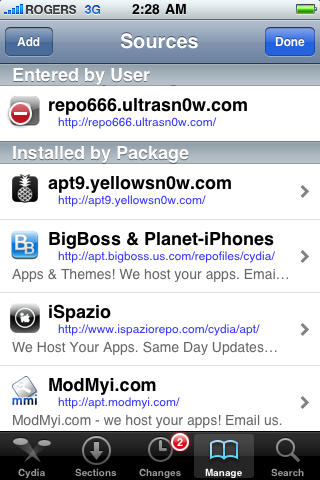
<p><span style="font-family: inherit;">4.</span><span style="font-family: inherit;">If the </span><b style="font-family: inherit;">ultrasn0w</b><span style="font-family: inherit;"> repo is not present press the </span><b style="font-family: inherit;"><i>Edit</i></b><span style="font-family: inherit;"> button at the top right of the screen. Otherwise, skip to Step 9.</span></p>
<div class="separator" style="clear: both; text-align: center;"><a href="http://4.bp.blogspot.com/-lMS2Pv_k5jM/TwttpTUrXAI/AAAAAAAAARs/WfnJXrkHBb8/s1600/unlock+whit+ultrasn0w+3.png" imageanchor="1" style="margin-left: 1em; margin-right: 1em;"><img border="0" height="200" src="http://4.bp.blogspot.com/-lMS2Pv_k5jM/TwttpTUrXAI/AAAAAAAAARs/WfnJXrkHBb8/s200/unlock+whit+ultrasn0w+3.png" width="133" /></a></div>
<p><span style="font-family: inherit;">5.</span><span style="font-family: inherit;">Press the </span><b style="font-family: inherit;"><i>Add</i></b><span style="font-family: inherit;"> button at the top left of the screen.</span></p>
<div class="separator" style="clear: both; text-align: center;"><a href="http://4.bp.blogspot.com/-poZ77hCTiDY/TwttuqSK33I/AAAAAAAAAR0/YfK72vHhimU/s1600/unlock+whit+ultrasn0w+4.png" imageanchor="1" style="margin-left: 1em; margin-right: 1em;"><img border="0" height="200" src="http://4.bp.blogspot.com/-poZ77hCTiDY/TwttuqSK33I/AAAAAAAAAR0/YfK72vHhimU/s200/unlock+whit+ultrasn0w+4.png" width="133" /></a></div>
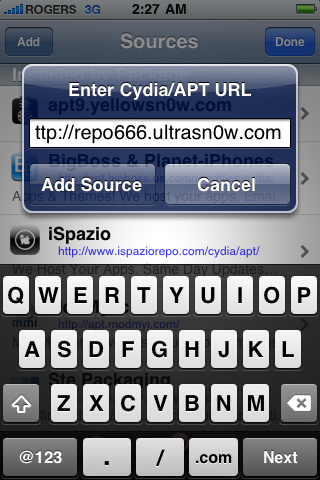
<p><span style="font-family: inherit;">6.</span><span style="font-family: inherit;">Enter </span><b style="font-family: inherit;"><i>http://repo666.ultrasn0w.com/</i></b><span style="font-family: inherit;"> as the source url and press the </span><b style="font-family: inherit;"><i>Add Source</i></b><span style="font-family: inherit;"> button.</span></p>
<div class="separator" style="clear: both; text-align: center;"><a href="http://2.bp.blogspot.com/-7ZH6DQrY-2Q/Twtt10zLHgI/AAAAAAAAAR8/QrREBRANksU/s1600/unlock+whit+ultrasn0w+5.png" imageanchor="1" style="margin-left: 1em; margin-right: 1em;"><img border="0" height="200" src="http://2.bp.blogspot.com/-7ZH6DQrY-2Q/Twtt10zLHgI/AAAAAAAAAR8/QrREBRANksU/s200/unlock+whit+ultrasn0w+5.png" width="133" /></a></div>
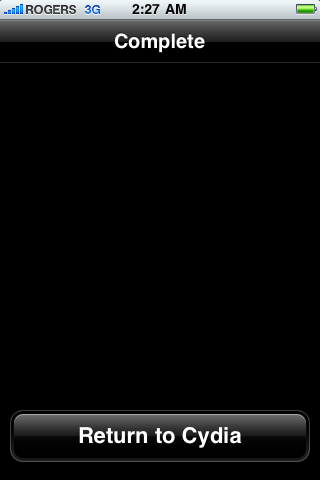
<p><span style="font-family: inherit;">7.</span><span style="font-family: inherit;">Once the source has been added press the large </span><b style="font-family: inherit;"><i>Return to Cydia</i></b><span style="font-family: inherit;"> button.</span></p>
<div class="separator" style="clear: both; text-align: center;"><a href="http://3.bp.blogspot.com/-n8hMAL4nH3c/Twtt7xwEkMI/AAAAAAAAASE/rm4CvWAju1M/s1600/unlock+whit+ultrasn0w+6.png" imageanchor="1" style="margin-left: 1em; margin-right: 1em;"><img border="0" height="200" src="http://3.bp.blogspot.com/-n8hMAL4nH3c/Twtt7xwEkMI/AAAAAAAAASE/rm4CvWAju1M/s200/unlock+whit+ultrasn0w+6.png" width="133" /></a></div>
<p><span style="font-family: inherit;">8.</span><span style="font-family: inherit;">Press the </span><b style="font-family: inherit;"><i>Done</i></b><span style="font-family: inherit;"> button at the top right of the screen.</span></p>
<div class="separator" style="clear: both; text-align: center;"><a href="http://3.bp.blogspot.com/-jt9mGxTlpK4/TwtuB7pi1DI/AAAAAAAAASM/twsicM-OvIE/s1600/unlock+whit+ultrasn0w+7.png" imageanchor="1" style="margin-left: 1em; margin-right: 1em;"><img border="0" height="200" src="http://3.bp.blogspot.com/-jt9mGxTlpK4/TwtuB7pi1DI/AAAAAAAAASM/twsicM-OvIE/s200/unlock+whit+ultrasn0w+7.png" width="133" /></a></div>
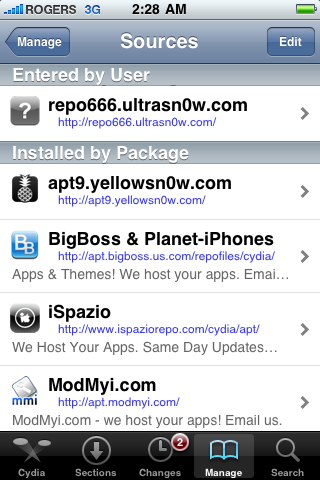
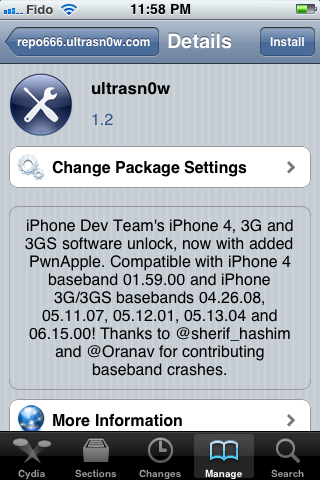
<p><span style="font-family: inherit;">9.</span><span style="font-family: inherit;">Press to select </span><b style="font-family: inherit;"><i>repo666.ultrasn0w.com</i></b><span style="font-family: inherit;"> from the list of user entered sources.</span></p>
<div class="separator" style="clear: both; text-align: center;"><a href="http://1.bp.blogspot.com/-VhVwOsyo0Mk/TwtuHj-9mgI/AAAAAAAAASU/HTSeOSrk-9g/s1600/unlock+whit+ultrasn0w+8.png" imageanchor="1" style="margin-left: 1em; margin-right: 1em;"><img border="0" height="200" src="http://1.bp.blogspot.com/-VhVwOsyo0Mk/TwtuHj-9mgI/AAAAAAAAASU/HTSeOSrk-9g/s200/unlock+whit+ultrasn0w+8.png" width="133" /></a></div>
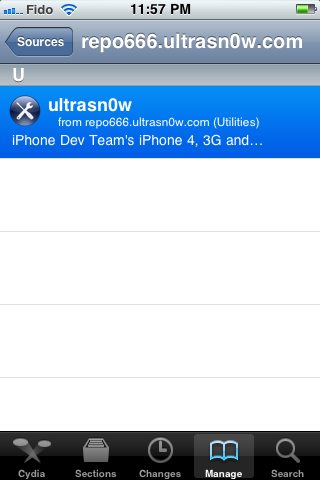
<p><span style="font-family: inherit;"><br /></span><br /><span style="font-family: inherit;">10.</span><span style="font-family: inherit;">Press to select</span><b style="font-family: inherit;"><i> ultrasn0w</i></b><span style="font-family: inherit;"> from the list of packages</span></p>
<div class="separator" style="clear: both; text-align: center;"><a href="http://3.bp.blogspot.com/-fWPpVc5XCKo/TwtuMyiwORI/AAAAAAAAASc/Gbf4dyCO3n4/s1600/unlock+whit+ultrasn0w+9.png" imageanchor="1" style="margin-left: 1em; margin-right: 1em;"><img border="0" height="200" src="http://3.bp.blogspot.com/-fWPpVc5XCKo/TwtuMyiwORI/AAAAAAAAASc/Gbf4dyCO3n4/s200/unlock+whit+ultrasn0w+9.png" width="133" /></a></div>
<p><span style="font-family: inherit;"><br /></span><br /><span style="font-family: inherit;">11.</span><span style="font-family: inherit;">Press the </span><b style="font-family: inherit;"><i>Install</i></b><span style="font-family: inherit;"> button at the top right of the screen.</span></p>
<div class="separator" style="clear: both; text-align: center;"><a href="http://1.bp.blogspot.com/-Cq5omNI4PJ8/TwtuaFy_hPI/AAAAAAAAASk/m1J6iGvWo8Y/s1600/unlock+whit+ultrasn0w+10.png" imageanchor="1" style="margin-left: 1em; margin-right: 1em;"><img border="0" height="200" src="http://1.bp.blogspot.com/-Cq5omNI4PJ8/TwtuaFy_hPI/AAAAAAAAASk/m1J6iGvWo8Y/s200/unlock+whit+ultrasn0w+10.png" width="133" /></a></div>
<p><span style="font-family: inherit;">12.</span><span style="font-family: inherit;">Press the <b><i>Confirm</i></b> button at the top right of the screen.</span>
<div class="separator" style="clear: both; text-align: center;"><a href="http://4.bp.blogspot.com/-7xVwTNaPuHM/Twtue1EgpRI/AAAAAAAAASs/9_F-FUKcVvo/s1600/unlock+whit+ultrasn0w+11.png" imageanchor="1" style="margin-left: 1em; margin-right: 1em;"><img border="0" height="200" src="http://4.bp.blogspot.com/-7xVwTNaPuHM/Twtue1EgpRI/AAAAAAAAASs/9_F-FUKcVvo/s200/unlock+whit+ultrasn0w+11.png" width="133" /></a></div>
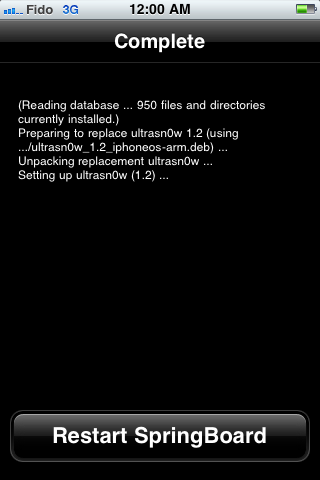
<p><span style="font-family: inherit;">13.</span><span style="font-family: inherit;">After installation completes successfully press the large </span><b style="font-family: inherit;"><i>Restart Springboard </i></b><span style="font-family: inherit;">button.</span></p>
<div class="separator" style="clear: both; text-align: center;"><a href="http://3.bp.blogspot.com/-H5g-BCQ5wOE/TwtujRNtNuI/AAAAAAAAAS0/P3bsrqPM5XM/s1600/unlock+whit+ultrasn0w+12.png" imageanchor="1" style="margin-left: 1em; margin-right: 1em;"><img border="0" height="200" src="http://3.bp.blogspot.com/-H5g-BCQ5wOE/TwtujRNtNuI/AAAAAAAAAS0/P3bsrqPM5XM/s200/unlock+whit+ultrasn0w+12.png" width="133" /></a></div>
<p><span style="font-family: inherit;">14.</span><span style="background-color: red; color: yellow; font-family: inherit;">You should now be able to insert the SIM of your choice!&nbsp;</span></p>
<div class="separator" style="clear: both; text-align: center;"><a href="http://4.bp.blogspot.com/-VHUQLbITiwA/Twtunvh6ULI/AAAAAAAAAS8/nQLQv_OLVDY/s1600/unlock+whit+ultrasn0w+13.png" imageanchor="1" style="margin-left: 1em; margin-right: 1em;"><img border="0" height="320" src="http://4.bp.blogspot.com/-VHUQLbITiwA/Twtunvh6ULI/AAAAAAAAAS8/nQLQv_OLVDY/s320/unlock+whit+ultrasn0w+13.png" width="213" /></a></div>
<div style="font-style: italic;"></div>
</div>
]]></content:encoded>
			<wfw:commentRss>http://modern-smartphone.6te.net/?feed=rss2&#038;p=34</wfw:commentRss>
		<slash:comments>0</slash:comments>
		</item>
		<item>
		<title>&gt;Jailbreak iOS 5.0.1 Untethered With Redsn0w 0.9.10b3</title>
		<link>http://modern-smartphone.6te.net/?p=33</link>
		<comments>http://modern-smartphone.6te.net/?p=33#comments</comments>
		<pubDate>Sun, 08 Jan 2012 23:58:00 +0000</pubDate>
		<dc:creator>admin</dc:creator>
				<category><![CDATA[iOS]]></category>
		<category><![CDATA[iPhone Apps]]></category>
		<category><![CDATA[iPhone Jailbreak]]></category>
		<category><![CDATA[iPhone tutorials]]></category>
		<category><![CDATA[iPhone unlock]]></category>

		<guid isPermaLink="false">http://modern-smartphone.6te.net/?p=33</guid>
		<description><![CDATA[>iPhone-Dev team released an untethered jailbreak for iOS 5.0.1 in the form of redsn0w 0.9.30b1 for Windows and Mac OS . This untethered jailbreak is based on Pod2G’s exploits, he was working on iOS 5.0.1 untethered jailbreak from quite some time now. iPhone 4 iPhone 3GS iPod Touch 3G iPod Touch 4G iPad 1 How [...]]]></description>
			<content:encoded><![CDATA[<p>><br />iPhone-Dev team released an untethered jailbreak for iOS 5.0.1 in the form of redsn0w 0.9.30b1 for Windows and Mac OS . This untethered jailbreak is based on Pod2G’s exploits, he was working on iOS 5.0.1 untethered jailbreak from quite some time now.</p>
<div class="separator" style="clear: both; text-align: center;"><a href="http://4.bp.blogspot.com/-TzmhYqOgdSU/TwomT43sxWI/AAAAAAAAAPk/M0QFtHr21rY/s1600/ios1.jpg" imageanchor="1" style="margin-left: 1em; margin-right: 1em;"><img border="0" height="200" src="http://4.bp.blogspot.com/-TzmhYqOgdSU/TwomT43sxWI/AAAAAAAAAPk/M0QFtHr21rY/s200/ios1.jpg" width="200" /></a><a href="http://3.bp.blogspot.com/-WIOXew6qumk/TwomUyMvG-I/AAAAAAAAAPs/sZZvnTcaDdI/s1600/ios-5.0.1.jpg" imageanchor="1" style="margin-left: 1em; margin-right: 1em;"><img border="0" height="200" src="http://3.bp.blogspot.com/-WIOXew6qumk/TwomUyMvG-I/AAAAAAAAAPs/sZZvnTcaDdI/s200/ios-5.0.1.jpg" width="200" /></a></div>
<p>
<ul>
<li>iPhone 4</li>
<li>iPhone 3GS</li>
<li>iPod Touch 3G</li>
<li>iPod Touch 4G</li>
<li>iPad 1</li>
</ul>
<p><b>How To Jailbreak iOS 5.0.1 Untethered With Redsn0w 0.9.10b3:</b></p>
<p><span style="background-color: red;"><span style="color: yellow;">Note: Before you proceed you should know that this jailbreak does not support iPad 2 and iPhone 4S.&nbsp;</span></span></p>
<p><b>Things you will need during this process:</b>
<ul>
<li><a href="http://www.apple.com/itunes/" target="_blank">iTunes 10.5.2</a>,</li>
<li>Redsn0w 0.9.10b3(download redsn0w for mac <a href="http://www.mediafire.com/?o0ovvoyhc3qg9c4" target="_blank">HERE</a> , download redsnow for windows <a href="http://www.mediafire.com/?w8msbtyujbp5c48" target="_blank">HERE</a>)<b><i>Step 1</i></b>: Connect your iOS device to computer and make a backup all your contacts and phone data .</li>
</ul>
<p><b><i>Step 2</i></b>: Restore your iPhone, iPad or iPod Touch with iOS 5.0.1</p>
<p><b>Here are the official download links to iOS 5.0.1:</b></p>
<ul>
<li><a href="http://appldnld.apple.com/iPhone4/041-3305.20111109.Bghy6/iPhone4,1_5.0.1_9A405_Restore.ipsw" target="_blank">iPhone 4S</a></li>
<li><a href="http://appldnld.apple.com/iPhone4/041-3309.20111109.64rtg/iPhone3,1_5.0.1_9A405_Restore.ipsw" target="_blank">iPhone 4 (GSM)</a></li>
<li><a href="http://appldnld.apple.com/iPhone4/041-3304.20111109.Vgtyh/iPhone3,3_5.0.1_9A405_Restore.ipsw" target="_blank">iPhone 4 (CDMA)</a></li>
<li><a href="http://appldnld.apple.com/iPhone4/041-3307.20111109.5tGhu/iPhone2,1_5.0.1_9A405_Restore.ipsw" target="_blank">iPhone 3GS</a></li>
<li><a href="http://appldnld.apple.com/iPhone4/041-3310.20111109.Cfp76/iPad2,1_5.0.1_9A405_Restore.ipsw" target="_blank">iPad 2 WiFi</a></li>
<li><a href="http://appldnld.apple.com/iPhone4/041-3311.20111109.Vpr43/iPad2,2_5.0.1_9A405_Restore.ipsw" target="_blank">iPad 2 GSM</a></li>
<li><a href="http://appldnld.apple.com/iPhone4/041-3312.20111109.zp3ws/iPad2,3_5.0.1_9A405_Restore.ipsw" target="_blank">iPad 2 CDMA</a></li>
<li><a href="http://appldnld.apple.com/iPhone4/041-3308.20111109.Fvgtr/iPad1,1_5.0.1_9A405_Restore.ipsw" target="_blank">iPad</a></li>
<li><a href="http://appldnld.apple.com/iPhone4/041-3314.20111109.Mbgh6/iPod3,1_5.0.1_9A405_Restore.ipsw" target="_blank">iPod touch 3G</a></li>
<li><a href="http://appldnld.apple.com/iPhone4/041-3313.20111109.Azxe3/iPod4,1_5.0.1_9A405_Restore.ipsw" target="_blank">iPod touch 4G</a></li>
</ul>
<p><i>Warning for unlockers: Restoring a stock IPSW file will update your baseband and you will loose your <a href="http://modern-smartphone.blogspot.com/2012/01/how-to-unlock-iphone-4-3gs-3g-using.html" target="_blank">unlock</a>. If you want to update your device to iOS 5.0.1 with your baseband preserved,<a href="http://modern-smartphone.blogspot.com/2012/01/how-to-jailbreak-your-iphone-without.html" target="_blank">follow this tutorial .</a></i><br /><b><i><br /></i></b><br /><b><i>Step 3</i></b>: Launch <b><i>redsn0w 0.9.10b3</i></b> .
<div class="separator" style="clear: both; text-align: center;"><a href="http://1.bp.blogspot.com/-O___z6A6fe8/TwonTyxB6WI/AAAAAAAAAP0/mSurVfkfPzs/s1600/redsnow1.png" imageanchor="1" style="margin-left: 1em; margin-right: 1em;"><img border="0" height="200" src="http://1.bp.blogspot.com/-O___z6A6fe8/TwonTyxB6WI/AAAAAAAAAP0/mSurVfkfPzs/s200/redsnow1.png" width="165" /></a></div>
<p><b><i>Step 4</i></b>: Click <b><i>Jailbreak</i></b><br /><b><i>Step 5</i></b>: In this step make sure your iPhone, iPad or iPod Touch is completely turned off.
<div class="separator" style="clear: both; text-align: center;"><a href="http://4.bp.blogspot.com/-kx_vZME9TwQ/TwooBL-mzZI/AAAAAAAAAP8/5AiGJpfHS1w/s1600/redsnow2.png" imageanchor="1" style="margin-left: 1em; margin-right: 1em;"><img border="0" height="200" src="http://4.bp.blogspot.com/-kx_vZME9TwQ/TwooBL-mzZI/AAAAAAAAAP8/5AiGJpfHS1w/s200/redsnow2.png" width="165" /></a></div>
<p><b><i>Step 6 :&nbsp;</i></b>Click Next and follow the instructions on your screen to put your <b><i>iPhone in DFU mode</i></b>;<br />
<blockquote class="tr_bq">
<ul>
<li>Hold down both the <b>Home</b> button and the <b>Power</b> button for<b> 10 seconds</b>.</li>
<li><b>Release</b> the <b>Power</b> button and<b> continue</b> holding the <b>Home</b> button until (approx 15-25 sec) your device’s screen turn black.</li>
</ul>
</blockquote>
<div class="separator" style="clear: both; text-align: center;"><a href="http://4.bp.blogspot.com/-i9qde_WINII/Twoof6cAHXI/AAAAAAAAAQE/9KqlYc5B__Q/s1600/redsnow3.png" imageanchor="1" style="margin-left: 1em; margin-right: 1em;"><img border="0" height="200" src="http://4.bp.blogspot.com/-i9qde_WINII/Twoof6cAHXI/AAAAAAAAAQE/9KqlYc5B__Q/s200/redsnow3.png" width="165" /></a></div>
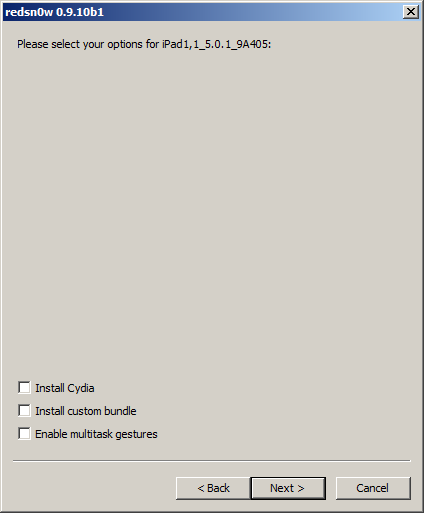
<p><b><i>Step 7</i></b>: Check<b><i> Install Cydia</i></b> and click Next</p>
<div class="separator" style="clear: both; text-align: center;"><a href="http://3.bp.blogspot.com/-LlJLoKDIt_g/TwoooRRDPWI/AAAAAAAAAQM/07ImqNHpB1k/s1600/redsnow4.png" imageanchor="1" style="margin-left: 1em; margin-right: 1em;"><img border="0" height="200" src="http://3.bp.blogspot.com/-LlJLoKDIt_g/TwoooRRDPWI/AAAAAAAAAQM/07ImqNHpB1k/s200/redsnow4.png" width="165" /></a></div>
<p><b><i>Important: If you’ve already tethered jailbreaked your iOS device on iOS 5.0.1 using redsn0w don’t forget to UNCHECK Install Cydia option.&nbsp;</i></b>
<div class="separator" style="clear: both; text-align: center;"><a href="http://1.bp.blogspot.com/-s67mRgNk6gE/TwoozCM3ytI/AAAAAAAAAQU/igXnjdtVUbI/s1600/redsnow5.png" imageanchor="1" style="margin-left: 1em; margin-right: 1em;"><img border="0" height="200" src="http://1.bp.blogspot.com/-s67mRgNk6gE/TwoozCM3ytI/AAAAAAAAAQU/igXnjdtVUbI/s200/redsnow5.png" width="165" /></a></div>
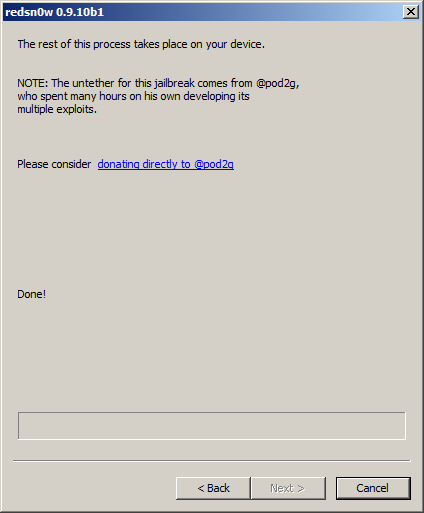
<p><b><i>Step 8</i></b>: <b>Redsn0w</b> will exploit your iOS device with limera1n, sit back and relax while redsn0w jailbreaks your iOS device. Once this process is complete you will be notified that RedSn0w is done. When your iPhone, iPad, iPod Touch finishes rebooting (5 minutes or so) it will be jailbroken untethered and running iOS 5.0.1.
<div class="separator" style="clear: both; text-align: center;"><a href="http://4.bp.blogspot.com/-eal4BtoKPoE/Twoo_7rEUtI/AAAAAAAAAQc/pLNOVDeTar0/s1600/redsnow6.png" imageanchor="1" style="margin-left: 1em; margin-right: 1em;"><img border="0" height="200" src="http://4.bp.blogspot.com/-eal4BtoKPoE/Twoo_7rEUtI/AAAAAAAAAQc/pLNOVDeTar0/s200/redsnow6.png" width="165" /></a><a href="http://2.bp.blogspot.com/-AzeXe84eFmo/TwopEY8tagI/AAAAAAAAAQk/HuKMExl0raI/s1600/redsnow7.png" imageanchor="1" style="margin-left: 1em; margin-right: 1em;"><img border="0" height="200" src="http://2.bp.blogspot.com/-AzeXe84eFmo/TwopEY8tagI/AAAAAAAAAQk/HuKMExl0raI/s200/redsnow7.png" width="165" /></a></div>
<p>That was it guys, you don’t need to boot your device in tethered mode anymore.</p>
<p><b><i>Update #2</i></b>: The<b> b2 version</b> of <b>redsn0w</b> includes the launchctl-related fix by @planetbeing as mentioned by @saurik here and here. As usual, you can just re-run <b>redsn0w</b> in jailbreak mode over your existing 5.0.1 jailbreak (even a PwnageTool one), making sure to de-select “Install Cydia” if you do. Always be sure to do a controlled “slide to power off” shutdown of your device before running redsn0w.</p>
<p><b><i>Update #3</i></b>: The <b>b3 version</b> of <b>redsn0w</b> fixes a problem where re-running redsn0w over an existing jailbreak would cause MobileSubstrate-based apps to stop running until MS was installed again. Now you can re-run the redsn0w jailbreak step without worrying about that (but still remember to de-select the “Install Cydia” option if it’s already installed).<br />TIP: If auto-detection fails and redsn0w tells you no identifying data was found, you can always pre-select <a href="http://theiphonewiki.com/wiki/index.php?title=Firmware" target="_blank">the appropriate 5.0.1 IPSW </a>using “<b>Extras-&gt;Select IPSW</b>”.</p>
<p>You can download redsn0w 0.9.10b3 (download for <a href="http://www.mediafire.com/?w8msbtyujbp5c48" target="_blank">windows</a> and for <a href="http://www.mediafire.com/?o0ovvoyhc3qg9c4" target="_blank">mac</a>) to jailbreak your iPhone 4, iPhone 3GS, iPod Touch 3G, iPod Touch 4G and iPad 1 on iOS 5.0.1<br /><b><i><u>Update :&nbsp;</u></i></b>
<ul>
<li><a href="https://sites.google.com/a/iphone-dev.com/files/home/redsn0w_mac_0.9.10b6.zip?attredirects=0&amp;d=1">redsn0w 0.9.10b6 for OS X</a></li>
<li><a href="https://sites.google.com/a/iphone-dev.com/files/home/redsn0w_mac_0.9.10b6.zip?attredirects=0&amp;d=1">redsn0w 0.9.10b6 for Windows</a> (be sure to run in Administrator mode)</li>
</ul>
]]></content:encoded>
			<wfw:commentRss>http://modern-smartphone.6te.net/?feed=rss2&#038;p=33</wfw:commentRss>
		<slash:comments>0</slash:comments>
		</item>
	</channel>
</rss>