<br />
<b>Warning</b>:  Declaration of Walker_Page::start_lvl(&$output, $depth) should be compatible with Walker::start_lvl(&$output) in <b>/home/vhosts/modern-smartphone.6te.net/wp-includes/post-template.php</b> on line <b>997</b><br />
<br />
<b>Warning</b>:  Declaration of Walker_Page::end_lvl(&$output, $depth) should be compatible with Walker::end_lvl(&$output) in <b>/home/vhosts/modern-smartphone.6te.net/wp-includes/post-template.php</b> on line <b>1009</b><br />
<br />
<b>Warning</b>:  Declaration of Walker_Page::start_el(&$output, $page, $depth, $args, $current_page) should be compatible with Walker::start_el(&$output) in <b>/home/vhosts/modern-smartphone.6te.net/wp-includes/post-template.php</b> on line <b>1024</b><br />
<br />
<b>Warning</b>:  Declaration of Walker_Page::end_el(&$output, $page, $depth) should be compatible with Walker::end_el(&$output) in <b>/home/vhosts/modern-smartphone.6te.net/wp-includes/post-template.php</b> on line <b>1067</b><br />
<br />
<b>Warning</b>:  Declaration of Walker_PageDropdown::start_el(&$output, $page, $depth, $args) should be compatible with Walker::start_el(&$output) in <b>/home/vhosts/modern-smartphone.6te.net/wp-includes/post-template.php</b> on line <b>1105</b><br />
<br />
<b>Warning</b>:  Declaration of Walker_Category::start_lvl(&$output, $depth, $args) should be compatible with Walker::start_lvl(&$output) in <b>/home/vhosts/modern-smartphone.6te.net/wp-includes/category-template.php</b> on line <b>800</b><br />
<br />
<b>Warning</b>:  Declaration of Walker_Category::end_lvl(&$output, $depth, $args) should be compatible with Walker::end_lvl(&$output) in <b>/home/vhosts/modern-smartphone.6te.net/wp-includes/category-template.php</b> on line <b>816</b><br />
<br />
<b>Warning</b>:  Declaration of Walker_Category::start_el(&$output, $category, $depth, $args) should be compatible with Walker::start_el(&$output) in <b>/home/vhosts/modern-smartphone.6te.net/wp-includes/category-template.php</b> on line <b>833</b><br />
<br />
<b>Warning</b>:  Declaration of Walker_Category::end_el(&$output, $page, $depth, $args) should be compatible with Walker::end_el(&$output) in <b>/home/vhosts/modern-smartphone.6te.net/wp-includes/category-template.php</b> on line <b>908</b><br />
<br />
<b>Warning</b>:  Declaration of Walker_CategoryDropdown::start_el(&$output, $category, $depth, $args) should be compatible with Walker::start_el(&$output) in <b>/home/vhosts/modern-smartphone.6te.net/wp-includes/category-template.php</b> on line <b>949</b><br />
<br />
<b>Warning</b>:  Declaration of Walker_Comment::start_lvl(&$output, $depth, $args) should be compatible with Walker::start_lvl(&$output) in <b>/home/vhosts/modern-smartphone.6te.net/wp-includes/comment-template.php</b> on line <b>1241</b><br />
<br />
<b>Warning</b>:  Declaration of Walker_Comment::end_lvl(&$output, $depth, $args) should be compatible with Walker::end_lvl(&$output) in <b>/home/vhosts/modern-smartphone.6te.net/wp-includes/comment-template.php</b> on line <b>1265</b><br />
<br />
<b>Warning</b>:  Declaration of Walker_Comment::start_el(&$output, $comment, $depth, $args) should be compatible with Walker::start_el(&$output) in <b>/home/vhosts/modern-smartphone.6te.net/wp-includes/comment-template.php</b> on line <b>1329</b><br />
<br />
<b>Warning</b>:  Declaration of Walker_Comment::end_el(&$output, $comment, $depth, $args) should be compatible with Walker::end_el(&$output) in <b>/home/vhosts/modern-smartphone.6te.net/wp-includes/comment-template.php</b> on line <b>1389</b><br />
<br />
<b>Warning</b>:  Declaration of Walker_Nav_Menu::start_lvl(&$output, $depth) should be compatible with Walker::start_lvl(&$output) in <b>/home/vhosts/modern-smartphone.6te.net/wp-includes/nav-menu-template.php</b> on line <b>40</b><br />
<br />
<b>Warning</b>:  Declaration of Walker_Nav_Menu::end_lvl(&$output, $depth) should be compatible with Walker::end_lvl(&$output) in <b>/home/vhosts/modern-smartphone.6te.net/wp-includes/nav-menu-template.php</b> on line <b>52</b><br />
<br />
<b>Warning</b>:  Declaration of Walker_Nav_Menu::start_el(&$output, $item, $depth, $args) should be compatible with Walker::start_el(&$output) in <b>/home/vhosts/modern-smartphone.6te.net/wp-includes/nav-menu-template.php</b> on line <b>67</b><br />
<br />
<b>Warning</b>:  Declaration of Walker_Nav_Menu::end_el(&$output, $item, $depth) should be compatible with Walker::end_el(&$output) in <b>/home/vhosts/modern-smartphone.6te.net/wp-includes/nav-menu-template.php</b> on line <b>106</b><br />
<?xml version="1.0" encoding="UTF-8"?>
<rss version="2.0"
	xmlns:content="http://purl.org/rss/1.0/modules/content/"
	xmlns:wfw="http://wellformedweb.org/CommentAPI/"
	xmlns:dc="http://purl.org/dc/elements/1.1/"
	xmlns:atom="http://www.w3.org/2005/Atom"
	xmlns:sy="http://purl.org/rss/1.0/modules/syndication/"
	xmlns:slash="http://purl.org/rss/1.0/modules/slash/"
	>

<channel>
	<title>Modern Smartphone &#187; Symbian tutorials</title>
	<atom:link href="http://modern-smartphone.6te.net/?cat=18&#038;feed=rss2" rel="self" type="application/rss+xml" />
	<link>http://modern-smartphone.6te.net</link>
	<description>Just another WordPress site</description>
	<lastBuildDate>Mon, 28 May 2012 10:07:11 +0000</lastBuildDate>
	<language>en</language>
	<sy:updatePeriod>hourly</sy:updatePeriod>
	<sy:updateFrequency>1</sy:updateFrequency>
	<generator>http://wordpress.org/?v=3.3.2</generator>
		<item>
		<title>&gt;Nokia OVI Maps</title>
		<link>http://modern-smartphone.6te.net/?p=117</link>
		<comments>http://modern-smartphone.6te.net/?p=117#comments</comments>
		<pubDate>Wed, 14 Mar 2012 21:29:00 +0000</pubDate>
		<dc:creator>admin</dc:creator>
				<category><![CDATA[Symbian]]></category>
		<category><![CDATA[Symbian Apps]]></category>
		<category><![CDATA[Symbian tutorials]]></category>

		<guid isPermaLink="false">http://modern-smartphone.6te.net/?p=117</guid>
		<description><![CDATA[>Guide 1 to install maps in your device: &#160;Download the official map loader from nokia.(NokiaMaploaderSetup_ENU.exe) and install. &#160;Open Ovi Maps installed in your phone and exit the program. &#160;Connect your phone in mass storage mode. &#160;Open the map loader and download new maps to your mobile. Guide 2 to install maps in your device:&#160; Open [...]]]></description>
			<content:encoded><![CDATA[<p>><b><i><u>Guide 1 to install maps in your device:  </u></i></b>
<ul>
<li>&nbsp;Download the official map loader from nokia.(<a href="http://nds1.nokia.com/files/support/global/phones/software/NokiaMaploaderSetup_ENU.exe">NokiaMaploaderSetup_ENU.exe</a>) and install.</li>
<li>&nbsp;Open Ovi Maps installed in your phone and exit the program.</li>
<li>&nbsp;Connect your phone in mass storage mode.</li>
<li>&nbsp;Open the map loader and download new maps to your mobile.</li>
</ul>
<p><b><i><u>Guide 2 to install maps in your device:&nbsp;</u></i></b>
<ul>
<li>Open Ovi Maps on your phone and exit. a new folder name cities\dishcache\ is made on your phone memory card with folders from 0-9, a-z.</li>
<li>Download the new maps as given bellow and copy the extracted folders {0-9,A-Z} to the cites\diskcache\  folder.</li>
<li>Merge the folders if it is asked.</li>
<li>Then The map will get installed.<a href="http://2.bp.blogspot.com/-eAykAsVWQPo/T2ELtcaMDDI/AAAAAAAAA0o/OYykkpJxeP8/s1600/nokia-ovi-maps.jpg" imageanchor="1" style="margin-left: 1em; margin-right: 1em; text-align: center;"><img border="0" src="http://2.bp.blogspot.com/-eAykAsVWQPo/T2ELtcaMDDI/AAAAAAAAA0o/OYykkpJxeP8/s1600/nokia-ovi-maps.jpg" /></a></li>
</ul>
<div style="text-align: center;"><b>NOKIA MAPS OVI V3 DOWNLOADS</b></div>
<p><a href="http://static.s2g.gate5.de/map5/maploaderzip-00.01.24.114/244.zip">Asia</a><br /><a href="http://static.s2g.gate5.de/map5/maploaderzip-00.01.24.114/2440.zip">Armenia</a> | <a href="http://static.s2g.gate5.de/map5/maploaderzip-00.01.24.114/2441.zip">Azerbaijan</a> | <a href="http://static.s2g.gate5.de/map5/maploaderzip-00.01.24.114/2442.zip">Bahrain</a> | <a href="http://static.s2g.gate5.de/map5/maploaderzip-00.01.24.114/24414.zip">China</a> | <a href="http://static.s2g.gate5.de/map5/maploaderzip-00.01.24.114/2443.zip">Hong Kong + Macau</a> | <a href="http://static.s2g.gate5.de/map5/maploaderzip-00.01.24.114/24415.zip">India</a> | <a href="http://static.s2g.gate5.de/map5/maploaderzip-00.01.24.114/24416.zip">Indonesia</a> | <a href="http://static.s2g.gate5.de/map5/maploaderzip-00.01.24.114/2444.zip">Japan</a> |<a href="http://static.s2g.gate5.de/map5/maploaderzip-00.01.24.114/24417.zip">Jordan</a> | <a href="http://static.s2g.gate5.de/map5/maploaderzip-00.01.24.114/2445.zip">Kuwait</a> | <a href="http://static.s2g.gate5.de/map5/maploaderzip-00.01.24.114/2446.zip">Malaysia</a> | <a href="http://static.s2g.gate5.de/map5/maploaderzip-00.01.24.114/2447.zip">Oman</a> | <a href="http://static.s2g.gate5.de/map5/maploaderzip-00.01.24.114/24419.zip">Philippines</a> | <a href="http://static.s2g.gate5.de/map5/maploaderzip-00.01.24.114/2448.zip">Qatar</a> | <a href="http://static.s2g.gate5.de/map5/maploaderzip-00.01.24.114/2449.zip">Saudi Arabia</a> | <a href="http://static.s2g.gate5.de/map5/maploaderzip-00.01.24.114/24410.zip">Singapore</a> | <a href="http://static.s2g.gate5.de/map5/maploaderzip-00.01.24.114/24420.zip">South Korea</a> | <a href="http://static.s2g.gate5.de/map5/maploaderzip-00.01.24.114/24411.zip">Taiwan</a> | <a href="http://static.s2g.gate5.de/map5/maploaderzip-00.01.24.114/24412.zip">Thailand</a> | <a href="http://static.s2g.gate5.de/map5/maploaderzip-00.01.24.114/24413.zip">United Arab Emirates</a> | <a href="http://static.s2g.gate5.de/map5/maploaderzip-00.01.24.114/24418.zip">Vietnam</a></p>
<hr /><a href="http://static.s2g.gate5.de/map5/maploaderzip-00.01.24.114/241.zip">America</a><br /><a href="http://static.s2g.gate5.de/map5/maploaderzip-00.01.24.114/2414.zip">Argentina</a> | <a href="http://static.s2g.gate5.de/map5/maploaderzip-00.01.24.114/2413.zip">Brasil</a> | | <a href="http://static.s2g.gate5.de/map5/maploaderzip-00.01.24.114/2415.zip">Chile</a> | <a href="http://static.s2g.gate5.de/map5/maploaderzip-00.01.24.114/2412.zip">Mexico</a><a href="http://static.s2g.gate5.de/map5/maploaderzip-00.01.24.114/2411.zip">| </a><a href="http://static.s2g.gate5.de/map5/maploaderzip-00.01.24.114/2416.zip">Venezuela</a></p>
<hr /><a href="http://static.s2g.gate5.de/map5/maploaderzip-00.01.24.114/2411.zip">Canada</a> <br /><a href="http://static.s2g.gate5.de/map5/maploaderzip-00.01.24.114/2411000.zip">Alberta</a> | <a href="http://static.s2g.gate5.de/map5/maploaderzip-00.01.24.114/2411001.zip">British Columbia</a> | <a href="http://static.s2g.gate5.de/map5/maploaderzip-00.01.24.114/2411002.zip">Manitoba</a> | <a href="http://static.s2g.gate5.de/map5/maploaderzip-00.01.24.114/2411003.zip">New Brunswick</a> | <a href="http://static.s2g.gate5.de/map5/maploaderzip-00.01.24.114/2411004.zip">Newfoundland &amp; Labrador</a> | <a href="http://static.s2g.gate5.de/map5/maploaderzip-00.01.24.114/2411005.zip">Nova Scotia</a> | <a href="http://static.s2g.gate5.de/map5/maploaderzip-00.01.24.114/2411006.zip">Ontario</a> |<a href="http://static.s2g.gate5.de/map5/maploaderzip-00.01.24.114/2411007.zip">Prince Edward Island</a> | <a href="http://static.s2g.gate5.de/map5/maploaderzip-00.01.24.114/2411008.zip">Quebec</a> | <a href="http://static.s2g.gate5.de/map5/maploaderzip-00.01.24.114/2411009.zip">Saskatchewan</a></p>
<hr /><a href="http://static.s2g.gate5.de/map5/maploaderzip-00.01.24.114/2410.zip">USA</a><br /><a href="http://static.s2g.gate5.de/map5/maploaderzip-00.01.24.114/2410000.zip">Alabama</a> | <a href="http://static.s2g.gate5.de/map5/maploaderzip-00.01.24.114/2410001.zip">Alaska</a> | <a href="http://static.s2g.gate5.de/map5/maploaderzip-00.01.24.114/2410003.zip">Arizona</a> | <a href="http://static.s2g.gate5.de/map5/maploaderzip-00.01.24.114/2410002.zip">Arkansas</a> | <a href="http://static.s2g.gate5.de/map5/maploaderzip-00.01.24.114/2410004.zip">California</a> | <a href="http://static.s2g.gate5.de/map5/maploaderzip-00.01.24.114/2410005.zip">Colorado</a> | <a href="http://static.s2g.gate5.de/map5/maploaderzip-00.01.24.114/2410006.zip">Connecticut</a> | <a href="http://static.s2g.gate5.de/map5/maploaderzip-00.01.24.114/2410007.zip">Delaware</a> | <a href="http://static.s2g.gate5.de/map5/maploaderzip-00.01.24.114/2410008.zip">Florida</a> | <a href="http://static.s2g.gate5.de/map5/maploaderzip-00.01.24.114/2410009.zip">Georgia</a> |<a href="http://static.s2g.gate5.de/map5/maploaderzip-00.01.24.114/2410010.zip">Hawaii</a> | <a href="http://static.s2g.gate5.de/map5/maploaderzip-00.01.24.114/2410011.zip">Idaho</a> | <a href="http://static.s2g.gate5.de/map5/maploaderzip-00.01.24.114/2410012.zip">Illinois</a> | <a href="http://static.s2g.gate5.de/map5/maploaderzip-00.01.24.114/2410013.zip">Indiana</a> | <a href="http://static.s2g.gate5.de/map5/maploaderzip-00.01.24.114/2410014.zip">Iowa</a> | <a href="http://static.s2g.gate5.de/map5/maploaderzip-00.01.24.114/2410015.zip">Kansas</a> | <a href="http://static.s2g.gate5.de/map5/maploaderzip-00.01.24.114/2410016.zip">Kentucky</a> | <a href="http://static.s2g.gate5.de/map5/maploaderzip-00.01.24.114/2410017.zip">Louisiana</a> | <a href="http://static.s2g.gate5.de/map5/maploaderzip-00.01.24.114/2410018.zip">Maine</a> | <a href="http://static.s2g.gate5.de/map5/maploaderzip-00.01.24.114/2410019.zip">Maryland</a> |<a href="http://static.s2g.gate5.de/map5/maploaderzip-00.01.24.114/2410020.zip">Massachusetts</a> | <a href="http://static.s2g.gate5.de/map5/maploaderzip-00.01.24.114/2410021.zip">Michigan</a> | <a href="http://static.s2g.gate5.de/map5/maploaderzip-00.01.24.114/2410022.zip">Minnesota</a> | <a href="http://static.s2g.gate5.de/map5/maploaderzip-00.01.24.114/2410023.zip">Mississippi</a> | <a href="http://static.s2g.gate5.de/map5/maploaderzip-00.01.24.114/2410024.zip">Missouri</a> | <a href="http://static.s2g.gate5.de/map5/maploaderzip-00.01.24.114/2410025.zip">Montana</a> | <a href="http://static.s2g.gate5.de/map5/maploaderzip-00.01.24.114/2410026.zip">Nebraska</a> | <a href="http://static.s2g.gate5.de/map5/maploaderzip-00.01.24.114/2410027.zip">Nevada</a> | <a href="http://static.s2g.gate5.de/map5/maploaderzip-00.01.24.114/2410028.zip">New Hampshire</a> | <a href="http://static.s2g.gate5.de/map5/maploaderzip-00.01.24.114/2410029.zip">New Jersey</a> | <a href="http://static.s2g.gate5.de/map5/maploaderzip-00.01.24.114/2410030.zip">New Mexico</a> | <a href="http://static.s2g.gate5.de/map5/maploaderzip-00.01.24.114/2410031.zip">New York</a> | <a href="http://static.s2g.gate5.de/map5/maploaderzip-00.01.24.114/2410032.zip">North Carolina</a> | <a href="http://static.s2g.gate5.de/map5/maploaderzip-00.01.24.114/2410033.zip">North Dakota</a> | <a href="http://static.s2g.gate5.de/map5/maploaderzip-00.01.24.114/2410034.zip">Ohio</a> | <a href="http://static.s2g.gate5.de/map5/maploaderzip-00.01.24.114/2410035.zip">Oklahoma</a> |<a href="http://static.s2g.gate5.de/map5/maploaderzip-00.01.24.114/2410036.zip">Oregon</a> | <a href="http://static.s2g.gate5.de/map5/maploaderzip-00.01.24.114/2410037.zip">Pennsylvania</a> | <a href="http://static.s2g.gate5.de/map5/maploaderzip-00.01.24.114/2410050.zip">Puerto Rico</a> | <a href="http://static.s2g.gate5.de/map5/maploaderzip-00.01.24.114/2410038.zip">Rhode Island</a> | <a href="http://static.s2g.gate5.de/map5/maploaderzip-00.01.24.114/2410039.zip">South Carolina</a> | <a href="http://static.s2g.gate5.de/map5/maploaderzip-00.01.24.114/2410040.zip">South Dakota</a> | <a href="http://static.s2g.gate5.de/map5/maploaderzip-00.01.24.114/2410041.zip">Tennessee</a> | <a href="http://static.s2g.gate5.de/map5/maploaderzip-00.01.24.114/2410042.zip">Texas</a>| <a href="http://static.s2g.gate5.de/map5/maploaderzip-00.01.24.114/2410043.zip">Utah</a>| <a href="http://static.s2g.gate5.de/map5/maploaderzip-00.01.24.114/2410044.zip">Vermont</a> | <a href="http://static.s2g.gate5.de/map5/maploaderzip-00.01.24.114/2410045.zip">Virginia</a> | <a href="http://static.s2g.gate5.de/map5/maploaderzip-00.01.24.114/2410046.zip">Washington</a> | <a href="http://static.s2g.gate5.de/map5/maploaderzip-00.01.24.114/2410047.zip">West Virginia</a> | <a href="http://static.s2g.gate5.de/map5/maploaderzip-00.01.24.114/2410048.zip">Wisconsin</a> | <a href="http://static.s2g.gate5.de/map5/maploaderzip-00.01.24.114/2410049.zip">Wyoming</a><br /><a href="http://static.s2g.gate5.de/map5/maploaderzip-00.01.24.114/2416.zip"><br /></a><br /><a href="http://static.s2g.gate5.de/map5/maploaderzip-00.01.24.114/243.zip">Africa</a><br /><a href="http://static.s2g.gate5.de/map5/maploaderzip-00.01.24.114/2430.zip">Algeria</a> | <a href="http://static.s2g.gate5.de/map5/maploaderzip-00.01.24.114/2437.zip">Botswana</a> | <a href="http://static.s2g.gate5.de/map5/maploaderzip-00.01.24.114/2431.zip">Egypt</a> | <a href="http://static.s2g.gate5.de/map5/maploaderzip-00.01.24.114/2439.zip">Lesotho</a> | <a href="http://static.s2g.gate5.de/map5/maploaderzip-00.01.24.114/2432.zip">Libya</a> | <a href="http://static.s2g.gate5.de/map5/maploaderzip-00.01.24.114/2433.zip">Morocco</a> | <a href="http://static.s2g.gate5.de/map5/maploaderzip-00.01.24.114/2436.zip">Namibia</a> | <a href="http://static.s2g.gate5.de/map5/maploaderzip-00.01.24.114/2434.zip">South Africa</a> | <a href="http://static.s2g.gate5.de/map5/maploaderzip-00.01.24.114/2438.zip">Swaziland</a> |<a href="http://static.s2g.gate5.de/map5/maploaderzip-00.01.24.114/2435.zip">Tunisia</a></p>
<hr /><a href="http://static.s2g.gate5.de/map5/maploaderzip-00.01.24.114/245.zip">Oceania</a><br /><a href="http://static.s2g.gate5.de/map5/maploaderzip-00.01.24.114/2450.zip">Australia</a> | <a href="http://static.s2g.gate5.de/map5/maploaderzip-00.01.24.114/2451.zip">New Zealand</a></p>
<hr /><a href="http://static.s2g.gate5.de/map5/maploaderzip-00.01.24.114/242.zip">Europe</a><br /><a href="http://static.s2g.gate5.de/map5/maploaderzip-00.01.24.114/24239.zip">Albania</a> | <a href="http://static.s2g.gate5.de/map5/maploaderzip-00.01.24.114/2426.zip">Andorra</a> | <a href="http://static.s2g.gate5.de/map5/maploaderzip-00.01.24.114/24215.zip">Austria</a> | <a href="http://static.s2g.gate5.de/map5/maploaderzip-00.01.24.114/24233.zip">Belarus</a> | <a href="http://static.s2g.gate5.de/map5/maploaderzip-00.01.24.114/24213.zip">Belgium</a> | <a href="http://static.s2g.gate5.de/map5/maploaderzip-00.01.24.114/24241.zip">Bosnia &amp; Herzegovina</a> | <a href="http://static.s2g.gate5.de/map5/maploaderzip-00.01.24.114/24235.zip">Bulgaria</a> | <a href="http://static.s2g.gate5.de/map5/maploaderzip-00.01.24.114/24242.zip">Croatia</a> |<a href="http://static.s2g.gate5.de/map5/maploaderzip-00.01.24.114/24237.zip">Cyprus</a> | <a href="http://static.s2g.gate5.de/map5/maploaderzip-00.01.24.114/24225.zip">Czech Republic</a> | <a href="http://static.s2g.gate5.de/map5/maploaderzip-00.01.24.114/24218.zip">Denmark</a> | <a href="http://static.s2g.gate5.de/map5/maploaderzip-00.01.24.114/24230.zip">Estonia</a> | <a href="http://static.s2g.gate5.de/map5/maploaderzip-00.01.24.114/24221.zip">Finland</a><a href="http://static.s2g.gate5.de/map5/maploaderzip-00.01.24.114/2421.zip"></a> | <a href="http://static.s2g.gate5.de/map5/maploaderzip-00.01.24.114/24245.zip">Georgia</a>  | <a href="http://static.s2g.gate5.de/map5/maploaderzip-00.01.24.114/2425.zip">Gibraltar</a> | <a href="http://static.s2g.gate5.de/map5/maploaderzip-00.01.24.114/24223.zip">Greece</a> | <a href="http://static.s2g.gate5.de/map5/maploaderzip-00.01.24.114/24227.zip">Hungary</a>| <a href="http://static.s2g.gate5.de/map5/maploaderzip-00.01.24.114/24211.zip">Ireland</a> | <a href="http://static.s2g.gate5.de/map5/maploaderzip-00.01.24.114/24229.zip">Latvia</a> | <a href="http://static.s2g.gate5.de/map5/maploaderzip-00.01.24.114/24217.zip">Liechtenstein</a> | <a href="http://static.s2g.gate5.de/map5/maploaderzip-00.01.24.114/24228.zip">Lithuania</a> | <a href="http://static.s2g.gate5.de/map5/maploaderzip-00.01.24.114/24214.zip">Luxembourg</a> | <a href="http://static.s2g.gate5.de/map5/maploaderzip-00.01.24.114/24238.zip">Macedonia</a> | <a href="http://static.s2g.gate5.de/map5/maploaderzip-00.01.24.114/24236.zip">Malta</a> | <a href="http://static.s2g.gate5.de/map5/maploaderzip-00.01.24.114/24232.zip">Moldova</a> |<a href="http://static.s2g.gate5.de/map5/maploaderzip-00.01.24.114/2427.zip">Monaco</a> | <a href="http://static.s2g.gate5.de/map5/maploaderzip-00.01.24.114/24212.zip">Netherlands</a> | <a href="http://static.s2g.gate5.de/map5/maploaderzip-00.01.24.114/24219.zip">Norway</a> | <a href="http://static.s2g.gate5.de/map5/maploaderzip-00.01.24.114/24224.zip">Poland</a> | <a href="http://static.s2g.gate5.de/map5/maploaderzip-00.01.24.114/2424.zip">Portugal</a> | <a href="http://static.s2g.gate5.de/map5/maploaderzip-00.01.24.114/24234.zip">Romania</a> | <a href="http://static.s2g.gate5.de/map5/maploaderzip-00.01.24.114/24244.zip">Russia</a> | <a href="http://static.s2g.gate5.de/map5/maploaderzip-00.01.24.114/2429.zip">San Marino</a> | <a href="http://static.s2g.gate5.de/map5/maploaderzip-00.01.24.114/24240.zip">Serbia &amp; Montenegro</a> | <a href="http://static.s2g.gate5.de/map5/maploaderzip-00.01.24.114/24226.zip">Slovakia</a> | <a href="http://static.s2g.gate5.de/map5/maploaderzip-00.01.24.114/24243.zip">Slovenia</a><a href="http://static.s2g.gate5.de/map5/maploaderzip-00.01.24.114/2422.zip"></a> | <a href="http://static.s2g.gate5.de/map5/maploaderzip-00.01.24.114/24220.zip">Sweden</a> | <a href="http://static.s2g.gate5.de/map5/maploaderzip-00.01.24.114/24216.zip">Switzerland</a> | <a href="http://static.s2g.gate5.de/map5/maploaderzip-00.01.24.114/24222.zip">Turkey</a> | <a href="http://static.s2g.gate5.de/map5/maploaderzip-00.01.24.114/24231.zip">Ukraine</a><a href="http://static.s2g.gate5.de/map5/maploaderzip-00.01.24.114/24210.zip"></a> | <a href="http://static.s2g.gate5.de/map5/maploaderzip-00.01.24.114/2428.zip">Vatican City</a> </p>
<hr /><a href="http://static.s2g.gate5.de/map5/maploaderzip-00.01.24.114/2421.zip">France</a><br /><a href="http://static.s2g.gate5.de/map5/maploaderzip-00.01.24.114/2421000.zip">Alsace</a> | <a href="http://static.s2g.gate5.de/map5/maploaderzip-00.01.24.114/2421001.zip">Aquitaine</a> | <a href="http://static.s2g.gate5.de/map5/maploaderzip-00.01.24.114/2421002.zip">Auvergne</a> | <a href="http://static.s2g.gate5.de/map5/maploaderzip-00.01.24.114/2421003.zip">Bretagne</a> | <a href="http://static.s2g.gate5.de/map5/maploaderzip-00.01.24.114/2421004.zip">Bourgogne</a> | <a href="http://static.s2g.gate5.de/map5/maploaderzip-00.01.24.114/2421005.zip">Centre</a> | <a href="http://static.s2g.gate5.de/map5/maploaderzip-00.01.24.114/2421006.zip">Champagne-Ardenne</a> | <a href="http://static.s2g.gate5.de/map5/maploaderzip-00.01.24.114/2421007.zip">Corsica</a> | <a href="http://static.s2g.gate5.de/map5/maploaderzip-00.01.24.114/2421008.zip">Franche-Comté</a> | <a href="http://static.s2g.gate5.de/map5/maploaderzip-00.01.24.114/2421009.zip">Langedoc-Roussillon</a> | <a href="http://static.s2g.gate5.de/map5/maploaderzip-00.01.24.114/2421010.zip">Limousin</a> | <a href="http://static.s2g.gate5.de/map5/maploaderzip-00.01.24.114/2421011.zip">Lorraine</a> | <a href="http://static.s2g.gate5.de/map5/maploaderzip-00.01.24.114/2421013.zip">Midi-Pyrénées</a> | <a href="http://static.s2g.gate5.de/map5/maploaderzip-00.01.24.114/2421012.zip">Normandie</a> | <a href="http://static.s2g.gate5.de/map5/maploaderzip-00.01.24.114/2421014.zip">Nord-Pas-de-Calais</a> |<a href="http://static.s2g.gate5.de/map5/maploaderzip-00.01.24.114/2421016.zip">Paris-Ile-de-France/Picardie</a> | <a href="http://static.s2g.gate5.de/map5/maploaderzip-00.01.24.114/2421015.zip">Pays-de-la-Loire</a> | <a href="http://static.s2g.gate5.de/map5/maploaderzip-00.01.24.114/2421017.zip">Poitou-Charentes</a> | <a href="http://static.s2g.gate5.de/map5/maploaderzip-00.01.24.114/2421018.zip">Provence-Alpes-Côte-d&#8217;Azur</a> | <a href="http://static.s2g.gate5.de/map5/maploaderzip-00.01.24.114/2421019.zip">Rhône-Alpes</a></p>
<hr /><a href="http://static.s2g.gate5.de/map5/maploaderzip-00.01.24.114/2420.zip">Germany</a> <br /><a href="http://static.s2g.gate5.de/map5/maploaderzip-00.01.24.114/2420000.zip">Baden-Württemberg</a> | <a href="http://static.s2g.gate5.de/map5/maploaderzip-00.01.24.114/2420001.zip">Bayern</a> | <a href="http://static.s2g.gate5.de/map5/maploaderzip-00.01.24.114/2420002.zip">Berlin/Brandenburg</a> | <a href="http://static.s2g.gate5.de/map5/maploaderzip-00.01.24.114/2420003.zip">Hessen</a> | <a href="http://static.s2g.gate5.de/map5/maploaderzip-00.01.24.114/2420004.zip">Mecklenburg-Vorpommern</a> |<a href="http://static.s2g.gate5.de/map5/maploaderzip-00.01.24.114/2420005.zip">Niedersachsen/Bremen</a> | <a href="http://static.s2g.gate5.de/map5/maploaderzip-00.01.24.114/2420006.zip">Nordrhein-Westfalen</a> | <a href="http://static.s2g.gate5.de/map5/maploaderzip-00.01.24.114/2420007.zip">Rheinland-Pfalz/Saarland</a> | <a href="http://static.s2g.gate5.de/map5/maploaderzip-00.01.24.114/2420009.zip">Sachsen</a> | <a href="http://static.s2g.gate5.de/map5/maploaderzip-00.01.24.114/2420008.zip">Sachsen-Anhalt</a> |<a href="http://static.s2g.gate5.de/map5/maploaderzip-00.01.24.114/2420010.zip">Schleswig-Holstein/Hamburg</a> | <a href="http://static.s2g.gate5.de/map5/maploaderzip-00.01.24.114/2420011.zip">Thüringen</a></p>
<hr /><a href="http://static.s2g.gate5.de/map5/maploaderzip-00.01.24.114/2423.zip">Italia</a><br /><a href="http://static.s2g.gate5.de/map5/maploaderzip-00.01.24.114/2423012.zip">Abruzzo</a> | <a href="http://static.s2g.gate5.de/map5/maploaderzip-00.01.24.114/2423016.zip">Basilicata</a> | <a href="http://static.s2g.gate5.de/map5/maploaderzip-00.01.24.114/2423017.zip">Calabria</a> | <a href="http://static.s2g.gate5.de/map5/maploaderzip-00.01.24.114/2423014.zip">Campania</a> | <a href="http://static.s2g.gate5.de/map5/maploaderzip-00.01.24.114/2423007.zip">Emilia-Romagna</a> | <a href="http://static.s2g.gate5.de/map5/maploaderzip-00.01.24.114/2423005.zip">Friuli-Venezia Giulia</a> | <a href="http://static.s2g.gate5.de/map5/maploaderzip-00.01.24.114/2423011.zip">Lazio</a> | <a href="http://static.s2g.gate5.de/map5/maploaderzip-00.01.24.114/2423006.zip">Liguria</a> |<a href="http://static.s2g.gate5.de/map5/maploaderzip-00.01.24.114/2423002.zip">Lombardia</a> | <a href="http://static.s2g.gate5.de/map5/maploaderzip-00.01.24.114/2423010.zip">Marche</a> | <a href="http://static.s2g.gate5.de/map5/maploaderzip-00.01.24.114/2423013.zip">Molise</a> | <a href="http://static.s2g.gate5.de/map5/maploaderzip-00.01.24.114/2423000.zip">Piemonte</a> | <a href="http://static.s2g.gate5.de/map5/maploaderzip-00.01.24.114/2423015.zip">Puglia</a> | <a href="http://static.s2g.gate5.de/map5/maploaderzip-00.01.24.114/2423019.zip">Sardegna</a> | <a href="http://static.s2g.gate5.de/map5/maploaderzip-00.01.24.114/2423018.zip">Sicilia</a> | <a href="http://static.s2g.gate5.de/map5/maploaderzip-00.01.24.114/2423008.zip">Toscana</a> | <a href="http://static.s2g.gate5.de/map5/maploaderzip-00.01.24.114/2423003.zip">Trentino-Alto Adige</a> |<a href="http://static.s2g.gate5.de/map5/maploaderzip-00.01.24.114/2423009.zip">Umbria</a> | <a href="http://static.s2g.gate5.de/map5/maploaderzip-00.01.24.114/2423001.zip">Valle d&#8217;Aosta</a> | <a href="http://static.s2g.gate5.de/map5/maploaderzip-00.01.24.114/2423004.zip">Veneto</a></p>
<hr /><a href="http://static.s2g.gate5.de/map5/maploaderzip-00.01.24.114/2422.zip">Spain</a><br /><a href="http://static.s2g.gate5.de/map5/maploaderzip-00.01.24.114/2422014.zip">Andalucía</a> | <a href="http://static.s2g.gate5.de/map5/maploaderzip-00.01.24.114/2422007.zip">Aragón</a> | <a href="http://static.s2g.gate5.de/map5/maploaderzip-00.01.24.114/2422001.zip">Asturias</a> | <a href="http://static.s2g.gate5.de/map5/maploaderzip-00.01.24.114/2422016.zip">Islas Canarias</a> | <a href="http://static.s2g.gate5.de/map5/maploaderzip-00.01.24.114/2422002.zip">Cantabria</a> | <a href="http://static.s2g.gate5.de/map5/maploaderzip-00.01.24.114/2422005.zip">Castilla y Léon</a> | <a href="http://static.s2g.gate5.de/map5/maploaderzip-00.01.24.114/2422011.zip">Castilla la Mancha</a> |<a href="http://static.s2g.gate5.de/map5/maploaderzip-00.01.24.114/2422008.zip">Catalunya</a> | <a href="http://static.s2g.gate5.de/map5/maploaderzip-00.01.24.114/2422017.zip">Ceuta</a> | <a href="http://static.s2g.gate5.de/map5/maploaderzip-00.01.24.114/2422012.zip">Communidad Valénciana</a> | <a href="http://static.s2g.gate5.de/map5/maploaderzip-00.01.24.114/2422010.zip">Extremadura</a> | <a href="http://static.s2g.gate5.de/map5/maploaderzip-00.01.24.114/2422000.zip">Galicia</a> | <a href="http://static.s2g.gate5.de/map5/maploaderzip-00.01.24.114/2422013.zip">Islas Baleares</a> | <a href="http://static.s2g.gate5.de/map5/maploaderzip-00.01.24.114/2422006.zip">La Rioja</a> | <a href="http://static.s2g.gate5.de/map5/maploaderzip-00.01.24.114/2422009.zip">Madrid</a> |<a href="http://static.s2g.gate5.de/map5/maploaderzip-00.01.24.114/2422018.zip">Melilla</a> | <a href="http://static.s2g.gate5.de/map5/maploaderzip-00.01.24.114/2422015.zip">Murcia</a> | <a href="http://static.s2g.gate5.de/map5/maploaderzip-00.01.24.114/2422004.zip">Navarre</a> | <a href="http://static.s2g.gate5.de/map5/maploaderzip-00.01.24.114/2422003.zip">País Vasco</a></p>
<hr /><a href="http://static.s2g.gate5.de/map5/maploaderzip-00.01.24.114/24210.zip">UK</a><br /><a href="http://static.s2g.gate5.de/map5/maploaderzip-00.01.24.114/24210000.zip">England</a> | <a href="http://static.s2g.gate5.de/map5/maploaderzip-00.01.24.114/24210003.zip">Northern Ireland</a> | <a href="http://static.s2g.gate5.de/map5/maploaderzip-00.01.24.114/24210001.zip">Scotland</a> | <a href="http://static.s2g.gate5.de/map5/maploaderzip-00.01.24.114/24210002.zip">Wales</a></p>
]]></content:encoded>
			<wfw:commentRss>http://modern-smartphone.6te.net/?feed=rss2&#038;p=117</wfw:commentRss>
		<slash:comments>0</slash:comments>
		</item>
		<item>
		<title>&gt;Norton Symbian Hack</title>
		<link>http://modern-smartphone.6te.net/?p=41</link>
		<comments>http://modern-smartphone.6te.net/?p=41#comments</comments>
		<pubDate>Tue, 10 Jan 2012 23:41:00 +0000</pubDate>
		<dc:creator>admin</dc:creator>
				<category><![CDATA[Symbian]]></category>
		<category><![CDATA[Symbian Hack]]></category>
		<category><![CDATA[Symbian tutorials]]></category>

		<guid isPermaLink="false">http://modern-smartphone.6te.net/?p=41</guid>
		<description><![CDATA[>By installing this hack you will no longer need to sign applications to install software&#8217;s in your phone. Thus eliminating the need to get certificates. also you will get full access to your phone folders. 1. install NortonSymbianHackLDD.sis2. Launch3. Go Options- Anti-Virus &#8211; Quarantine list4. Go Options &#8211; Restore All, accept prompt5. Exit application, delete [...]]]></description>
			<content:encoded><![CDATA[<p>>By installing this hack you will no longer need to sign applications to install software&#8217;s in your phone. Thus eliminating the need to get certificates. also you will get full access to your phone folders.</p>
<p>1. install <b>NortonSymbianHackLDD.sis</b><br />2. <b>Launch</b><br />3. Go <b>Options- Anti-Virus &#8211; Quarantine list</b><br />4. Go <b>Options &#8211; Restore All</b>, accept prompt<br />5. <b>Exit application</b>, delete from App manager (Symantec Symbian Hack). Also<b> delete c:\shared\ folder</b>.<br />6. Install <a href="http://modern-smartphone.blogspot.com/2012/01/rompatcher-v31-version-with-s3-support.html" target="_blank">RomPatcherPlus 3.1</a><br />7. Launch and apply patches:<br />&nbsp; &nbsp;- <b>Open4all</b> for full access to file system<br />&nbsp; &nbsp;- <b>Installserver</b> for installing any unsigned applications ( if red cross &#8211; get installserver.exe <a href="http://modern-smartphone.blogspot.com/2012/01/hacking-symbian-phone-without-cer-key.html" target="_blank">HERE</a> )<br />Set patches to auto if needed (<b>Options &#8211; Add to auto</b>)</p>
<p><b><i>Installserver Notes :</i></b><br /><i>Install server must be installed for you to install applications without needing to sign. See <a href="http://modern-smartphone.blogspot.com/2012/01/hacking-symbian-phone-without-cer-key.html" target="_blank">this post </a>for more information.</i></p>
<p><b>Download NortonSymbianHackLDD</b>&nbsp;from <a href="http://www.mediafire.com/?wpy6kwzk8n38d2d" target="_blank">HERE</a></p>
]]></content:encoded>
			<wfw:commentRss>http://modern-smartphone.6te.net/?feed=rss2&#038;p=41</wfw:commentRss>
		<slash:comments>0</slash:comments>
		</item>
		<item>
		<title>&gt;Hacking Symbian Phone Without Cer Key Using Xplore and Installserver</title>
		<link>http://modern-smartphone.6te.net/?p=40</link>
		<comments>http://modern-smartphone.6te.net/?p=40#comments</comments>
		<pubDate>Tue, 10 Jan 2012 23:27:00 +0000</pubDate>
		<dc:creator>admin</dc:creator>
				<category><![CDATA[Symbian]]></category>
		<category><![CDATA[Symbian Hack]]></category>
		<category><![CDATA[Symbian tutorials]]></category>
		<category><![CDATA[Symbian^3]]></category>

		<guid isPermaLink="false">http://modern-smartphone.6te.net/?p=40</guid>
		<description><![CDATA[>If you tired with requesting cer and key for signing apps and still facing issue with lots of app while installing. Simply hack your phone to get rid of such issues. We need Xplore file manager to create folder and to copy-paste files to location. We also need installserver that compatible with our device. Download [...]]]></description>
			<content:encoded><![CDATA[<p>>If you tired with requesting cer and key for signing apps and still facing issue with lots of app while installing. Simply hack your phone to get rid of such issues.</p>
<p>We need <b><a href="http://modern-smartphone.blogspot.com/2012/01/x-plore-file-manager.html" target="_blank">Xplore</a></b> file manager to create folder and to copy-paste files to location. We also need installserver that compatible with our device. <b>Download correct installserver that match with our phone OS version</b>. After u downloaded installserver that compatible with your device, copy it to your memory card. Installserver available for for Symbian S60v3, S60v5 and S^3.</p>
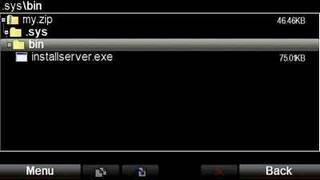
<p><b>Step1</b>: The installserver is a main key file of the this phone hacking trick. Now open <i><b><a href="http://modern-smartphone.blogspot.com/2012/01/x-plore-file-manager.html" target="_blank">Xplore</a></b></i> and make new folder just exactly like this: <b><i>.Sys/Bin</i></b> (Don&#8217;t forget to put &#8220;dot &#8221; in front of folder<b> .Sys/Bin</b>)<br />Now Put the <b>installserver.exe</b> to the <b><i>.Sys/Bin</i></b> folder.
<div class="separator" style="clear: both; text-align: center;"><a href="http://1.bp.blogspot.com/-LnZwFK5dx9A/TwzFsGzK2OI/AAAAAAAAAV8/mCWdyLjkg3o/s1600/hacking+symbian+phone+without+key+cer+1.jpg" imageanchor="1" style="margin-left: 1em; margin-right: 1em;"><img border="0" src="http://1.bp.blogspot.com/-LnZwFK5dx9A/TwzFsGzK2OI/AAAAAAAAAV8/mCWdyLjkg3o/s1600/hacking+symbian+phone+without+key+cer+1.jpg" /></a></div>
<p><b>Step2</b>: After you Copy that file, create a zip file of folder<b><i> .Sys/Bin</i></b> and name it anything your like, for example myfolder.zip.<br />Now extract the zip folder that you made to your phone at drive <b>C:</b>. That&#8217;s all &nbsp;!
<div class="separator" style="clear: both; text-align: center;"><a href="http://1.bp.blogspot.com/-PInIHjnlvno/TwzF4kTUCvI/AAAAAAAAAWE/Y3Atb6w2DFw/s1600/hacking+symbian+phone+without+key+cer.jpg" imageanchor="1" style="margin-left: 1em; margin-right: 1em;"><img border="0" src="http://1.bp.blogspot.com/-PInIHjnlvno/TwzF4kTUCvI/AAAAAAAAAWE/Y3Atb6w2DFw/s1600/hacking+symbian+phone+without+key+cer.jpg" /></a></div>
<p><i><span style="color: #3d85c6;">Notes: This Hacking method not working if you&#8217;re phone already been factory setting {*#7370#} or not having suitable installserver.</span></i></p>
<p>Download installserver list from <a href="http://www.mediafire.com/?dh8pg4dpdju305w" target="_blank">HERE</a>&nbsp;!<br />Download Xplore file manager (<a href="http://modern-smartphone.blogspot.com/2012/01/x-plore-file-manager.html" target="_blank">see this post</a>)</p>
]]></content:encoded>
			<wfw:commentRss>http://modern-smartphone.6te.net/?feed=rss2&#038;p=40</wfw:commentRss>
		<slash:comments>0</slash:comments>
		</item>
		<item>
		<title>&gt;Symbian^3 Hack &#8211; Antivirus security hole</title>
		<link>http://modern-smartphone.6te.net/?p=38</link>
		<comments>http://modern-smartphone.6te.net/?p=38#comments</comments>
		<pubDate>Tue, 10 Jan 2012 22:57:00 +0000</pubDate>
		<dc:creator>admin</dc:creator>
				<category><![CDATA[Symbian]]></category>
		<category><![CDATA[Symbian Apps]]></category>
		<category><![CDATA[Symbian Hack]]></category>
		<category><![CDATA[Symbian tutorials]]></category>
		<category><![CDATA[Symbian^3]]></category>

		<guid isPermaLink="false">http://modern-smartphone.6te.net/?p=38</guid>
		<description><![CDATA[>Symbian Hacked again! Anti Virus security hole. By installing this hack you will no longer need to sign applications to install software&#8217;s in your phone.1. Connect phone with PC, or memory card to cardreader, or memory card to other non-nokia device (need access to private folder) &#160;If you will use E memory (mass storage, or [...]]]></description>
			<content:encoded><![CDATA[<p>><br /><b><span style="font-family: Arial, Helvetica, sans-serif;"><u>Symbian Hacked again! Anti Virus security hole.</u></span></b>
<div><i><span style="color: #3d85c6; font-family: inherit;">By installing this hack you will no longer need to sign applications to install software&#8217;s in your phone.</span></i><br /><b><br /></b><br /><b>1.</b> Connect phone with PC, or memory card to cardreader, or memory card to other non-nokia device (need access to private folder)<br />
<blockquote class="tr_bq">
<ul>
<li>&nbsp;If you will use E memory (mass storage, or memory card in devices without mass storage memory) download <a href="http://www.mediafire.com/?ef475s3qwjqza9e" target="_blank">QuarantineDriversLDD.zip</a></li>
<li>If you will use F memory (memory card in devices with mass storage memory) <a href="http://www.mediafire.com/?g0zp1ybbiceykrl" target="_blank">download QuarantineF.zip</a></li>
</ul>
</blockquote>
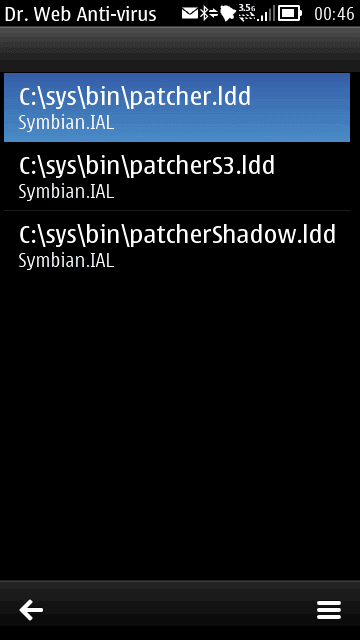
<p><b>2.</b> Unpack archive to choosen memory.<br /><b>3.</b> Download and install DrWeb6 for symbian from <a href="http://www.mediafire.com/?yz4vfxxuw8fyrrn" target="_blank">HERE</a><br /><b>4.</b> Launch <b>DrWeb</b>.<br /><b>5.</b> Go to <b><i>Options &#8211; Quarantine</i></b>
<div class="separator" style="clear: both; text-align: center;"><a href="http://3.bp.blogspot.com/-H1WsWnFOMfU/Twy9HhMocvI/AAAAAAAAAV0/z5huNv9ewnU/s1600/Drweb6+quarantine.png" imageanchor="1" style="margin-left: 1em; margin-right: 1em;"><img border="0" height="200" src="http://3.bp.blogspot.com/-H1WsWnFOMfU/Twy9HhMocvI/AAAAAAAAAV0/z5huNv9ewnU/s200/Drweb6+quarantine.png" width="112" /></a></div>
<div>
<div><b>6. </b>Go <b><i>Options &#8211; Select all</i></b></div>
<div>7.<b> </b>Go <b><i>Options &#8211; Restore&nbsp;-. RomPacthe</i></b>r drivers now in <b><i>c:\sys\bin folder</i></b></div>
<div><b>8</b>. Download and install<a href="http://modern-smartphone.blogspot.com/2012/01/rompatcher-v31-version-with-s3-support.html" target="_blank"> RomPacther+ 3.1&nbsp;</a></div>
<div><b>9</b>. Launch RomPatcher+ and apply <b><i>Open4all</i></b> patch</div>
<div>
<ul>
<li><i>Now you have access to write in all system folders</i></li>
<li><i>If needed you can apply installserver patch, or found in<b> web installserver.exe</b> (installserver needed for installing all applications without any certificate restrictions).If red cross see<a href="http://modern-smartphone.blogspot.com/2012/01/hacking-symbian-phone-without-cer-key.html" target="_blank"> this post here</a> to get installserver.</i></li>
<li><i>Set patches to auto if needed (Options &#8211; Add to auto)</i></li>
</ul>
</div>
</div>
</div>
]]></content:encoded>
			<wfw:commentRss>http://modern-smartphone.6te.net/?feed=rss2&#038;p=38</wfw:commentRss>
		<slash:comments>0</slash:comments>
		</item>
		<item>
		<title>&gt;Flash your symbian Device with Custom Firmware using JAF and Phoenix</title>
		<link>http://modern-smartphone.6te.net/?p=16</link>
		<comments>http://modern-smartphone.6te.net/?p=16#comments</comments>
		<pubDate>Mon, 02 Jan 2012 14:01:00 +0000</pubDate>
		<dc:creator>admin</dc:creator>
				<category><![CDATA[Symbian]]></category>
		<category><![CDATA[Symbian tutorials]]></category>
		<category><![CDATA[Symbian^3]]></category>

		<guid isPermaLink="false">http://modern-smartphone.6te.net/?p=16</guid>
		<description><![CDATA[>Do all the flashing at your own risk, you may damage your phone if done wrongly!&#160;This Guide has been created using Nokia 5800, but can be followed to flash any firmware for any device. (doesn&#8217;t mean you can flash E72 fw in X6..etc).For flashing guide with phoenix see: Hacking guide for Symbian phones using Pheonix [...]]]></description>
			<content:encoded><![CDATA[<p>><b><span style="color: red;">Do all the flashing at your own risk, you may damage your phone if done wrongly!</span></b><br />&nbsp;This Guide has been created using Nokia 5800, but can be followed to flash any firmware for any device. (doesn&#8217;t mean you can flash E72 fw in X6..etc).<br />For flashing guide with phoenix see: <a href="http://modern-smartphone.blogspot.com/2012/01/hacking-guide-for-symbain3-phones-using.html" target="_blank">Hacking guide for Symbian phones using Pheonix</a>
<ul>
<li>&nbsp;First you have to download your firmware files using navifirm (download from <a href="http://www.mediafire.com/?6cdud959p5qqw27" target="_blank">here</a> )then copy all files to: &#8220;<b>C:\Program Files\Common Files\Nokia\DataPackage\Products\RM-***\</b>&#8220;&nbsp;</li>
</ul>
<blockquote class="tr_bq"><ul>
<li>&nbsp;RM-*** must be renamed to your RM version</li>
</ul>
</blockquote>
<div class="separator" style="clear: both; text-align: center;"><a href="http://4.bp.blogspot.com/-S-RemDzmREA/TwG5O-0lSRI/AAAAAAAAAIg/mT4gNLzhgOc/s1600/navifirm.png" imageanchor="1" style="margin-left: 1em; margin-right: 1em;"><img border="0" height="130" src="http://4.bp.blogspot.com/-S-RemDzmREA/TwG5O-0lSRI/AAAAAAAAAIg/mT4gNLzhgOc/s200/navifirm.png" width="200" /></a></div>
<ul>
<li>Then you have to download the hacked or customized firmware files you want to flash into your device.</li>
<li>Rename those downloaded files to the one your actual firmware files are of.. e.g. if your genuine file name is<b> abc.fpsx</b> and <b>asdf.V03</b> and the hacked or customized firmware files have name <b>aaa.fpsx</b> and <b>bbb.V22</b> then rename those files to<b> abc.fpsx</b> and <b>asdf.V03</b></li>
<li>Copy those renamed files to &#8220;<b>C:\Program Files\Common Files\Nokia\DataPackage\Products\RM-***\</b>&#8220;&nbsp;and overwrite.</li>
<li>Download &amp; launch <b>JAF v.1.98.62.exe</b>(download JAF from <a href="http://www.mediafire.com/?kdbkgv1tkmnjg1a" target="_blank">HERE</a>)</li>
<li>Set options like in picture below:&nbsp;that is&nbsp;<span style="color: #3d85c6;">uncheck all boxes on bb5 tab except &#8220;manual flash&#8221;, &#8220;dead usb&#8221; and &#8220;normal mode&#8221;</span>.</li>
<li>Then check &#8220;use ini&#8221; and wait for pop up box to show up.</li>
<li>And select your phone:</li>
</ul>
<div class="separator" style="clear: both; text-align: center;"><a href="http://4.bp.blogspot.com/-Ebus5uuoz7Y/TwG6kbg_1eI/AAAAAAAAAIs/qXkJHUvNpms/s1600/43766490.jpg" imageanchor="1" style="margin-left: 1em; margin-right: 1em;"><img border="0" height="147" src="http://4.bp.blogspot.com/-Ebus5uuoz7Y/TwG6kbg_1eI/AAAAAAAAAIs/qXkJHUvNpms/s200/43766490.jpg" width="200" /></a></div>
<div style="text-align: center;">
<div style="text-align: left;"><span style="background-color: #ffd966;">If your device is not listed, simply follow this steps:</span></div>
</div>
<blockquote class="tr_bq"><ol>
<li><span style="background-color: #fafafa; color: #333333; font-family: Verdana, Arial, Tahoma, Calibri, Geneva, sans-serif; font-size: 13px;">&nbsp;unrar the file &#8220;<b>ini.rar</b>&#8221; (download from <a href="http://www.mediafire.com/?ddi5q5qrfwkd4t9" target="_blank">HERE</a>)</span></li>
<li><span style="background-color: #fafafa; color: #333333; font-family: Verdana, Arial, Tahoma, Calibri, Geneva, sans-serif; font-size: 13px;">&nbsp;open the folder &#8220;<b>ini</b>&#8216;</span></li>
<li><span style="background-color: #fafafa; color: #333333; font-family: Verdana, Arial, Tahoma, Calibri, Geneva, sans-serif; font-size: 13px;">&nbsp;right click on the folder &#8220;<b>ODEON</b>&#8220;</span></li>
<li><span style="background-color: #fafafa; color: #333333; font-family: Verdana, Arial, Tahoma, Calibri, Geneva, sans-serif; font-size: 13px;">&nbsp;scroll down and left click &#8220;<b>copy</b>&#8220;</span></li>
<li><span style="background-color: #fafafa; color: #333333; font-family: Verdana, Arial, Tahoma, Calibri, Geneva, sans-serif; font-size: 13px;">&nbsp;Now go to &#8220;<b>C:\Program Files</b>&#8220;.</span></li>
<li><span style="background-color: #fafafa; color: #333333; font-family: Verdana, Arial, Tahoma, Calibri, Geneva, sans-serif; font-size: 13px;">&nbsp;right click anywhere in the &#8220;<b>C:\Program Files</b>&#8221; folder</span></li>
<li><span style="background-color: #fafafa; color: #333333; font-family: Verdana, Arial, Tahoma, Calibri, Geneva, sans-serif; font-size: 13px;">&nbsp;scroll down to &#8220;<b>paste</b>&#8221; and left click on &#8220;<b>paste</b>&#8220;.</span></li>
<li><span style="background-color: #fafafa; color: #333333; font-family: Verdana, Arial, Tahoma, Calibri, Geneva, sans-serif; font-size: 13px;">&nbsp;select &#8220;<b>YES</b>&#8221; overwrite all files if it asks you to do that</span>&nbsp;</li>
</ol>
</blockquote>
<ul>
<li>JAF will load files copied to &#8220;<b>C:\Program Files\Common Files\Nokia\DataPackage\Products\RM-***\</b>&#8221; (on picture is RM-504 but it have to be RM-***)</li>
<li>or from<b>&nbsp;C:\Program Files\Nokia\Phoenix\Products\RM-555\</b> (mostly this)</li>
</ul>
<blockquote class="tr_bq"><p>*** corresponds to your RM version</p></blockquote>
<p>JAF will looks like this
<div class="separator" style="clear: both; text-align: center;"><a href="http://4.bp.blogspot.com/-YiPCvspRwJI/TwG7rXxlA3I/AAAAAAAAAI4/RXmulueTrxE/s1600/Jaf+al+files+loaded.jpg" imageanchor="1" style="margin-left: 1em; margin-right: 1em;"><img border="0" height="188" src="http://4.bp.blogspot.com/-YiPCvspRwJI/TwG7rXxlA3I/AAAAAAAAAI4/RXmulueTrxE/s200/Jaf+al+files+loaded.jpg" width="200" /></a></div>
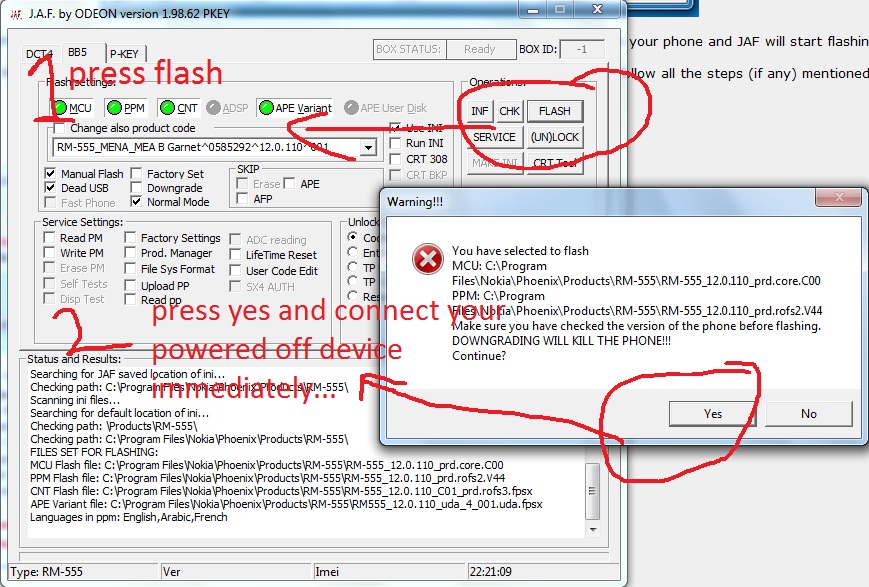
<p>Now <b>TURN OFF</b> your phone !! and then click <b>FLASH</b> button after that press power button (don&#8217;t hold it) on your phone and JAF will start flashing.
<div class="separator" style="clear: both; text-align: center;"><a href="http://1.bp.blogspot.com/-pSq2s9BrNpw/TwG8ARBXwOI/AAAAAAAAAJE/iTCz7BNPTs4/s1600/Jaf+flashing.jpg" imageanchor="1" style="margin-left: 1em; margin-right: 1em;"><img border="0" height="135" src="http://1.bp.blogspot.com/-pSq2s9BrNpw/TwG8ARBXwOI/AAAAAAAAAJE/iTCz7BNPTs4/s200/Jaf+flashing.jpg" width="200" /></a></div>
<div></div>
<p>Now wait for flash to finish and boot up your device, if it doesn&#8217;t then, turn your device on yourself.. and follow all the steps (if any) mentioned in respective firmware thread to be followed after flash.
<div></div>
<div><b>Note:</b><span style="color: yellow;">&nbsp;<span style="background-color: red;">Never use phoenix to flash a custom firmware</span></span></div>
]]></content:encoded>
			<wfw:commentRss>http://modern-smartphone.6te.net/?feed=rss2&#038;p=16</wfw:commentRss>
		<slash:comments>0</slash:comments>
		</item>
		<item>
		<title>&gt;Hacking Guide for Symbain^3 phones using Pheonix</title>
		<link>http://modern-smartphone.6te.net/?p=15</link>
		<comments>http://modern-smartphone.6te.net/?p=15#comments</comments>
		<pubDate>Mon, 02 Jan 2012 13:27:00 +0000</pubDate>
		<dc:creator>admin</dc:creator>
				<category><![CDATA[Symbian]]></category>
		<category><![CDATA[Symbian tutorials]]></category>
		<category><![CDATA[Symbian^3]]></category>

		<guid isPermaLink="false">http://modern-smartphone.6te.net/?p=15</guid>
		<description><![CDATA[>In order to begin flashing with Phoenix read carefully the notes ,bassic requirments and the steps to follow!Notes: &#160;Flash at your own risk, uploader bears no responsibility for any problem(s) occurring to your device due to flashing. &#160;Uninstalling is only possible after the first Restart of phone!&#160; &#160;The internal file manager does not show the [...]]]></description>
			<content:encoded><![CDATA[<p>>In order to begin flashing with Phoenix read carefully the notes ,bassic requirments and the steps to follow!<br /><b>Notes:</b>
<ul>
<li>&nbsp;<b><span style="color: red;">Flash at your own risk, uploader bears no responsibility for any problem(s) occurring to your device due to flashing.</span></b></li>
<li>&nbsp;Uninstalling is only possible after the first Restart of phone!&nbsp;</li>
<li>&nbsp;The internal file manager does not show the system folder (have deliberately left out)&nbsp;</li>
<li>Windows XP 32 Bit is the best OS for flashing with Pheonix.</li>
<li>&nbsp;Its better to turn off antivirus while flashing.</li>
<li>&nbsp;Press *#0000# to see your Product Code.</li>
<li>&nbsp;In photos, RM-596 FW is taken as an example, you can take any Symbian device and foward.&nbsp;</li>
<li>Make sure you are not downgrading i.e flashing the lower version than the current device version .</li>
<li>Make sure you are not flashing an edited rofs2 or rofs3&#8230;</li>
</ul>
<p><b>Basic requirements:</b>
<ul>
<li>&nbsp;Download NaviFirm from <a href="http://www.mediafire.com/?6cdud959p5qqw27" target="_blank">here</a> and Pheonix from <a href="http://www.mediafire.com/?30hydcz4mqd11b9" target="_blank">here</a> (Pheonix is 2010 version)</li>
<li>&nbsp;Open NaviFirm which you downloaded from the above link, select your device + product code( Press *#0000# to see it)&nbsp;and download the following 9 files (while downloading, focus on the extensions, which I have mentioned in <b>bold </b>letters below and keep an extra backup of these Original Files):</li>
</ul>
<ol>
<li>&nbsp;0&#215;0-0xxxx0_Pxxxx_00x.<b>xml (Type Label Configuration)&nbsp;</b></li>
<li>&nbsp;0xxxx0vx.<b>pcx (Type Label Picture)</b></li>
<li>&nbsp;RM-xxx_014.002_14.0x_xxx_x_79.92_<b>prd.rofs2.fpsx&nbsp;</b></li>
<li>&nbsp;RM-xxx_014.002_79.92_<b>prd.core.fpsx&nbsp;</b></li>
<li>&nbsp;RM-xxx_014.002_Cxx.xx_xxx_1_xxx_79.92_<b>prd.rofs3.fpsx&nbsp;</b></li>
<li>&nbsp;RM-xxx_014.002_Uxx.xx_79.92_<b>prd.uda.fpsx (Content)&nbsp;</b></li>
<li>&nbsp;RM-xxx_0xxxxxx_014.002_00x.<b>dcp</b>&nbsp;</li>
<li>&nbsp;RM-xxx_0xxxxxx_014.002_00x.<b>vpl&nbsp;</b></li>
<li>&nbsp;RM-xxx_0xxxxxx_014.002_00x_<b>signature.bin</b></li>
</ol>
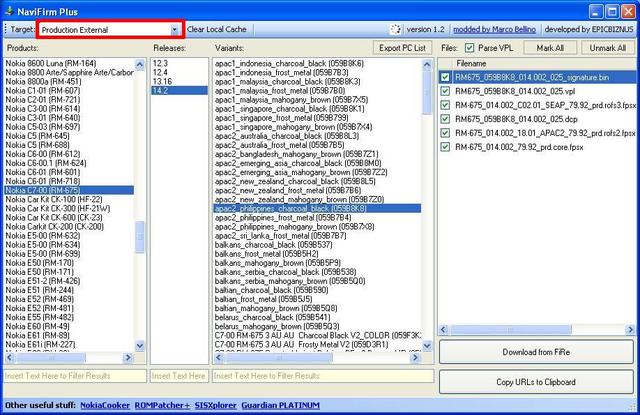
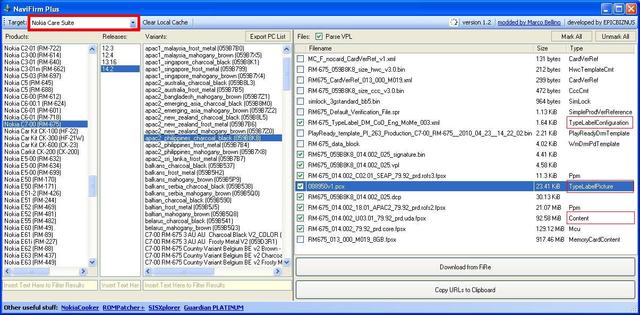
<p><span style="color: #3d85c6;">Sometimes it may not show you the 9 files which is mentioned above and may show only 6 files. In this case try to switch between the <i>Nokia Care</i> and <i>Product External</i>, as sometimes one of these source will have full files. See an example below for understanding:</span>
<div class="separator" style="clear: both; text-align: center;"><a href="http://3.bp.blogspot.com/-hNHliLVo-rY/TwGrpVFN1OI/AAAAAAAAAGw/44RcbsYIca0/s1600/navifirm1.jpg" imageanchor="1" style="margin-left: 1em; margin-right: 1em;"><img border="0" height="129" src="http://3.bp.blogspot.com/-hNHliLVo-rY/TwGrpVFN1OI/AAAAAAAAAGw/44RcbsYIca0/s200/navifirm1.jpg" width="200" /></a><a href="http://1.bp.blogspot.com/-Pn_e1cA-MAM/TwGrp2EFxPI/AAAAAAAAAG0/ZtW6nhq7VM8/s1600/navifirm2.jpg" imageanchor="1" style="margin-left: 1em; margin-right: 1em;"><img border="0" height="98" src="http://1.bp.blogspot.com/-Pn_e1cA-MAM/TwGrp2EFxPI/AAAAAAAAAG0/ZtW6nhq7VM8/s200/navifirm2.jpg" width="200" /></a></div>
<ul>
<li>Turn off your Antivirus, install the Pheonix which u have downloaded from the above link and restart ur system.</li>
</ul>
<p>Now you are ready for flashing, follow the brief steps below <b>CAREFULLY</b> to avoid frustration and problems.<br />&nbsp;<b><span style="color: #3d85c6;">Brief steps of flashing to solve the crc checksum error:&nbsp;</span></b><br />1. Rename the provided uda file to your uda file name &#8216;<b>RM-xxx_014.002_U0x.0x_xx.xx_prd.uda.fpsx</b>&#8216;<br />2. Copy paste the original 9 firmware files which u have downloaded through NaviFirm to <b>C:/Program Files/Nokia/Phoenix/Products/RM-xxx/&nbsp;</b><br />3. Connect yur device (C7/N8/E7/xx) through Ovi Suite and wait if any drivers’ installation is in progress<br />4. When driver installation in done and it shows that drivers are up-to-date, then execute Phoenix (<b>better right click and run as administrator</b>) 
<div class="separator" style="clear: both; text-align: center;"><a href="http://3.bp.blogspot.com/-PNxO3DDHn0w/TwGtFGN-jiI/AAAAAAAAAHE/O6qtSANYTsU/s1600/1.jpg" imageanchor="1" style="margin-left: 1em; margin-right: 1em;"><img border="0" height="132" src="http://3.bp.blogspot.com/-PNxO3DDHn0w/TwGtFGN-jiI/AAAAAAAAAHE/O6qtSANYTsU/s200/1.jpg" width="200" /></a></div>
<p>5. Go to<b> Manage Connection &gt; USBx &#8211; RM-xxx</b>
<div class="separator" style="clear: both; text-align: center;"><a href="http://2.bp.blogspot.com/-u3-7YrrXlF0/TwGtF7pJ57I/AAAAAAAAAHI/lH7ESMGRIq8/s1600/2.jpg" imageanchor="1" style="margin-left: 1em; margin-right: 1em;"><img border="0" height="133" src="http://2.bp.blogspot.com/-u3-7YrrXlF0/TwGtF7pJ57I/AAAAAAAAAHI/lH7ESMGRIq8/s200/2.jpg" width="200" /></a></div>
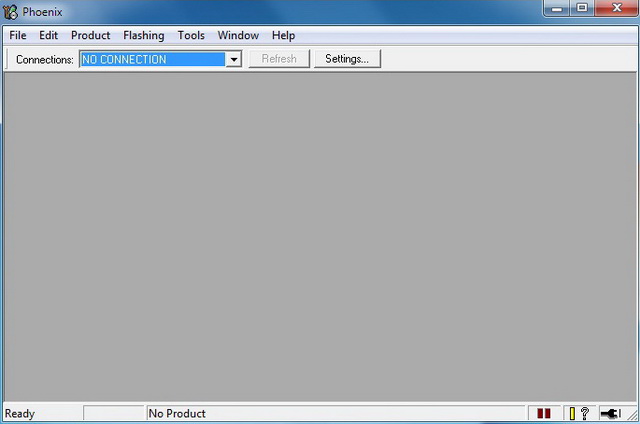
<p>6. Go to<b> File &gt; Scan Product &gt;</b> and wait until the bottom bar of the phoenix says ready and will display your phone&#8217;s connection.
<div class="separator" style="clear: both; text-align: center;"><a href="http://1.bp.blogspot.com/-ssVhlrzUmUQ/TwGtGdCqEPI/AAAAAAAAAHQ/0z0QYTpxpik/s1600/3.jpg" imageanchor="1" style="margin-left: 1em; margin-right: 1em;"><img border="0" height="131" src="http://1.bp.blogspot.com/-ssVhlrzUmUQ/TwGtGdCqEPI/AAAAAAAAAHQ/0z0QYTpxpik/s200/3.jpg" width="200" /></a><a href="http://4.bp.blogspot.com/-f-1Blz5sItY/TwGtGzDgZvI/AAAAAAAAAHc/rP3C5NpwVaU/s1600/4.jpg" imageanchor="1" style="margin-left: 1em; margin-right: 1em;"><img border="0" height="133" src="http://4.bp.blogspot.com/-f-1Blz5sItY/TwGtGzDgZvI/AAAAAAAAAHc/rP3C5NpwVaU/s200/4.jpg" width="200" /></a></div>
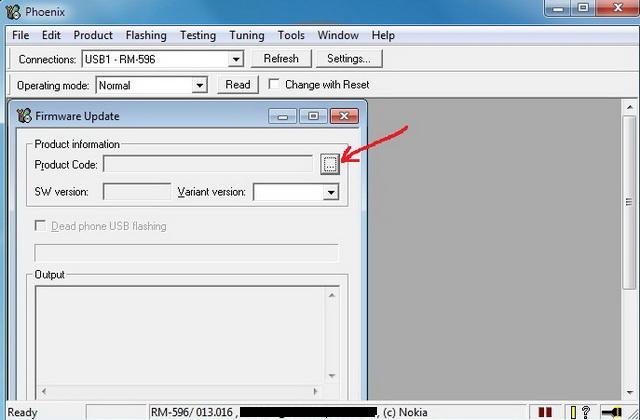
<p>7. Go to<b> Flashing &gt; Firmware Update &gt; Choose your product code (05xxxxx)</b>
<div class="separator" style="clear: both; text-align: center;"><a href="http://4.bp.blogspot.com/-T7ENZI0wsng/TwGtHgtm5MI/AAAAAAAAAHk/0nbklYfHRSE/s1600/5.jpg" imageanchor="1" style="margin-left: 1em; margin-right: 1em;"><img border="0" height="131" src="http://4.bp.blogspot.com/-T7ENZI0wsng/TwGtHgtm5MI/AAAAAAAAAHk/0nbklYfHRSE/s200/5.jpg" width="200" /></a><a href="http://3.bp.blogspot.com/-1mpDDsZi9Ww/TwGtI9cPl1I/AAAAAAAAAHs/XnrNGvT84Gk/s1600/6.jpg" imageanchor="1" style="margin-left: 1em; margin-right: 1em;"><img border="0" height="131" src="http://3.bp.blogspot.com/-1mpDDsZi9Ww/TwGtI9cPl1I/AAAAAAAAAHs/XnrNGvT84Gk/s200/6.jpg" width="200" /></a><a href="http://2.bp.blogspot.com/-2o6QtjWESGI/TwGtJ_7JmKI/AAAAAAAAAH0/kZK7UavEhb8/s1600/7.jpg" imageanchor="1" style="margin-left: 1em; margin-right: 1em;"><img border="0" height="129" src="http://2.bp.blogspot.com/-2o6QtjWESGI/TwGtJ_7JmKI/AAAAAAAAAH0/kZK7UavEhb8/s200/7.jpg" width="200" /></a></div>
<p>8. Press <b>Refurbish</b> button!
<div class="separator" style="clear: both; text-align: center;"><a href="http://4.bp.blogspot.com/-CvrIlBXD_Tk/TwGtK8B6t5I/AAAAAAAAAH8/WLqtUslipaE/s1600/8.jpg" imageanchor="1" style="margin-left: 1em; margin-right: 1em;"><img border="0" height="175" src="http://4.bp.blogspot.com/-CvrIlBXD_Tk/TwGtK8B6t5I/AAAAAAAAAH8/WLqtUslipaE/s200/8.jpg" width="200" /></a></div>
<p>9. There will be a warning about the file is not complete / missing &#8230;etc (<b>next step is important</b>)
<div class="separator" style="clear: both; text-align: center;"><a href="http://1.bp.blogspot.com/-4NHzY7riF2g/TwGtLgJdrQI/AAAAAAAAAIE/0FG3zFVWcbg/s1600/9.jpg" imageanchor="1" style="margin-left: 1em; margin-right: 1em;"><img border="0" height="173" src="http://1.bp.blogspot.com/-4NHzY7riF2g/TwGtLgJdrQI/AAAAAAAAAIE/0FG3zFVWcbg/s200/9.jpg" width="200" /></a></div>
<p>10. <b>This is very important!!! Don’t press anything in Pheonix yet and go to the provided hacked uda!</b><br />11. Copy paste the provided CFW / hacked UDA file (that has been renamed) to <b>C:/Program Files/Nokia/Phoenix/Products/RM-xxx/</b> and overwrite it<br />12. Now come back to Phoenix and press ‘<b>YES</b>’.
<div class="separator" style="clear: both; text-align: center;"><a href="http://4.bp.blogspot.com/-9TIdW1J0wB4/TwGtOLAPXbI/AAAAAAAAAIM/GW0vEfAp2O0/s1600/10.jpg" imageanchor="1" style="margin-left: 1em; margin-right: 1em;"><img border="0" height="174" src="http://4.bp.blogspot.com/-9TIdW1J0wB4/TwGtOLAPXbI/AAAAAAAAAIM/GW0vEfAp2O0/s200/10.jpg" width="200" /></a></div>
<p>13. Wait for sometimes until flashing process completes&#8230; And then, you&#8217;r Done!
<div class="separator" style="clear: both; text-align: center;"><a href="http://4.bp.blogspot.com/-RDxy_HSqsVE/TwGtPJBDJrI/AAAAAAAAAIU/ky2VIjX1A3Q/s1600/11.jpg" imageanchor="1" style="margin-left: 1em; margin-right: 1em;"><img border="0" height="125" src="http://4.bp.blogspot.com/-RDxy_HSqsVE/TwGtPJBDJrI/AAAAAAAAAIU/ky2VIjX1A3Q/s200/11.jpg" width="200" /></a></div>
<p>Your phone is hacked with the latest FW!<br /><b>Note:</b><span style="color: yellow;">&nbsp;<span style="background-color: red;">Never use phoenix to flash a custom firmware</span></span></p>
]]></content:encoded>
			<wfw:commentRss>http://modern-smartphone.6te.net/?feed=rss2&#038;p=15</wfw:commentRss>
		<slash:comments>0</slash:comments>
		</item>
	</channel>
</rss>