<br />
<b>Warning</b>:  Declaration of Walker_Page::start_lvl(&$output, $depth) should be compatible with Walker::start_lvl(&$output) in <b>/home/vhosts/modern-smartphone.6te.net/wp-includes/post-template.php</b> on line <b>997</b><br />
<br />
<b>Warning</b>:  Declaration of Walker_Page::end_lvl(&$output, $depth) should be compatible with Walker::end_lvl(&$output) in <b>/home/vhosts/modern-smartphone.6te.net/wp-includes/post-template.php</b> on line <b>1009</b><br />
<br />
<b>Warning</b>:  Declaration of Walker_Page::start_el(&$output, $page, $depth, $args, $current_page) should be compatible with Walker::start_el(&$output) in <b>/home/vhosts/modern-smartphone.6te.net/wp-includes/post-template.php</b> on line <b>1024</b><br />
<br />
<b>Warning</b>:  Declaration of Walker_Page::end_el(&$output, $page, $depth) should be compatible with Walker::end_el(&$output) in <b>/home/vhosts/modern-smartphone.6te.net/wp-includes/post-template.php</b> on line <b>1067</b><br />
<br />
<b>Warning</b>:  Declaration of Walker_PageDropdown::start_el(&$output, $page, $depth, $args) should be compatible with Walker::start_el(&$output) in <b>/home/vhosts/modern-smartphone.6te.net/wp-includes/post-template.php</b> on line <b>1105</b><br />
<br />
<b>Warning</b>:  Declaration of Walker_Category::start_lvl(&$output, $depth, $args) should be compatible with Walker::start_lvl(&$output) in <b>/home/vhosts/modern-smartphone.6te.net/wp-includes/category-template.php</b> on line <b>800</b><br />
<br />
<b>Warning</b>:  Declaration of Walker_Category::end_lvl(&$output, $depth, $args) should be compatible with Walker::end_lvl(&$output) in <b>/home/vhosts/modern-smartphone.6te.net/wp-includes/category-template.php</b> on line <b>816</b><br />
<br />
<b>Warning</b>:  Declaration of Walker_Category::start_el(&$output, $category, $depth, $args) should be compatible with Walker::start_el(&$output) in <b>/home/vhosts/modern-smartphone.6te.net/wp-includes/category-template.php</b> on line <b>833</b><br />
<br />
<b>Warning</b>:  Declaration of Walker_Category::end_el(&$output, $page, $depth, $args) should be compatible with Walker::end_el(&$output) in <b>/home/vhosts/modern-smartphone.6te.net/wp-includes/category-template.php</b> on line <b>908</b><br />
<br />
<b>Warning</b>:  Declaration of Walker_CategoryDropdown::start_el(&$output, $category, $depth, $args) should be compatible with Walker::start_el(&$output) in <b>/home/vhosts/modern-smartphone.6te.net/wp-includes/category-template.php</b> on line <b>949</b><br />
<br />
<b>Warning</b>:  Declaration of Walker_Comment::start_lvl(&$output, $depth, $args) should be compatible with Walker::start_lvl(&$output) in <b>/home/vhosts/modern-smartphone.6te.net/wp-includes/comment-template.php</b> on line <b>1241</b><br />
<br />
<b>Warning</b>:  Declaration of Walker_Comment::end_lvl(&$output, $depth, $args) should be compatible with Walker::end_lvl(&$output) in <b>/home/vhosts/modern-smartphone.6te.net/wp-includes/comment-template.php</b> on line <b>1265</b><br />
<br />
<b>Warning</b>:  Declaration of Walker_Comment::start_el(&$output, $comment, $depth, $args) should be compatible with Walker::start_el(&$output) in <b>/home/vhosts/modern-smartphone.6te.net/wp-includes/comment-template.php</b> on line <b>1329</b><br />
<br />
<b>Warning</b>:  Declaration of Walker_Comment::end_el(&$output, $comment, $depth, $args) should be compatible with Walker::end_el(&$output) in <b>/home/vhosts/modern-smartphone.6te.net/wp-includes/comment-template.php</b> on line <b>1389</b><br />
<br />
<b>Warning</b>:  Declaration of Walker_Nav_Menu::start_lvl(&$output, $depth) should be compatible with Walker::start_lvl(&$output) in <b>/home/vhosts/modern-smartphone.6te.net/wp-includes/nav-menu-template.php</b> on line <b>40</b><br />
<br />
<b>Warning</b>:  Declaration of Walker_Nav_Menu::end_lvl(&$output, $depth) should be compatible with Walker::end_lvl(&$output) in <b>/home/vhosts/modern-smartphone.6te.net/wp-includes/nav-menu-template.php</b> on line <b>52</b><br />
<br />
<b>Warning</b>:  Declaration of Walker_Nav_Menu::start_el(&$output, $item, $depth, $args) should be compatible with Walker::start_el(&$output) in <b>/home/vhosts/modern-smartphone.6te.net/wp-includes/nav-menu-template.php</b> on line <b>67</b><br />
<br />
<b>Warning</b>:  Declaration of Walker_Nav_Menu::end_el(&$output, $item, $depth) should be compatible with Walker::end_el(&$output) in <b>/home/vhosts/modern-smartphone.6te.net/wp-includes/nav-menu-template.php</b> on line <b>106</b><br />
<?xml version="1.0" encoding="UTF-8"?>
<rss version="2.0"
	xmlns:content="http://purl.org/rss/1.0/modules/content/"
	xmlns:wfw="http://wellformedweb.org/CommentAPI/"
	xmlns:dc="http://purl.org/dc/elements/1.1/"
	xmlns:atom="http://www.w3.org/2005/Atom"
	xmlns:sy="http://purl.org/rss/1.0/modules/syndication/"
	xmlns:slash="http://purl.org/rss/1.0/modules/slash/"
	>

<channel>
	<title>Modern Smartphone &#187; BlackBerry</title>
	<atom:link href="http://modern-smartphone.6te.net/?cat=14&#038;feed=rss2" rel="self" type="application/rss+xml" />
	<link>http://modern-smartphone.6te.net</link>
	<description>Just another WordPress site</description>
	<lastBuildDate>Mon, 28 May 2012 10:07:11 +0000</lastBuildDate>
	<language>en</language>
	<sy:updatePeriod>hourly</sy:updatePeriod>
	<sy:updateFrequency>1</sy:updateFrequency>
	<generator>http://wordpress.org/?v=3.3.2</generator>
		<item>
		<title>&gt;Aces 3D Brick Breaker game for BlackBerry</title>
		<link>http://modern-smartphone.6te.net/?p=126</link>
		<comments>http://modern-smartphone.6te.net/?p=126#comments</comments>
		<pubDate>Sun, 18 Mar 2012 02:07:00 +0000</pubDate>
		<dc:creator>admin</dc:creator>
				<category><![CDATA[BlackBerry]]></category>
		<category><![CDATA[BlackBerry Games]]></category>

		<guid isPermaLink="false">http://modern-smartphone.6te.net/?p=126</guid>
		<description><![CDATA[>&#160; &#160;Have you mastered the standard Brick Breaker game? Are you ready for a new challenge? Aces 3D Brick Breaker creates an exciting new 3D Brick Breaker experience! Try the levels in all seven themes including construction, underwater and jungle. Earn tons of extra points by collecting gems and activating power ups for the paddle [...]]]></description>
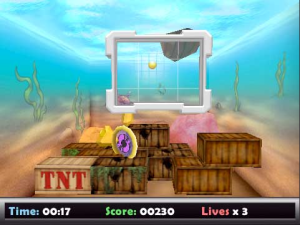
			<content:encoded><![CDATA[<p>><br /><i>&nbsp; &nbsp;Have you mastered the standard Brick Breaker game? Are you ready for a new challenge? Aces 3D Brick Breaker creates an exciting new 3D Brick Breaker experience! Try the levels in all seven themes including construction, underwater and jungle. Earn tons of extra points by collecting gems and activating power ups for the paddle and the ball.&nbsp;</i>
<div class="separator" style="clear: both; text-align: center;"><a href="http://3.bp.blogspot.com/-rTJV0oTjMK0/T2VCjcol-aI/AAAAAAAAA4A/f7WoGu3u5_c/s1600/Aces+3D+Brick+Breaker+Classic.jpg" imageanchor="1" style="margin-left: 1em; margin-right: 1em;"><img border="0" height="150" src="http://3.bp.blogspot.com/-rTJV0oTjMK0/T2VCjcol-aI/AAAAAAAAA4A/f7WoGu3u5_c/s200/Aces+3D+Brick+Breaker+Classic.jpg" width="200" /></a><a href="http://4.bp.blogspot.com/-evbcP28x2II/T2VCloKNUzI/AAAAAAAAA4I/FHUFdT127_Y/s1600/Aces+3D+Brick+Breaker+Classic1.jpg" imageanchor="1" style="margin-left: 1em; margin-right: 1em;"><img border="0" height="150" src="http://4.bp.blogspot.com/-evbcP28x2II/T2VCloKNUzI/AAAAAAAAA4I/FHUFdT127_Y/s200/Aces+3D+Brick+Breaker+Classic1.jpg" width="200" /></a></div>
<p>&nbsp;<b>Aces 3D Brick Breaker</b> uses OpenGL to create one of the most realistic 3D experiences available on BlackBerry®. The lifelike physics allows the ball to move realistically in three dimensions. The statistics and online leaderboards make it easy to track you progress and compete against friends and family.</p>
<p><b><i><u>Game Features:</u></i></b>
<ul>
<li>7 different themes</li>
<li>Tons of power ups for the paddle and balls&nbsp;</li>
<li>Collect gems to earn extra points</li>
<li>3D graphics and realistic game physics</li>
<li>Online Leaderboards; daily, weekly and overall</li>
<li>Tracks tons of statistics</li>
<li>In-game tutorials</li>
</ul>
<p><b><i><u>Supported Devices</u></i></b>
<ul>
<li>BlackBerry 8530</li>
<li>BlackBerry 9330</li>
<li>BlackBerry 9520</li>
<li>BlackBerry 9550</li>
<li>BlackBerry 9650</li>
<li>BlackBerry 9670</li>
</ul>
<p><b>Download&nbsp;Aces 3D Brick Breaker game for BlackBerry</b> from <a href="http://www.mediafire.com/?a0hmwap28d7hh7o" target="_blank">HERE </a>!</p>
]]></content:encoded>
			<wfw:commentRss>http://modern-smartphone.6te.net/?feed=rss2&#038;p=126</wfw:commentRss>
		<slash:comments>0</slash:comments>
		</item>
		<item>
		<title>&gt;MoonLight Animated theme for BlackBerry</title>
		<link>http://modern-smartphone.6te.net/?p=121</link>
		<comments>http://modern-smartphone.6te.net/?p=121#comments</comments>
		<pubDate>Fri, 16 Mar 2012 12:15:00 +0000</pubDate>
		<dc:creator>admin</dc:creator>
				<category><![CDATA[BlackBerry]]></category>
		<category><![CDATA[BlackBerry Theme]]></category>

		<guid isPermaLink="false">http://modern-smartphone.6te.net/?p=121</guid>
		<description><![CDATA[>Love the Moon Light? Get this awesome animated theme where you’ll see the Moon ascending.The wallpaper isn’t customizable. Compatible with: BlackBerry CURVE 9350/9360/9370 7.0 BlackBerry BOLD 9900/9930 7.0 BlackBerry TORCH 9810 7.0 BlackBerry TORCH 9850/9860 7.0 Download&#160;MoonLight Animated theme for BlackBerry from HERE !]]></description>
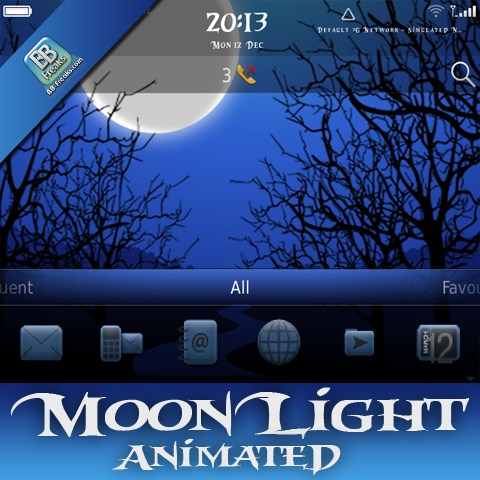
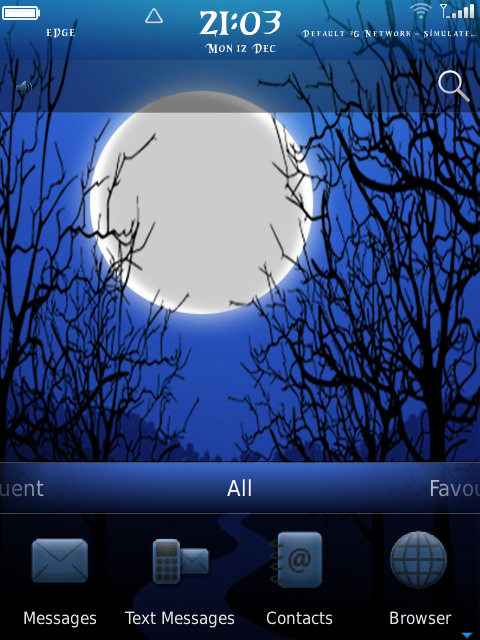
			<content:encoded><![CDATA[<p>><br />Love the Moon Light? Get this awesome animated theme where you’ll see the Moon ascending.<br /><i><span style="color: #6fa8dc;">The wallpaper isn’t customizable.</span></i>
<div class="separator" style="clear: both; text-align: center;"><a href="http://3.bp.blogspot.com/-bhiK4HZkolI/T2MuFGoRtdI/AAAAAAAAA2g/IYAdjrIS54o/s1600/MoonLight+Animated.png" imageanchor="1" style="margin-left: 1em; margin-right: 1em;"><img border="0" height="400" src="http://3.bp.blogspot.com/-bhiK4HZkolI/T2MuFGoRtdI/AAAAAAAAA2g/IYAdjrIS54o/s400/MoonLight+Animated.png" width="400" /></a></div>
<p><b><i><u>Compatible with:</u></i></b>
<ul>
<li>BlackBerry CURVE 9350/9360/9370 7.0</li>
<li>BlackBerry BOLD 9900/9930 7.0</li>
<li>BlackBerry TORCH 9810 7.0</li>
<li>BlackBerry TORCH 9850/9860 7.0</li>
</ul>
<div class="separator" style="clear: both; text-align: center;"><a href="http://2.bp.blogspot.com/-jpd7JQk2zqk/T2Mubr9bKbI/AAAAAAAAA2w/evErPbNNkAs/s1600/MoonLight+Animated+2.jpg" imageanchor="1" style="margin-left: 1em; margin-right: 1em;"><img border="0" height="320" src="http://2.bp.blogspot.com/-jpd7JQk2zqk/T2Mubr9bKbI/AAAAAAAAA2w/evErPbNNkAs/s320/MoonLight+Animated+2.jpg" width="240" /></a></div>
<p><b>Download&nbsp;MoonLight Animated theme for BlackBerry from</b> <a href="http://www.mediafire.com/?jtooedvsvpxfl1k" target="_blank">HERE </a>!</p>
]]></content:encoded>
			<wfw:commentRss>http://modern-smartphone.6te.net/?feed=rss2&#038;p=121</wfw:commentRss>
		<slash:comments>0</slash:comments>
		</item>
		<item>
		<title>&gt;RIM BLACKBERRY 7xxxx 8xxx 9xxx Unlocker</title>
		<link>http://modern-smartphone.6te.net/?p=82</link>
		<comments>http://modern-smartphone.6te.net/?p=82#comments</comments>
		<pubDate>Thu, 16 Feb 2012 22:49:00 +0000</pubDate>
		<dc:creator>admin</dc:creator>
				<category><![CDATA[BlackBerry]]></category>
		<category><![CDATA[BlackBerry Tutorials]]></category>

		<guid isPermaLink="false">http://modern-smartphone.6te.net/?p=82</guid>
		<description><![CDATA[> This is a guide to free unlock your RIM BLACKBERRY 7xxx/8xxxx/9xxx with free software!First you should check for compatibility see below the supported models :BlackBerry 7xxx 8xxx 9xxx Unlocker by harald kubovy freeUnlock free 7xxx SERIE: 7100g, 7100g, 7100i, 7100r, 7100t,7100v, 7105t,7130e, 7230, 7250, 7280, 7290, 7520, 7730, 77507780 Electron,Pearl,Pearl Flip,88XX,curve,bold,Strom,Tour8700M,7100M,8100M,8310M,7290M,8707,8110M8800M,8107,8520,7510,5800,7700M,8220M,6200M&#160;7130,8350i,8310,8110,8100,7750M,7290,8700M8800M,6230,8110M,8800,7100c,8300,8820,7700M8700M,5800,7200E,7520,8120,7100M,9500,5810&#160;8100C,8320,8900,7200M,6700M,7100M,8820,8900M&#160;8320,900M,7290M,8800,8310Installation: &#160;RUN the &#8220;BlackberryUnlocker09.msi&#8221; [...]]]></description>
			<content:encoded><![CDATA[<p>>
<div class="separator" style="clear: both; text-align: center;"><a href="http://3.bp.blogspot.com/-LQTbsAbSBnQ/Tz15gXPp4oI/AAAAAAAAAlw/TH1hzyjwkMY/s1600/Unlock+BlackBerry.jpeg" imageanchor="1" style="clear: right; float: right; margin-bottom: 1em; margin-left: 1em;"><img border="0" height="238" src="http://3.bp.blogspot.com/-LQTbsAbSBnQ/Tz15gXPp4oI/AAAAAAAAAlw/TH1hzyjwkMY/s320/Unlock+BlackBerry.jpeg" width="320" /></a></div>
<p>This is a guide to free<b> unlock your RIM BLACKBERRY 7xxx/8xxxx/9xxx</b> with free software!<br />First you should check for compatibility see below the <b>supported models</b> :<br /><b><i><span style="color: #3d85c6;">BlackBerry 7xxx 8xxx 9xxx Unlocker by harald kubovy free<br />Unlock free 7xxx SERIE: 7100g, 7100g, 7100i, 7100r, 7100t,<br />7100v, 7105t,7130e, 7230, 7250, 7280, 7290, 7520, 7730, 7750<br />7780 Electron,Pearl,Pearl Flip,88XX,curve,bold,Strom,Tour<br />8700M,7100M,8100M,8310M,7290M,8707,8110M<br />8800M,8107,8520,7510,5800,7700M,8220M,6200M&nbsp;7130,8350i,8310,8110,8100,7750M,7290,8700M<br />8800M,6230,8110M,8800,7100c,8300,8820,7700M<br />8700M,5800,7200E,7520,8120,7100M,9500,5810&nbsp;8100C,8320,8900,7200M,6700M,7100M,8820,8900M&nbsp;8320,900M,7290M,8800,8310</span></i></b><b><br /></b><br /><b>Installation:</b>
<ol>
<li>&nbsp;RUN the &#8220;<i><b>BlackberryUnlocker09.msi</b></i>&#8221; Installation program.(<i><span style="color: red;">W7 users run program in compatibility mode for windows Xp</span></i>)</li>
<li>&nbsp;If not Installed, install: &#8220;<b><i>Blackberry Desktop SW 40033dt-ml.exe</i></b>&#8221; &nbsp; (<span style="color: red;">you can find it in &#8220;<b>c:\MML</b>&#8220;</span>)</li>
<li>&nbsp;if you dont have <b>MICROSOFT NETFRAMEWORK</b> installed, then install: &nbsp;&#8221;<b><i>dotnetfx.exe</i></b>&#8221; &nbsp;(<span style="color: red;">you can find it in &#8220;<i>c:\MML</i>&#8220;</span>)</li>
<li><i>NOW ALL IS READY</i>!</li>
</ol>
<p><b>Unlocking steps:</b>
<ol>
<li><i>Start the Unlocker (wait for program start of MML Multiloader)</i></li>
<li><i>Connect your Blackberry to Datacable and wait for driver installing.</i></li>
<li><i>Click the &#8220;<span style="color: red;">PHONE INFO</span>&#8221; button.</i></li>
<li><i>Blackberry Unlocker show you now if SFI files for Restore are aviable or not.</i></li>
<li><i>&nbsp;If no SFI file aviable, Reflashing after unlock its needed.(<a href="http://modern-smartphone.blogspot.com/2012/02/how-to-updatereinstall-blackberry.html" target="_blank">see here</a>)</i></li>
<li><i>Now Click the &#8220;<span style="color: red;">RESTART</span>&#8221; button (you must click the restart button after every new move (read info, unlock)</i></li>
<li><i>Disconnect and Reconnect your Blackberry and wait for connection.</i></li>
<li><i>Now click the &#8220;UNLOCK&#8221; button, after some time a massage box comes up and tells you that the unlock&nbsp;</i><i>has worked! Click OK or ENTER to start the Restore Process.</i></li>
<li><i>Wait till the Processbar show a red text with &#8220;DONE!&#8221;</i></li>
<li><i>&nbsp;Your Blackberry is now unlocked and Finsihed!</i></li>
<li><i>Disconnect and test</i></li>
</ol>
<p><b>IMPORTANT NOTE :</b><br /><i style="background-color: #ffd966;">DONT DISCONNECT YOUR BLACKBERRY UNTILL &#8220;<b>DONE</b>!&#8221; IS DISPALYED IN THE PROGRESS BAR!</i><br /><i style="background-color: #ffd966;"><br /></i><br /><i style="background-color: #ffd966;"></i><br /><i><b style="background-color: white;">To determine if your BlackBerry is &#8220;unlocked&#8221; for use on carriers other than for which it is branded:</b></i>
<ul>
<li><i><i>
<div style="background-color: white; display: inline !important;">&nbsp;On your BlackBerry, go to <b>Options &gt; Advanced Options &gt; Sim Card.</b></div>
<p></i></i></li>
<li><i><i>
<div style="background-color: white; display: inline !important;">&nbsp;At that screen type &nbsp;<i><i></i></i></div>
<div style="display: inline !important;"><i><i><b>MEPD&nbsp;</b></i></i></div>
<p>on your keyboard. A new menu will pop up.</i></i></li>
<li><i><i>
<div style="background-color: white; display: inline !important;">If your BlackBerry has a SureType keyboard (71xx and 81xx devices) you will need to double-tap the P, so the actual keys entered become M E P P D.</div>
<p></i></i></li>
<li><i><i>
<div style="background-color: white; display: inline !important;">&nbsp;Look for Network in the list.</div>
<p></i></i></li>
<li><i><i>
<div style="background-color: white; display: inline !important;">&nbsp;If your device is &#8220;<b>unlocked</b>&#8220;, it should say <b>Disabled or Inactive</b>. If it says Active, it&#8217;s still locked to that carrier</div>
<p></i></i></li>
</ul>
<p><i>All nedeed files included in the download package</i><br /><i><b>Download&nbsp;RIM BLACKBERRY 7xxxx 8xxx 9xxx Unlocker</b> from <a aiotitle="click to expand" href="javascript:togglecomments('BB unlocker')">HERE +/- (expand/collapse)</a><br /></i>
<div class="commenthidden" id="BB unlocker"><a href="http://www.mediafire.com/?63616cqzedsiwrm,4gvejvu7dh682ge,khy9ttr2yxwfey4,59c2zq0q432kf8b,6fqa3adb6b7domk,aamgrbl63nrmbl8,9ct7dw957i7bu9z" target="_blank"><i></i>Multiple file download</a></div>
]]></content:encoded>
			<wfw:commentRss>http://modern-smartphone.6te.net/?feed=rss2&#038;p=82</wfw:commentRss>
		<slash:comments>0</slash:comments>
		</item>
		<item>
		<title>&gt;how To update/ReInstall BlackBerry Operating System</title>
		<link>http://modern-smartphone.6te.net/?p=81</link>
		<comments>http://modern-smartphone.6te.net/?p=81#comments</comments>
		<pubDate>Thu, 16 Feb 2012 22:34:00 +0000</pubDate>
		<dc:creator>admin</dc:creator>
				<category><![CDATA[BlackBerry]]></category>
		<category><![CDATA[BlackBerry Tutorials]]></category>

		<guid isPermaLink="false">http://modern-smartphone.6te.net/?p=81</guid>
		<description><![CDATA[>Here is a giude how To update/Reinstall BlackBerry Operating System. Connect your device to your computer. Open the BlackBerry® Desktop Manager. Click Application Loader. Click Start in Add/Remove Applications or Update Applications. If necessary, perform the following actions: If the Device Security Password dialog box appears, type your device password.&#160; If the Communication Port Selection [...]]]></description>
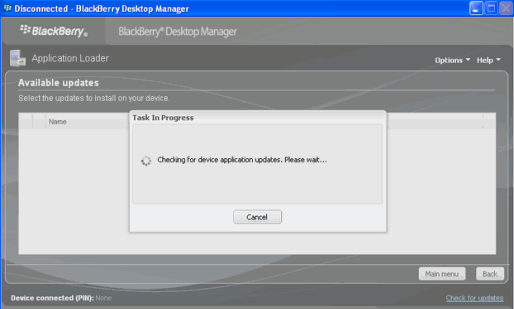
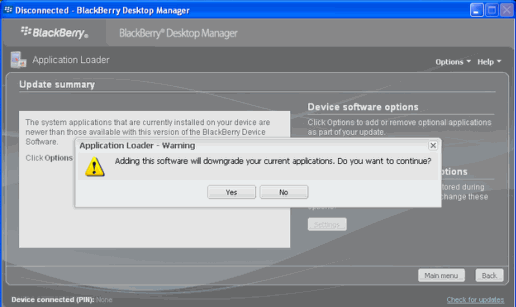
			<content:encoded><![CDATA[<p>><b><i>Here is a giude how To update/Reinstall BlackBerry Operating System. </i></b>
<ol>
<li>Connect your device to your computer.</li>
<li>Open the <b>BlackBerry® Desktop Manager</b>.</li>
<li>Click <b>Application Loader</b>.</li>
<li>Click <b>Start in Add/Remove Applications or Update Applications</b>.</li>
<li>If necessary, perform the following actions:</li>
<li>If the Device <b>Security Password</b> dialog box appears, type your device password.&nbsp;</li>
<li>If the Communication<b> Port Selection</b> dialog box appears, specify a communications port.&nbsp;</li>
<li>Perform any of the following actions:</li>
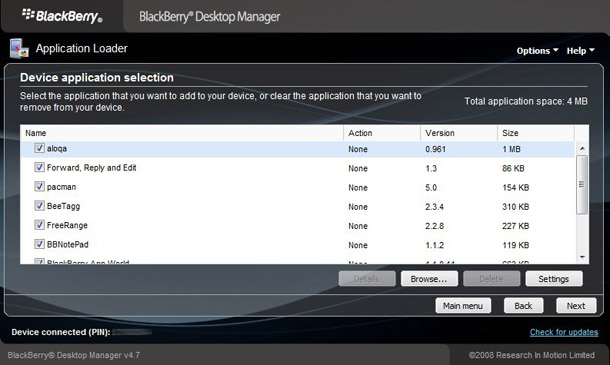
<li>To add an application that appears in the list, select the check box beside the application.</li>
<li>To add an application that does not appear in the list, click <b>Browse</b>. Double-click an application loader (.alx or .ali) file.</li>
<li>Click Finish.</li>
</ol>
<div class="separator" style="clear: both; text-align: center;"><a href="http://3.bp.blogspot.com/-1F7a9WDyuI0/Tz2D0rykDjI/AAAAAAAAAl4/vlUbA1awX2Q/s1600/03.png" imageanchor="1" style="margin-left: 1em; margin-right: 1em;"><img border="0" height="120" src="http://3.bp.blogspot.com/-1F7a9WDyuI0/Tz2D0rykDjI/AAAAAAAAAl4/vlUbA1awX2Q/s200/03.png" width="200" /></a><a href="http://2.bp.blogspot.com/-U_tK8Aplshc/Tz2D1b7AirI/AAAAAAAAAmA/PFCuC28na88/s1600/05.png" imageanchor="1" style="margin-left: 1em; margin-right: 1em;"><img border="0" height="118" src="http://2.bp.blogspot.com/-U_tK8Aplshc/Tz2D1b7AirI/AAAAAAAAAmA/PFCuC28na88/s200/05.png" width="200" /></a></div>
<p>
<div class="separator" style="clear: both; text-align: center;"><a href="http://4.bp.blogspot.com/-qh1bMTNjg2g/Tz2D3gq0r-I/AAAAAAAAAmI/FgGbV75z2zw/s1600/06.png" imageanchor="1" style="margin-left: 1em; margin-right: 1em;"><img border="0" height="237" src="http://4.bp.blogspot.com/-qh1bMTNjg2g/Tz2D3gq0r-I/AAAAAAAAAmI/FgGbV75z2zw/s400/06.png" width="400" /></a></div>
<p><b>Without desktop manager read this</b>
<ul>
<li><i>Download &amp; install the blackberry<a href="http://us.blackberry.com/support/downloads/download_sites.jsp" target="_blank"> flashfile</a> (no need install blackberry desktop manager)</i></li>
<li><i><span style="color: red;">Delete the vendor.xml file located in c:\program files\common files\research in motion\apploader</span></i></li>
<li><i>With battery Connect your BlackBerry device to your computer</i></li>
<li><i>Run Loader from c:\program files\common files\research in motion\apploader &amp; click Next</i></li>
<li><i>Select all software you want installed.</i></li>
<li><i>Proceed to the end portion untill you see the &#8220;<b>Finish</b>&#8221; button</i></li>
<li><i><span style="color: red;">Very IMPORTANT. do not hit the finish button, instead select the ADVANCED button.</span></i></li>
<li><i>Make sure both boxes are checked.</i></li>
<li><i>Proceed until it ask you if you want to automatically back up and restore, Select <b>DO NOT AUTOMATICALLY BACK UP MY HANDHELD</b> then next.</i></li>
<li><i>Wait for Your device&#8217;s software has been updated successfully</i></li>
</ul>
<p></p>
]]></content:encoded>
			<wfw:commentRss>http://modern-smartphone.6te.net/?feed=rss2&#038;p=81</wfw:commentRss>
		<slash:comments>0</slash:comments>
		</item>
		<item>
		<title>&gt;Angry Farm (full)</title>
		<link>http://modern-smartphone.6te.net/?p=24</link>
		<comments>http://modern-smartphone.6te.net/?p=24#comments</comments>
		<pubDate>Wed, 04 Jan 2012 00:57:00 +0000</pubDate>
		<dc:creator>admin</dc:creator>
				<category><![CDATA[BlackBerry]]></category>
		<category><![CDATA[BlackBerry Games]]></category>

		<guid isPermaLink="false">http://modern-smartphone.6te.net/?p=24</guid>
		<description><![CDATA[> &#160; &#160;The Farmer is away and the farm has been overrun by an army of hungry foxes.Features: *200 action-packed game levels *Engaging special audio and video effects *Supports BlackBerry OS 4.6 devices and above *free upgrades to all existing customers forever There is also a user community for Angry Farm. Angry Farmers can go [...]]]></description>
			<content:encoded><![CDATA[<p>>
<div class="separator" style="clear: both; text-align: center;"><a href="http://4.bp.blogspot.com/-daZvOzj6S_c/TwOjVG1oWVI/AAAAAAAAANM/tO6dyHv3AOc/s1600/Angry+Farm.png" imageanchor="1" style="clear: right; float: right; margin-bottom: 1em; margin-left: 1em;"><img border="0" height="240" src="http://4.bp.blogspot.com/-daZvOzj6S_c/TwOjVG1oWVI/AAAAAAAAANM/tO6dyHv3AOc/s320/Angry+Farm.png" width="320" /></a></div>
<p>&nbsp; &nbsp;The Farmer is away and the farm has been overrun by an army of hungry foxes.<br /><b>Features:</b>
<ul>
<li>*200 action-packed game levels</li>
<li>*Engaging special audio and video effects</li>
<li>*Supports BlackBerry OS 4.6 devices and above</li>
<li>*free upgrades to all existing customers forever</li>
</ul>
<p>There is also a user community for Angry Farm. Angry Farmers can go to ask questions about a particular level and receive help from either community moderators or other Angry Farmers at the Smarter Apps website under the Support tab. Click on Angry Farm Tips &amp; Tricks.</p>
<p><span style="color: #3d85c6;">Angry Farm is compatible with most BlackBerry smartphones, including the new BlackBerry 7 devices (Bold 9900/30, Torch 9810, 9850/60).</span><br /><span style="color: #3d85c6;">Angry Farm Last Update Supports Device OS7.</span></p>
<p>You can download Angry Farm from <a href="http://www.mediafire.com/?v99ng5755g6zhj7" target="_blank">HERE</a> ! OTA(over the air) download <a href="http://goo.gl/57DLx" target="_blank">HERE</a> !</p>
]]></content:encoded>
			<wfw:commentRss>http://modern-smartphone.6te.net/?feed=rss2&#038;p=24</wfw:commentRss>
		<slash:comments>0</slash:comments>
		</item>
		<item>
		<title>&gt;PlayBerry v3.5 to v3.6 (Only OS 6)</title>
		<link>http://modern-smartphone.6te.net/?p=12</link>
		<comments>http://modern-smartphone.6te.net/?p=12#comments</comments>
		<pubDate>Mon, 02 Jan 2012 00:17:00 +0000</pubDate>
		<dc:creator>admin</dc:creator>
				<category><![CDATA[BlackBerry]]></category>
		<category><![CDATA[BlackBerry Theme]]></category>

		<guid isPermaLink="false">http://modern-smartphone.6te.net/?p=12</guid>
		<description><![CDATA[>PlayBook for you Blackberry Bold. With many shortcuts and sliding bottom dock divided with different tabs. Definitely the closest theme to PlayBook tablet with OS7 icons. Get a BB logo splash screen on running an app from homescreen as seen on playbook.Suported devices : 9780/9799/9750 &#38;&#160;Torch&#160;9800 ! NOTE: -Do a battery pull after installing/activating.&#160; 10 [...]]]></description>
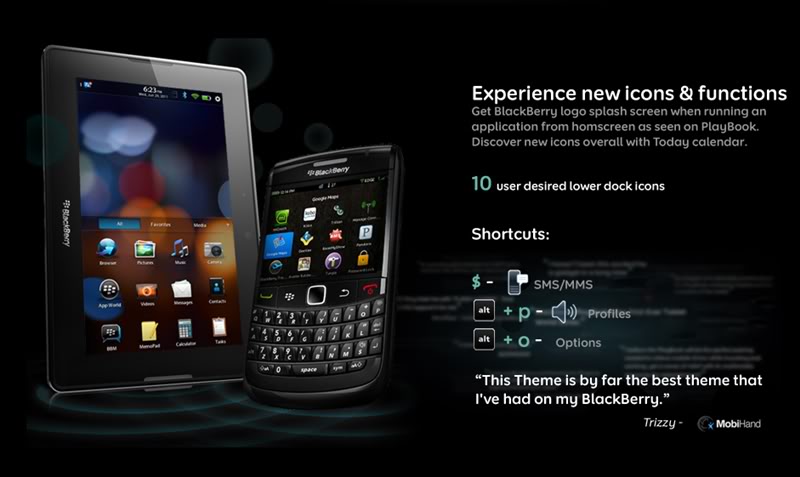
			<content:encoded><![CDATA[<p>>PlayBook for you Blackberry Bold. With many shortcuts and sliding bottom dock divided with different tabs. Definitely the closest theme to PlayBook tablet with OS7 icons. Get a BB logo splash screen on running an app from homescreen as seen on playbook.<br />Suported devices : <b>9780/9799/9750 &amp;&nbsp;</b><b>Torch&nbsp;</b><b>9800 !</b>
<div class="separator" style="clear: both; text-align: center;"></div>
<div class="separator" style="clear: both; text-align: center;"><a href="http://3.bp.blogspot.com/-pwKlMRYexPk/TwDzQz_dHBI/AAAAAAAAAF0/hrJd3YLnkCw/s1600/PlayBerry+Theme.jpg" imageanchor="1" style="margin-left: 1em; margin-right: 1em;"><img border="0" height="190" src="http://3.bp.blogspot.com/-pwKlMRYexPk/TwDzQz_dHBI/AAAAAAAAAF0/hrJd3YLnkCw/s320/PlayBerry+Theme.jpg" width="320" /></a></div>
<p><span style="color: #3d85c6;">NOTE: -Do a battery pull after installing/activating.&nbsp;</span>
<ul>
<li>10 user desired lower dock icons.&nbsp;</li>
<li>Shortcut &#8211; alt+p &#8211; profiles&nbsp;</li>
<li>Shortcut &#8211; $ &#8211; SMS &amp; MMS&nbsp;</li>
<li>Shortcut &#8211; alt+o &#8211; options  PlayBerry&nbsp;</li>
</ul>
<p><b>3.0 to 3.5 change log:</b>
<ul>
<li>+ New battery, signals, WiFi icons</li>
<li>&nbsp;+ &#8216;Favorite&#8217; swaps &#8216;Web&#8217; tab &amp; enables 10 user desired shortcuts on homescreen (5 on Torch portrait view)&nbsp;</li>
</ul>
<p><b><span style="color: #3d85c6;">&nbsp;Today feature only for Torch 9800</span></b>
<div class="separator" style="clear: both; text-align: center;"></div>
<p>
<div class="separator" style="clear: both; text-align: center;"><a href="http://2.bp.blogspot.com/-rf-X2blWD_o/TwDzQVBBRzI/AAAAAAAAAFw/1ZF69_suGTA/s1600/BB+torch.jpg" imageanchor="1" style="margin-left: 1em; margin-right: 1em;"><img border="0" height="134" src="http://2.bp.blogspot.com/-rf-X2blWD_o/TwDzQVBBRzI/AAAAAAAAAFw/1ZF69_suGTA/s320/BB+torch.jpg" width="320" /></a></div>
<p>&nbsp;You can download for : 9650/9700/9780 OS6 <a href="http://www.mediafire.com/?x6dqgf7bvv92wsb"><span id="goog_279966492"></span>here<span id="goog_279966493"></span></a> !<br />&nbsp;You can download for : Torch 9800 <a href="http://www.mediafire.com/?b8i0u2a3wsxg6lp" target="_blank">here</a> !</p>
]]></content:encoded>
			<wfw:commentRss>http://modern-smartphone.6te.net/?feed=rss2&#038;p=12</wfw:commentRss>
		<slash:comments>0</slash:comments>
		</item>
		<item>
		<title>&gt;How to install apps and themes using the BlackBerry Desktop Manager</title>
		<link>http://modern-smartphone.6te.net/?p=11</link>
		<comments>http://modern-smartphone.6te.net/?p=11#comments</comments>
		<pubDate>Sun, 01 Jan 2012 22:41:00 +0000</pubDate>
		<dc:creator>admin</dc:creator>
				<category><![CDATA[BlackBerry]]></category>
		<category><![CDATA[BlackBerry Tutorials]]></category>

		<guid isPermaLink="false">http://modern-smartphone.6te.net/?p=11</guid>
		<description><![CDATA[> &#160; &#160;In order to install apps and themes on your BlackBerry, you will need the BlackBerry Desktop Software installed on your desktop computer. You can download the latest version from the official BlackBerry website HERE&#160;. BDS is available both for Windows and Mac. Once you have installed BDS on your PC connect your BlackBerry [...]]]></description>
			<content:encoded><![CDATA[<p>>
<div class="separator" style="clear: both; text-align: center;"></div>
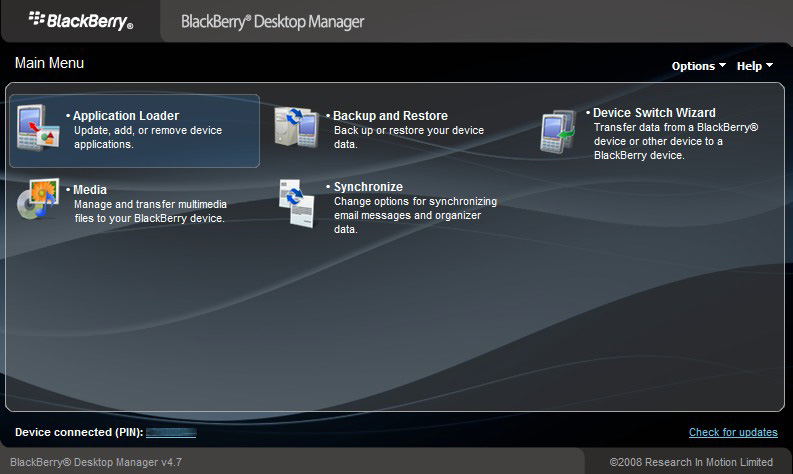
<p>&nbsp; &nbsp;In order to install apps and themes on your BlackBerry, you will need the BlackBerry Desktop Software installed on your desktop computer. You can download the latest version from the official BlackBerry website <i><a href="http://na.blackberry.com/eng/services/desktop/" target="_blank">HERE</a></i>&nbsp;. BDS is available both for Windows and Mac. Once you have installed BDS on your PC connect your BlackBerry smartphone with the USB cable provided with your phone or any other USB cable that fits, start the BlackBerry Desktop Manager program from your desktop shortcut or from the Start menu programs on your PC.
<div class="separator" style="clear: both; text-align: center;"><a href="http://2.bp.blogspot.com/-_KR2A96N5uQ/TwDe7BH70AI/AAAAAAAAAFk/nPRgZR3PW2A/s1600/BBDM.jpg" imageanchor="1" style="margin-left: 1em; margin-right: 1em;"><img border="0" height="191" src="http://2.bp.blogspot.com/-_KR2A96N5uQ/TwDe7BH70AI/AAAAAAAAAFk/nPRgZR3PW2A/s320/BBDM.jpg" width="320" /></a></div>
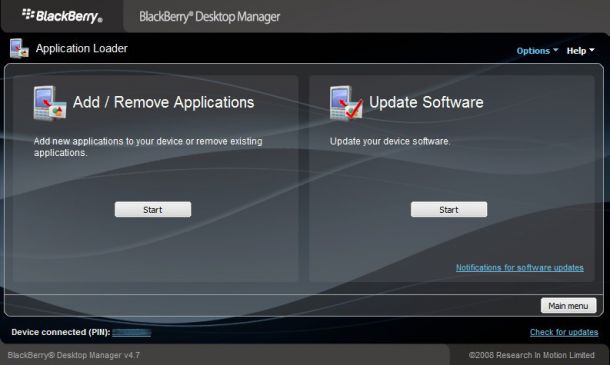
<p>When the BlackBerry Desktop Manager starts, you will be shown a screen with few options to choose from, if you want to install applications and themes go to &#8220;<b>Application Loader &#8211; Update, add, or remove device applications</b>&#8220;. Once you click on the &#8220;<b>Application Loader</b>&#8221; icon you will be show the following screen with the two options to choose from:
<div class="separator" style="clear: both; text-align: center;"><a href="http://1.bp.blogspot.com/-A_Hk2N1AkVo/TwDe4XyvWVI/AAAAAAAAAFE/wvHcrX6mU8U/s1600/BBDM+1.jpg" imageanchor="1" style="margin-left: 1em; margin-right: 1em;"><img border="0" height="191" src="http://1.bp.blogspot.com/-A_Hk2N1AkVo/TwDe4XyvWVI/AAAAAAAAAFE/wvHcrX6mU8U/s320/BBDM+1.jpg" width="320" /></a></div>
<p>The first option &#8220;<b>Add/Remove Applications &#8211; Add new applications to your device or remove existing applications</b>.&#8221; is the one we need in order to install the app or the theme we want on our device. The second one &#8220;<b>Update Software &#8211; Update your device software</b>&#8221; is used for updating your BlackBerry device software. If you are still staring at this screen click &#8220;<b>Add/Remove Applications</b>&#8221; and you will see the next screen: 
<div class="separator" style="clear: both; text-align: center;"><a href="http://3.bp.blogspot.com/-9iaTqX0QPHA/TwDe5GyOK2I/AAAAAAAAAFM/vmLpzMaMuFk/s1600/BBDM+2.jpg" imageanchor="1" style="margin-left: 1em; margin-right: 1em;"><img border="0" height="191" src="http://3.bp.blogspot.com/-9iaTqX0QPHA/TwDe5GyOK2I/AAAAAAAAAFM/vmLpzMaMuFk/s320/BBDM+2.jpg" width="320" /></a></div>
<p>&nbsp;Most BlackBerry apps and themes you will install using the BlackBerry Desktop Manager will come as a ZIP file you need to extract into a folder somewhere. Once you extract your app/theme ZIP you will see several files like this:</p>
<div class="separator" style="clear: both; text-align: center;"><a href="http://1.bp.blogspot.com/-wAzyq1IO8us/TwDe6plOwKI/AAAAAAAAAFY/70TSazrW8bc/s1600/BBDM+4.jpg" imageanchor="1" style="margin-left: 1em; margin-right: 1em;"><img border="0" height="47" src="http://1.bp.blogspot.com/-wAzyq1IO8us/TwDe6plOwKI/AAAAAAAAAFY/70TSazrW8bc/s320/BBDM+4.jpg" width="320" /></a></div>
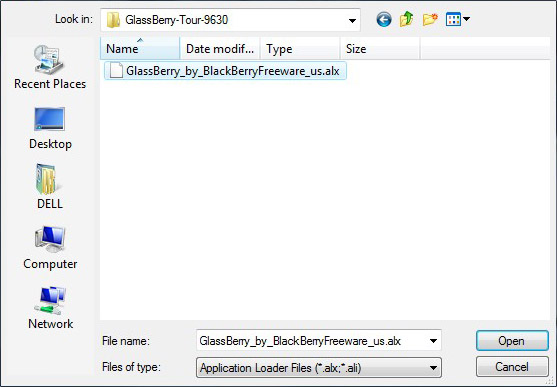
<p>Now from the BlackBerry Desktop Manager screen on the previous image locate the &#8220;<b>Browse</b>&#8221; button and click it. Now browse to the folder where your app/theme files are and select the <b>ALX</b> file, please make sure that both the <b>ALX</b> and the <b>COD</b> files are in the same folder.
<div class="separator" style="clear: both; text-align: center;"><a href="http://1.bp.blogspot.com/-y_BSZsQ8-wU/TwDe543-hCI/AAAAAAAAAFU/Nxaw5yQt7PY/s1600/BBDM+3.jpg" imageanchor="1" style="margin-left: 1em; margin-right: 1em;"><img border="0" height="222" src="http://1.bp.blogspot.com/-y_BSZsQ8-wU/TwDe543-hCI/AAAAAAAAAFU/Nxaw5yQt7PY/s320/BBDM+3.jpg" width="320" /></a></div>
<p>After you select the file, you will see the app/theme is listed in the Application Loader box. Now click &#8220;<b>Next</b>&#8221; to install the application or theme and you will be shown a screen where you can see what you will be installing on your phone. Click &#8220;<b>Finish</b>&#8221; and the installation will begin. Once it is complete you will be show a success message. This means that you have installed the theme or application on your BlackBerry smartphone. Now disconnect your device and enjoy.<br />
<blockquote class="tr_bq"><span style="color: #3d85c6;">If you are installing themes you can activate the new theme that you just loaded on your BlackBerry smartphone by going to</span><b> &#8220;Menu&#8221; &gt; &#8220;Options&#8221;&gt; &#8220;Theme&#8221;</b><span style="color: #3d85c6;"> on your phone, from where you can select the theme you want. Scroll to the one you would like to use click the </span><b>&#8220;Menu&#8221;</b><span style="color: #3d85c6;"> button and select </span><b>&#8220;Activate&#8221;</b><span style="color: #3d85c6;"> and you are done.</span></p></blockquote>
]]></content:encoded>
			<wfw:commentRss>http://modern-smartphone.6te.net/?feed=rss2&#038;p=11</wfw:commentRss>
		<slash:comments>0</slash:comments>
		</item>
	</channel>
</rss>